Free No account needed
Open a .p7m file and check its signature
Got a document that ends in .pdf.p7m and nothing opens it? Open the P7M file here, free: you get the document inside and a report of who signed it, when, and whether the signature is still intact.
- Free. No account, no watermark.
- Signature checked: who signed, when, intact or not.
- The document itself, exactly as it was signed.
- Deleted after 24 hours. Nobody reads it.
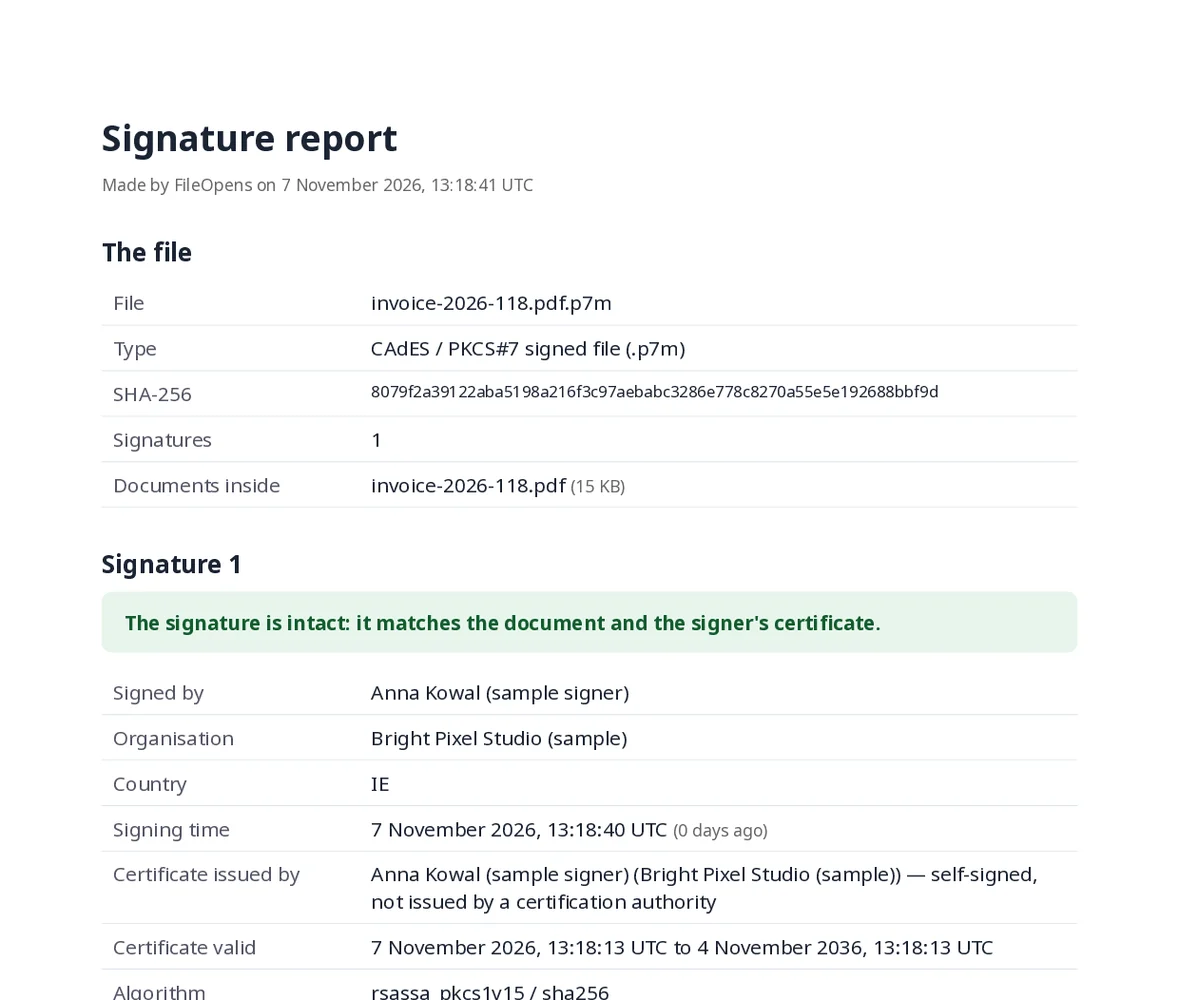
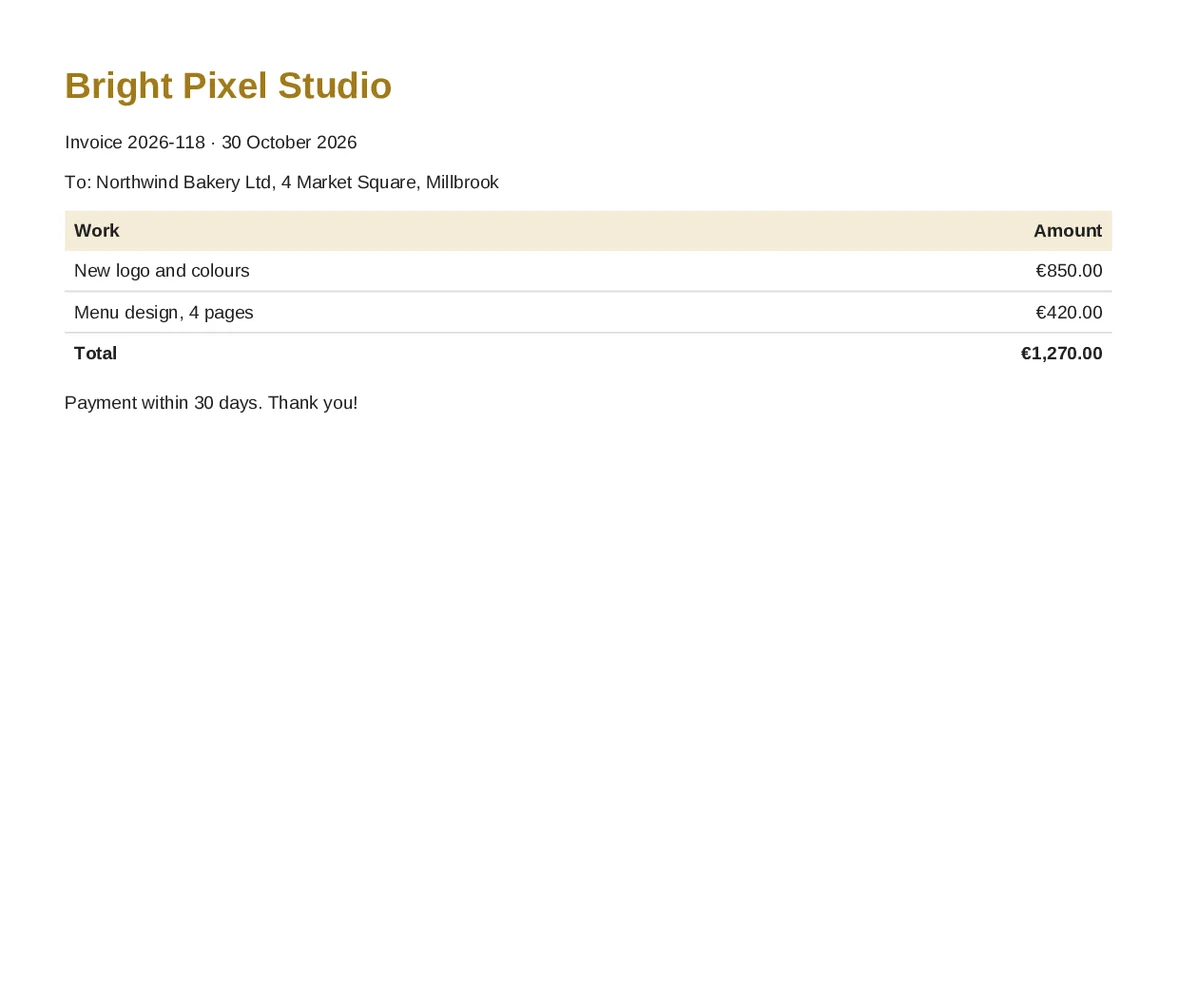
A signed .p7m opened by FileOpens
invoice-2026-118.pdf.p7minvoice.pdf + report
Signature report
- Who signed and when
- Whether the signature is intact
- Who issued the certificate
invoice-2026-118.pdf.p7minvoice.pdf + report
The signed document itself
- The PDF from inside, unchanged
- Ready to open, print or forward
Sample signed file we made ourselves, with made-up names and data, converted here and shown as they came out. Your own files are never shown to anyone.
What you get
- A signature reportWho signed (name and tax code or ID), the issuer, the signing time and the certificate dates.
- A clear resultIntact, or changed after signing, for every signature, including double-signed files.
- The documentThe PDF inside follows the report, ready to read and print; other files come in a ZIP.
- Data box messagesFor .zfo: sender, recipient, subject, delivery time and every attachment.
What is a .p7m file?
A .p7m file is a document wrapped in a digital signature. The format is CMS (PKCS#7), and the European flavour used for legal signatures is called CAdES. The original file sits inside unchanged, so certificato.pdf.p7m contains certificato.pdf, together with the signer's certificate and the signature itself. Italy uses it more than any other country: comuni, courts, notaries, chambers of commerce and the public administration send certificates, contracts and invoices as .p7m files signed with a firma digitale, a qualified electronic signature that EU law treats like a handwritten one.
Why a .p7m file will not open
Windows and macOS do not know the format, so double-clicking does nothing, and renaming it to .pdf gives a damaged file, because the PDF is wrapped inside the signature. In Italy people install a signing program such as the one their smart card came with, but abroad nobody has it. This is the everyday problem of people applying for Italian citizenship by descent: the comune e-mails the birth, marriage or death certificate as a .p7m, and the applicant in the US, Brazil or Argentina cannot even look at it. Some files are double-signed (.p7m.p7m), and some arrive as base64 text, which confuses the few tools that exist even more.
How to open a P7M file here
Drop the .p7m above. The signatures are unwrapped one by one, however many there are, and the document inside comes out exactly as it was signed. If it is a PDF, it follows the report in the same PDF, ready to read and print; Word, XML and other files come in a ZIP with their proper names. On a phone, pick the file from the e-mail attachment or the Files app. It works the same on Windows, Mac and Chromebook, with nothing to install.
What the signature report shows
For every signature: the signer's name and identifier, which for Italian certificates is the codice fiscale (as TINIT-…), the organisation, the certification authority that issued the certificate, the certificate's validity dates, whether it is marked as an EU qualified certificate, and the signing time, with a time stamp when there is one and how many days ago that was. Then the result: intact, meaning the document still matches the signature, or changed after signing. The report starts with the file name and its SHA-256 fingerprint, so it can be tied to the exact file you received. See also P7M to PDF.
Other signed formats
The same tool reads Czech data box messages (.zfo) with their sender, recipient, delivery time and attachments, and ASiC-E containers (.asice, .bdoc, .edoc) from Estonia, Latvia and other EU countries, with every file inside and every signature checked. Signed e-mails saved as smime.p7m come out as an .eml file that opens with our free e-mail to PDF tool.
Also on FileOpens
Questions about signed files
How do I open a .p7m file?
Upload it on this page. You get the document inside (usually a PDF) and a report on the signature, free.
Can I just rename .pdf.p7m to .pdf?
No. The PDF is wrapped inside the signature, so a renamed file is damaged. Unwrapping it here gives the real PDF.
My file ends in .p7m.p7m. Is that a problem?
No. It is signed twice, often by two officials. Both signatures are checked and listed in the report.
Is it free?
Yes. Reading the signed file, the report and the documents inside are free, with no account and no watermark.
Does this replace an official validation?
No. We check that each signature matches the document and that it was made while the certificate was valid. We do not check revocation or the EU trusted lists; for a legally binding check use the validator the authority names, such as the European Commission's DSS validator.
What happens to my file?
It is used only to make your report and is deleted automatically 24 hours after upload. Nobody looks at it, and it is never shared.