Free No account needed
ODS to Excel: convert ODS to XLSX
Turn an .ods spreadsheet from LibreOffice Calc or OpenOffice into an Excel workbook, free: every sheet, with its formulas, formats and charts, plus a PDF of the pages.
- Free. No account, no watermark.
- See the pages right on this site.
- Deleted after 24 hours. Nobody reads it.
ODS spreadsheets converted by FileOpens
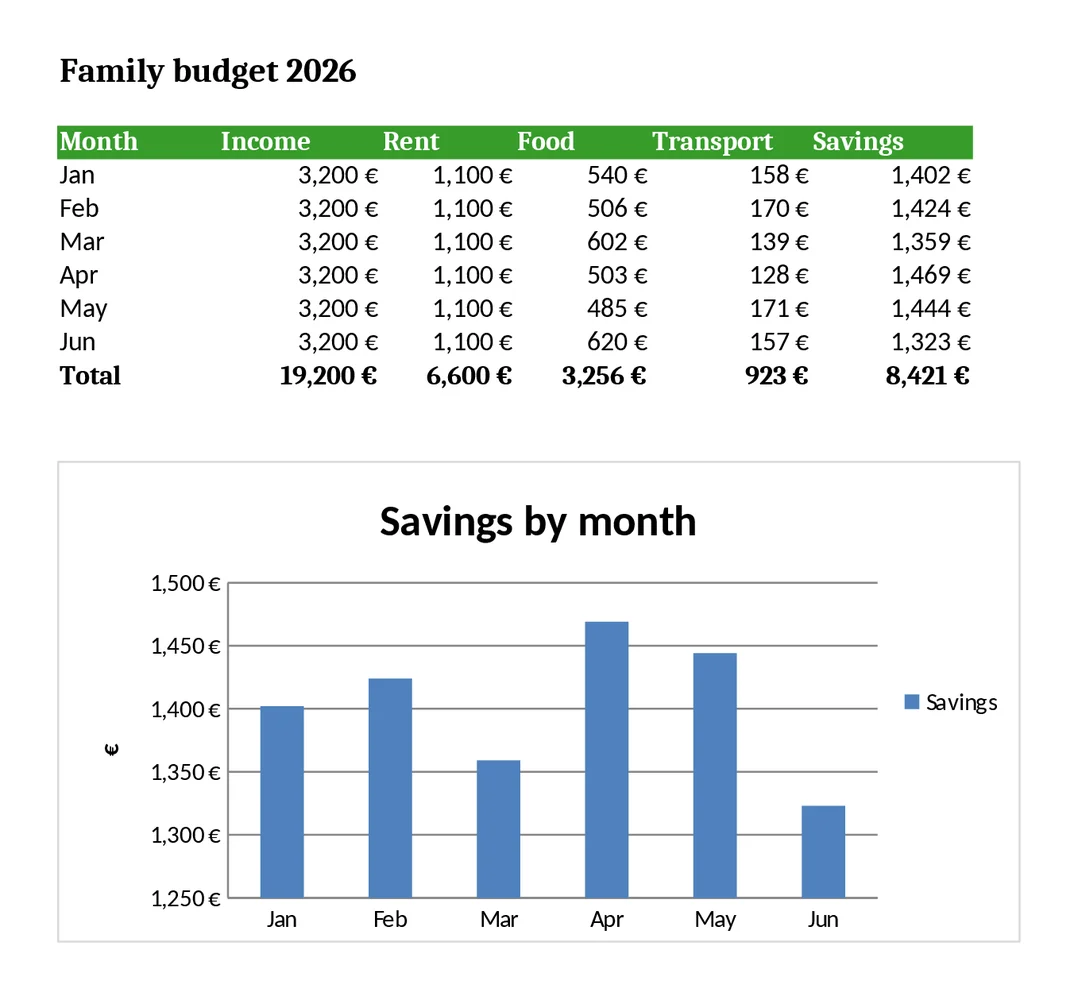
budget.odsbudget.xlsx + .pdf
Family budget with a chart
- Formulas still work in Excel
- Euro number format
- Bar chart comes through
- Shown here: the PDF
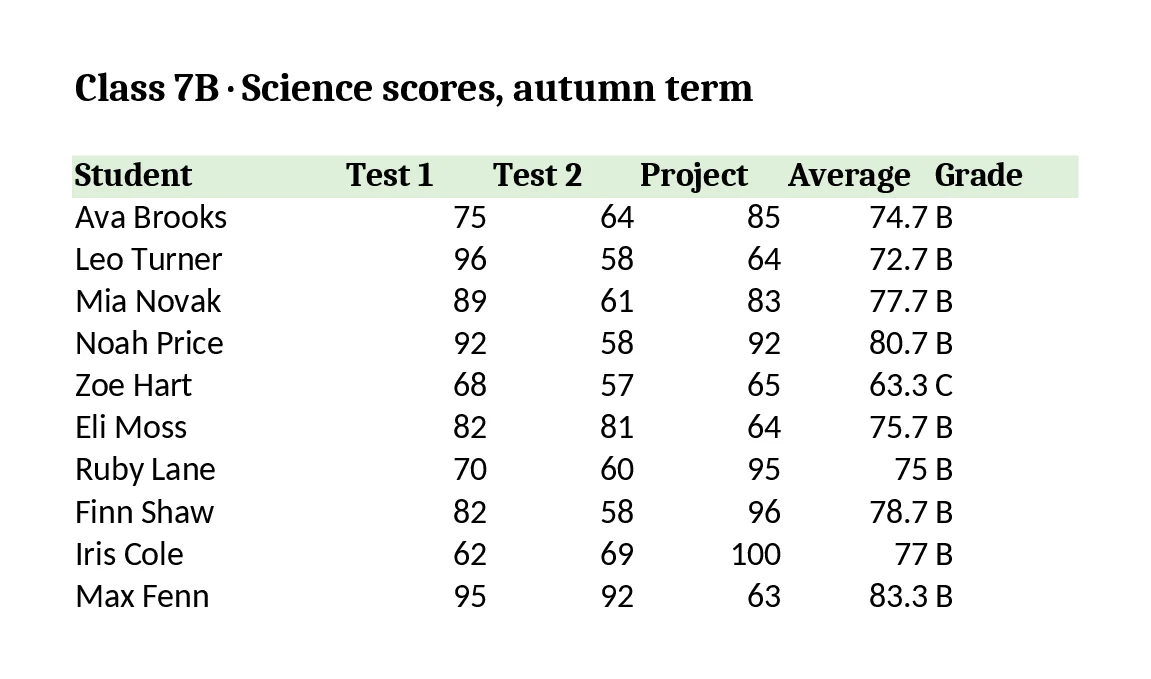
scores.odsscores.xlsx + .pdf
Class test scores
- AVERAGE and IF formulas
- Shaded header row
- Every row and column
Sample spreadsheets we made ourselves, with made-up names and data, converted here and shown as they came out. Your own files are never shown to anyone.
What you get
- Excel workbookAn .xlsx with every sheet, formulas, number formats, charts and pictures.
- A PDF as wellThe sheets laid out on pages, as LibreOffice would print them.
- ODS, OTS, FODSSpreadsheets and templates from LibreOffice Calc and OpenOffice.
- See it firstThe pages appear on this site before you download anything.
Why convert ODS to Excel
ODS (OpenDocument Spreadsheet) is the format LibreOffice Calc and OpenOffice save in. When a budget, a price list, a timetable or a data export arrives as .ods and the rest of the team works in Excel, an .xlsx is easier: it opens everywhere, keeps working in Excel's own formulas and can be uploaded to systems that only accept Excel files.
How to convert ODS to XLSX here
Choose the .ods file above. In a few seconds you see the sheets laid out as pages, so you can check them. Then download the Excel workbook, and the PDF if you want to print. It is free, with no account and no watermark. LibreOffice does the conversion, so it reads every part of the file the way Calc does.
What comes across into Excel
Every sheet with its name and order, cell values, formulas (as Excel formulas), number and date formats, column widths, merged cells, colours and borders, comments, charts and pictures. Functions that exist only in LibreOffice, macros written in LibreOffice Basic and some chart styles cannot become exact Excel equivalents: the formulas keep their last result, macros are left out, and charts may look a little different. Check the workbook once before you send it on.
Excel can open ODS itself
Excel 2016 and later and Excel for Microsoft 365 open .ods files directly, and Microsoft 365 supports OpenDocument 1.4. If you have Excel, try that first; formatting can change on the way. This page is for when there is no Excel, when you need a real .xlsx to pass on, or when a system will not take .ods. Google Sheets can also import .ods files from Google Drive.
Large sheets, templates and privacy
Templates (.ots) and flat XML spreadsheets (.fods) convert too, up to 25 MB. A spreadsheet protected with a password to open cannot be read without it: remove the password in LibreOffice first. Your file is deleted 24 hours after upload. Got presentations as well? See ODP to PowerPoint, or for text documents ODT to Word.
Also on FileOpens
Questions about ODS to Excel
How do I open an ODS file without LibreOffice?
Upload it here and you see the sheets in your browser, then download them as Excel or PDF. Excel 2016 and later and Google Sheets can also open .ods files.
Do my formulas still work in Excel?
Yes, ordinary formulas are written as Excel formulas and recalculate. A few LibreOffice-only functions keep their last calculated value instead.
Why is the PDF many pages long?
The PDF shows the sheets as LibreOffice would print them, so a wide or long sheet runs over several pages. The Excel file has no such limit.
What happens to macros in the spreadsheet?
Macros written in LibreOffice Basic do not work in Excel, so they are left out of the .xlsx. The data, formulas and formatting are all there; only the automation has to be rebuilt in Excel if you need it.
Is it really free?
Yes: no account, no watermark, no limit on the number of files. We make our money converting old document formats such as Publisher and Works files.
What happens to my file?
It is used only to make your PDF and is deleted automatically 24 hours after upload. Nobody looks at it.