Convert MPP to Excel
Turn a Microsoft Project plan into an Excel workbook you can sort, filter and share, with a PDF of the Gantt chart. Check the plan free before you pay.
- See the Gantt chart free before you pay.
- Excel and PDF in one go.
- Refund in one click if it is not usable.
- Deleted after 24 hours. Nobody looks at it.
A Microsoft Project plan converted by FileOpens
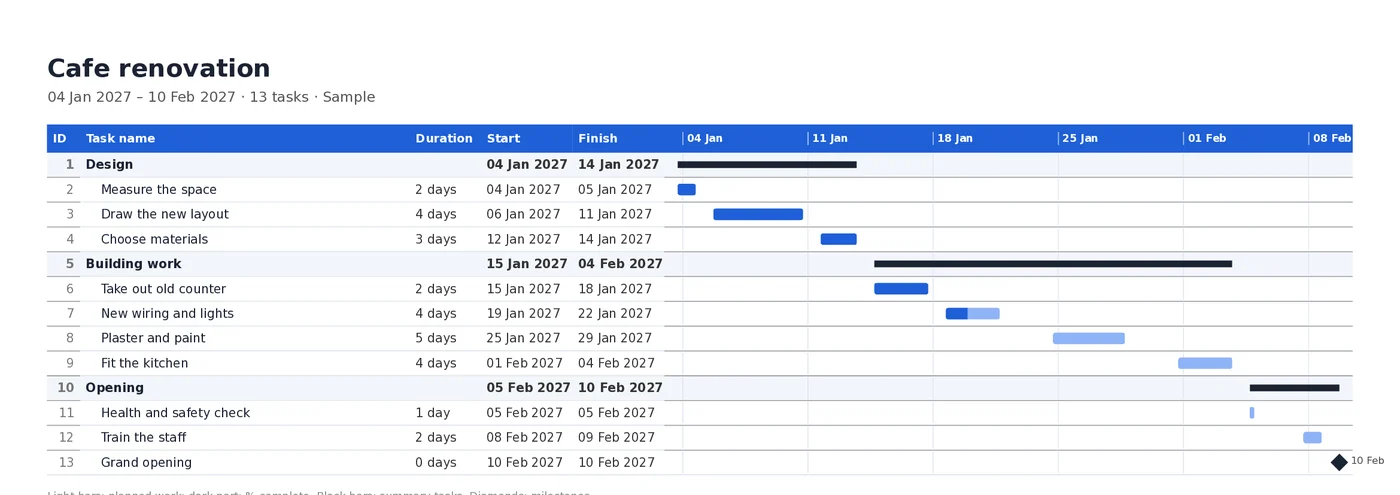
cafe-renovation.mpxplan.xlsx + Gantt PDF
Gantt chart of a renovation plan
- Tasks with their outline numbers
- Start, finish and duration
- Bars, progress and the milestone
- Every task also in Excel
Sample project plan we made ourselves, with made-up names and data, converted here and shown as they came out. Your own files are never shown to anyone.
Project plans people open with us
- Construction schedules
- Software release plans
- Engineering projects
- Event plans
- Tender and bid schedules
- Office moves
- Old project archives
How to open a Microsoft Project file
-
STEP 1
Upload your .mpp file
One plan or many. No Project licence needed.
-
STEP 2
See the Gantt chart first
Tasks, dates and bars, ready in seconds.
-
STEP 3
Pay once, download
Excel with every task and a PDF Gantt chart. Refund in one click.
What you get back
- Every task in ExcelID, WBS, indented names, durations, dates, % complete, predecessors, resources, notes.
- A Gantt chart PDFTask table and bars on landscape pages, the date scale on every page.
- Resources and detailsPeople, equipment and materials, plus the project title, manager and dates.
- Project 98 to today.mpp from every version, .mpt templates and old .mpx files.
- See it firstEvery page in the preview before you pay, so there are no surprises.
Price
See the Gantt chart free. Then $4.99 per plan, or $14.99 for up to 10 files and $39 for up to 100. One payment, no subscription.
How to convert MPP to Excel
Choose the .mpp file above, or several plans at once. In a few seconds you see the first pages of each plan. If they look right, pay once and download an Excel workbook (.xlsx) and a PDF with the Gantt chart for every plan.
What the Excel workbook contains
The Tasks sheet has one row per task: ID, WBS code, the task name indented by its outline level, duration, start and finish as real dates, % complete, predecessors written the way Project writes them (for example 4SS+2d), the assigned resources and the notes. Summary tasks are bold, the header row stays in view, and filters are switched on. A Resources sheet lists people, equipment and materials, and a Project sheet holds the title, manager, start and finish.
Why export a plan to Excel
Excel is what clients, finance teams and site managers have. With the plan in a workbook they can filter their own tasks, add columns for comments or costs, build a pivot table by resource, or paste the schedule into a report, without a Project licence. See also open an MPP file.
MPP to PDF
Every conversion includes a PDF of the plan on A4 landscape pages: the task table on the left and the Gantt chart on the right, with the date scale repeated on each page. Plans with more than 5,000 tasks get the first 5,000 in the PDF; the Excel file always has all of them.
Microsoft Project versions
Plans saved by Project 98 up to Project 2024 and the Project desktop app in Microsoft 365 are read, as well as .mpt templates and old .mpx exports. You do not need to know which version made the file: choose it and the first pages show whether it was read correctly, before you pay anything.
Using the Excel file with other planning tools
Many planning tools import a task list from Excel or CSV: Smartsheet, monday.com, Asana, ProjectLibre and others. Use the Tasks sheet as the source: one row per task, with the name, start, finish, duration and predecessors in their own columns. Each tool maps columns its own way, so check the dependencies after importing. To keep a record of a plan as it was on a given day, the PDF is the simplest copy to file away. Schedules from Primavera P6 come as .xer files: see open an XER file.
More Project tools
Also on FileOpens
Questions about Microsoft Project files
Does the Excel file keep the predecessors?
Yes, as text in the Predecessors column (for example 3, 5FS+1d, 7SS), the same notation Project uses, so every dependency can be read and traced.
Which Project files can you open?
Plans from Microsoft Project 98 to Project 2021 and 2024 and the Project desktop app in Microsoft 365: .mpp files, .mpt templates and older .mpx files.
What do I get back?
An Excel workbook with every task (ID, WBS, name indented by level, duration, start, finish, % complete, predecessors, resources and notes), a sheet of resources and one with the project details, plus a PDF of the task list with a Gantt chart, ready to print or send.
What is not included?
Project's own views, filters, custom reports, baselines and cost tables stay in Project. The schedule itself, the dates Project calculated, comes through as it was last saved.
How much does it cost?
You see the first pages of the Gantt chart free. Then $4.99 per plan, or $14.99 for up to 10 files and $39 for up to 100, mixed with any other format we convert. Not usable? Refund within 24 hours.
What happens to my file?
It is used only to make your Excel and PDF files and is deleted automatically 24 hours after upload. Nobody looks at it.