Free Your pictures are not uploaded
EXIF viewer
This EXIF viewer shows the hidden data inside your photos: camera and lens, the date and time taken, exposure settings, the GPS location if there is one, editing software and every other field, clearly listed. If you do not like what you see, remove it with one click. Nothing is uploaded.
or drop them here. JPG, PNG, WebP, HEIC, AVIF, TIFF. Nothing is uploaded.
What is inside your photos
Everything happens in this browser tab: your pictures are not sent to FileOpens or anywhere else, and nothing is kept when you close the page.
Photo data shown and removed by FileOpens
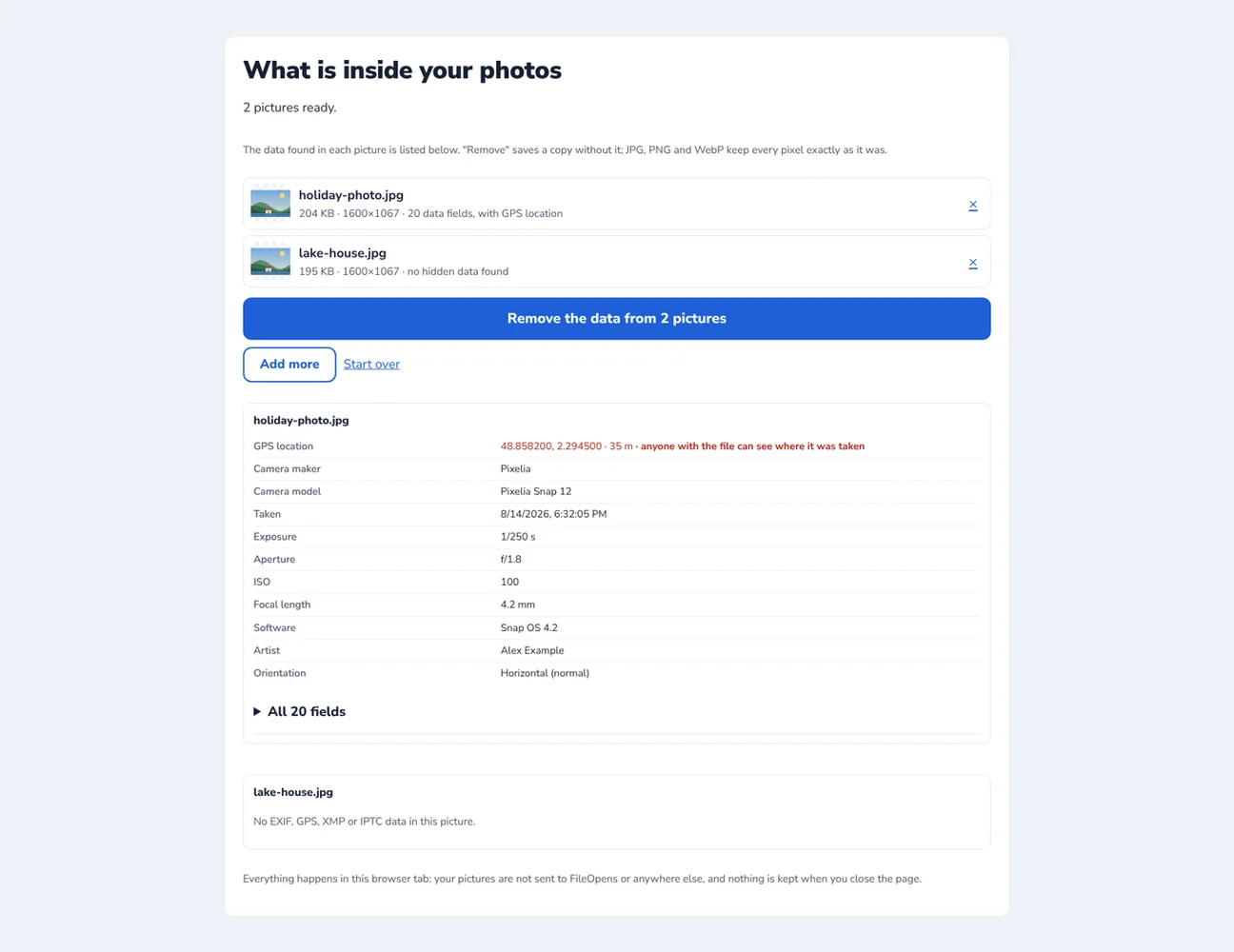
holiday-photo.jpgthe data
What a photo reveals, GPS first
- 20 fields found
- Location shown in red
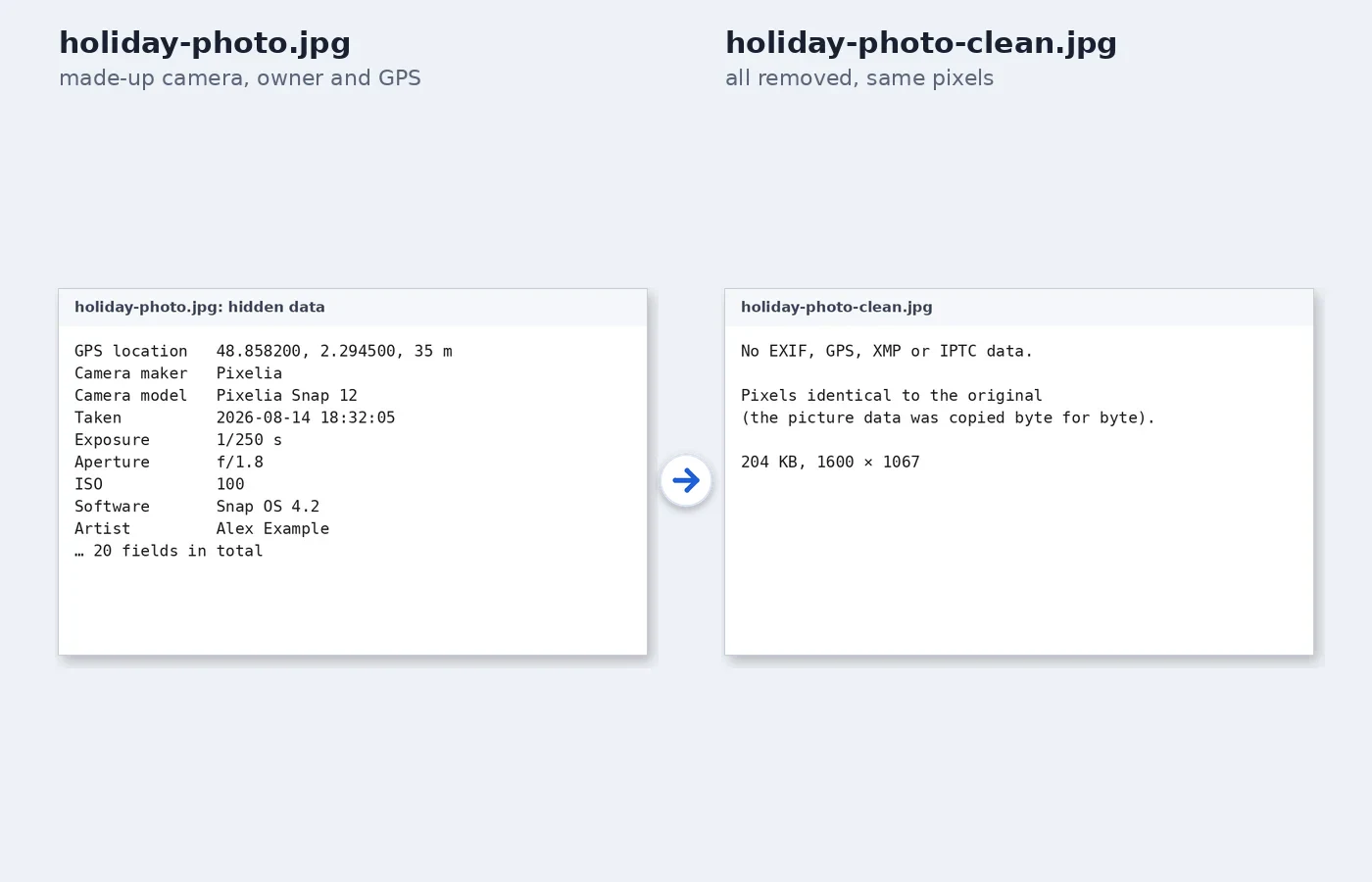
holiday-photo.jpgholiday-photo-clean.jpg
The same photo after removing the data
- All 20 fields removed
- Pixels identical to the original
A sample photo we made ourselves, with made-up names and data, opened in this tool and shown as it came out. Your own files stay on your device.
How to view EXIF data
-
Step 1
Choose the photos
From your phone, a camera, a download or an email.
-
Step 2
Read the data
The main fields first, then every field under "All fields".
-
Step 3
Remove it if you want
One click saves clean copies without the data.
What the EXIF viewer shows
EXIF (Exchangeable Image File Format) is the standard way cameras and phones record details in a photo. The viewer lists the camera maker and model, the lens, when the photo was taken and last modified, exposure time, aperture, ISO, focal length and flash, the software that edited it, and author and copyright fields if someone filled them in. XMP and IPTC data, used by Lightroom, Photoshop and news agencies for captions, keywords and ratings, are shown too. Everything else found is listed under "All fields".
Check a photo's location
If the photo contains a GPS position, it is shown first, in red, with latitude, longitude and altitude, so you know before you share it. Coordinates can be pasted into any map app to see the exact place. This is worth checking for photos of your home, your children or valuables, and for photos you are about to put on a marketplace. No location means the camera had location switched off or the data was already removed.
Photographers and checking facts
Photographers use EXIF to learn from their settings, check which lens or shutter speed made a shot sharp, or confirm a client's file came from the right camera. Journalists and fact-checkers look at dates, devices and software to judge whether a picture is what it claims to be; remember that EXIF can be edited or removed, so it is a clue, not proof.
Remove what you do not want to share
Press "Remove the data" and you get copies without EXIF, XMP or IPTC; JPG, PNG and WebP keep every pixel unchanged, and a tiny orientation note keeps photos upright. The dedicated page remove EXIF data explains the details. HEIC photos from iPhones are read here too; to convert them, use HEIC to JPG. The data is read with exifr, an open-source library, in your browser.
Common fields explained
Exposure is how long the shutter was open, such as 1/250 s; aperture (f/1.8, f/8) is how wide the lens opened; ISO is how sensitive the sensor was set, higher meaning more noise; focal length is the zoom in millimetres. Orientation tells viewers how to turn the photo. Software shows the program that last saved the file, such as an iPhone version or Adobe Lightroom. Date taken is the camera clock, which may be wrong if it was never set or the time zone changed during travel.
Private
Your photos are read in your browser and never uploaded; the data shown never leaves your device.
More free image converters
- Image converter
- Compress image
- JPG to PNG
- PNG to JPG
- JPEG to JPG
- Compress JPEG
- Compress PNG
- GIF to PNG
- PNG to GIF
- GIF to JPG
- JPG to GIF
- GIF maker
- Remove background
- Background eraser
- Make background transparent
- White background for photo
- Remove white background
- Resize image
- Crop image
- Rotate image
- Flip image
- Blur image
- Pixelate image
- Black and white photo
- Invert image colors
- Merge images
- Watermark image
- Add text to image
- Remove EXIF data
- Change DPI
- Image to Base64
- Base64 to image
- MP4 to GIF
- Video to GIF
- GIF to MP4
- GIF compressor
- PNG to SVG
- JPG to SVG
- Image to SVG
- SVG to PDF
- Image to text
- PNG to DXF
- SVG to DXF
- DXF to SVG
- HEIC to JPG
- HEIC to PNG
- HEIC to PDF
- HEIC viewer
- WebP to PNG
- WebP to JPG
- WebP to GIF
- WebP to PDF
- PNG to WebP
- JPG to WebP
- AVIF to PNG
- AVIF to JPG
- JFIF to JPG
- JFIF to PNG
- SVG to PNG
- SVG to JPG
- PNG to ICO
- ICO to PNG
- BMP to JPG
- BMP to PNG
- TIFF to JPG
- TIFF to PNG
- PSD viewer
- PSD to PNG
- PSD to JPG
- PSD to PDF
- AI to SVG
- AI to PNG
- Open AI file
- EPS to PNG
- DDS to PNG
- TGA to PNG
- TGA to JPG
- RAW to JPG
- CR3 to JPG
- CR2 to JPG
- NEF to JPG
Questions about the EXIF viewer
How can I see where a photo was taken?
Open it here; if it has a GPS position, it is shown first, in red.
Why does my photo show no data?
It was removed, for example by a social network or messaging app, or the camera did not store any.
Does it read iPhone HEIC photos?
Yes, including their location and camera data.
Can EXIF data be faked?
Yes, it can be edited, so treat it as a clue rather than proof.
Can I remove the data here?
Yes, press "Remove the data" to save clean copies.
Are my photos uploaded?
No, everything is read in your browser.