Free No account · the file is deleted after 24 hours
RAW to JPG converter
Convert RAW to JPG here: a photo straight from your camera, in Canon, Nikon, Sony, Fujifilm, Panasonic, Olympus, Pentax or DNG format, is developed into a full-size JPG with the camera's own white balance, ready to share or print. Nothing to install.
or drop it here. One RAW photo at a time, up to 200 MB. Free, no account.
Develop your photo
The file is sent over an encrypted connection to our server in Canada (OVHcloud, Beauharnois, Quebec), processed by a program there, and deleted with the result 24 hours later. Nobody looks at it.
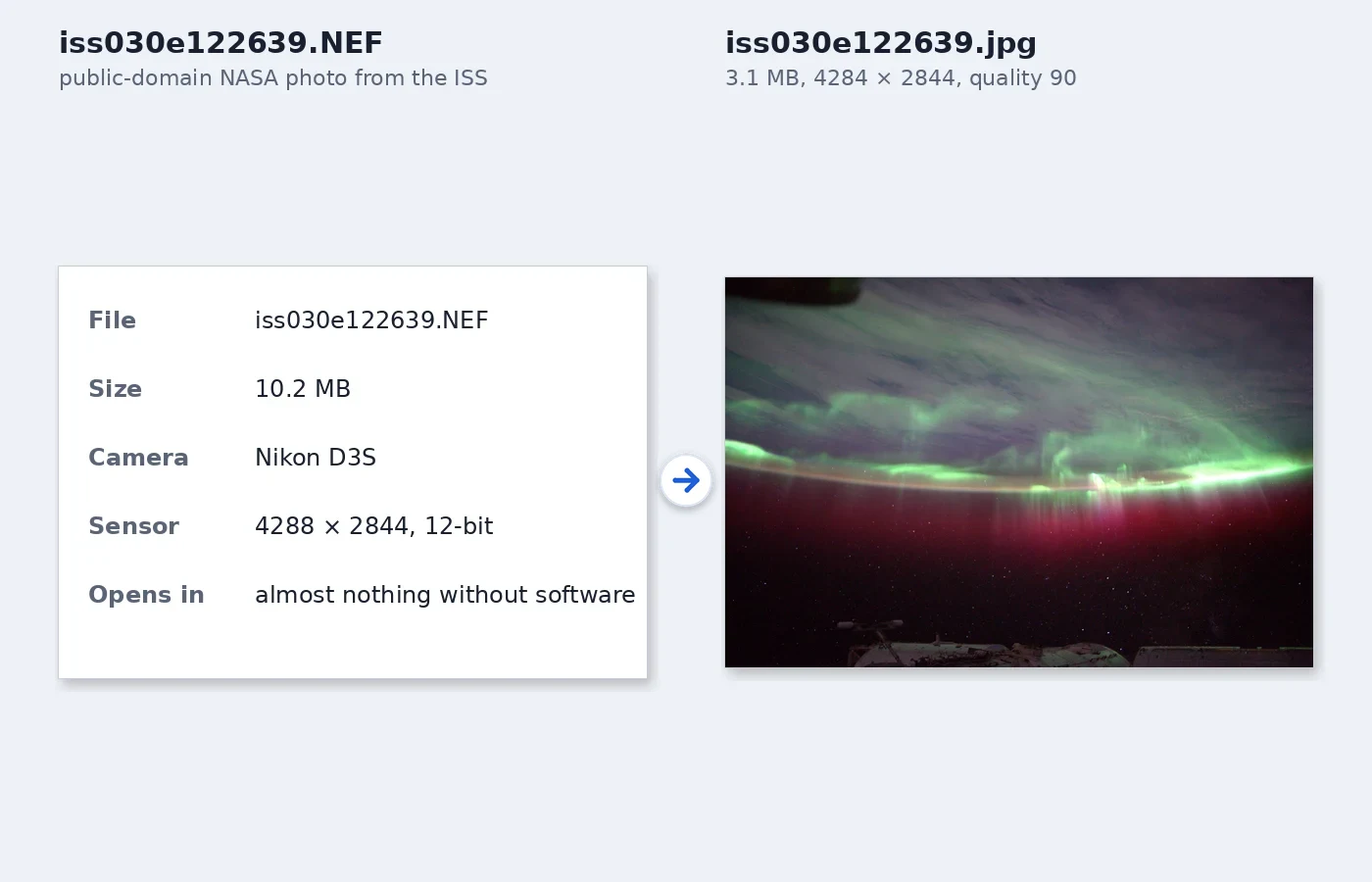
A camera RAW photo developed by FileOpens
iss030e122639.NEFiss030e122639.jpg
A Nikon NEF (public-domain NASA photo) developed to JPG
- 10.2 MB NEF to 3.1 MB JPG
- Full size, 4284 × 2844
- Camera white balance
A public-domain photo taken by NASA astronauts on the International Space Station, developed by this tool and shown as it came out. Your photos are deleted after 24 hours and never shown to anyone.
How to convert RAW to JPG
-
Step 1
Choose the .raw file
Straight from the camera or its card.
-
Step 2
Pick the quality
Full size at JPG quality 90, or 95 and half size if you prefer.
-
Step 3
Download the JPG
With a preview on the result page.
What a RAW file is
Cameras and many phones can save RAW files: the unprocessed data from the sensor, with more colour depth and detail than a JPG, so photographers can adjust exposure and colour afterwards without loss. Every maker has its own format: Canon CR3 and CR2, Nikon NEF, Sony ARW, Fujifilm RAF, Panasonic RW2, Olympus ORF, Pentax PEF, and Adobe's DNG used by Leica, some phones and many converters. The price is that a RAW file is not a picture yet: most programs, websites and phones cannot show it.
How the photo is developed
A RAW file holds what the camera's sensor recorded, before the camera turned it into a picture. We develop it on our server with LibRaw, the open-source RAW library used by many photo programs: the camera's own white balance is applied, colours are converted to standard sRGB, the picture is turned the right way up, and it is saved as a full-size JPG at quality 90 (or 95). No filters, lens corrections or "picture styles" are added, so the result can look a little flatter or differently coloured than the JPG your camera would have made; it is a faithful, neutral development, a good starting point for editing.
Supported cameras and formats
LibRaw reads RAW files from over a thousand camera models: Canon CR3, CR2 and CRW, Nikon NEF and NRW, Sony ARW, SRF and SR2, Adobe DNG, Fujifilm RAF, Panasonic RW2, Olympus ORF, Pentax PEF, Samsung SRW, Sigma X3F, Hasselblad 3FR, Phase One IIQ, Leica RWL, Minolta MRW and Kodak KDC. Very new cameras can need a newer LibRaw than we have; if a file is not recognised, the page says so. For a specific camera, see CR3 to JPG, CR2 to JPG and NEF to JPG.
RAW to JPG on Windows and Mac
Windows 10 and 11 show many RAW formats in Photos after installing the free "Raw Image Extension" from the Microsoft Store. macOS Photos and Preview open most RAW files and can export JPG. Every camera maker offers free software too: Canon Digital Photo Professional, Nikon NX Studio, Sony Imaging Edge, Fujifilm X RAW Studio. Lightroom, Capture One, darktable and RawTherapee give you full control. This page is for the quick case: one photo, a JPG, no installation, on any computer.
Full size or half size, quality 90 or 95
Full size keeps every pixel the sensor recorded, right for printing and cropping. Half size halves the width and height, a quarter of the pixels, which is still about 6 megapixels from a 24-megapixel camera: plenty for screens, social media and email, and the file is roughly four times smaller. Quality 90 is visually identical to the original for nearly every photo; 95 keeps the finest texture, such as foliage or fabric, at about 1.5 times the file size. DNG files from Android phones that shoot RAW develop the same way.
Privacy and limits
One photo per conversion, up to 200 MB. The file goes to our server over an encrypted connection, is developed automatically, and is deleted with the JPG 24 hours later. Nobody looks at your photos.
More free image converters
- Image converter
- Compress image
- JPG to PNG
- PNG to JPG
- JPEG to JPG
- Compress JPEG
- Compress PNG
- GIF to PNG
- PNG to GIF
- GIF to JPG
- JPG to GIF
- GIF maker
- Remove background
- Background eraser
- Make background transparent
- White background for photo
- Remove white background
- Resize image
- Crop image
- Rotate image
- Flip image
- Blur image
- Pixelate image
- Black and white photo
- Invert image colors
- Merge images
- Watermark image
- Add text to image
- Remove EXIF data
- EXIF viewer
- Change DPI
- Image to Base64
- Base64 to image
- MP4 to GIF
- Video to GIF
- GIF to MP4
- GIF compressor
- PNG to SVG
- JPG to SVG
- Image to SVG
- SVG to PDF
- Image to text
- PNG to DXF
- SVG to DXF
- DXF to SVG
- HEIC to JPG
- HEIC to PNG
- HEIC to PDF
- HEIC viewer
- WebP to PNG
- WebP to JPG
- WebP to GIF
- WebP to PDF
- PNG to WebP
- JPG to WebP
- AVIF to PNG
- AVIF to JPG
- JFIF to JPG
- JFIF to PNG
- SVG to PNG
- SVG to JPG
- PNG to ICO
- ICO to PNG
- BMP to JPG
- BMP to PNG
- TIFF to JPG
- TIFF to PNG
- PSD viewer
- PSD to PNG
- PSD to JPG
- PSD to PDF
- AI to SVG
- AI to PNG
- Open AI file
- EPS to PNG
- DDS to PNG
- TGA to PNG
- TGA to JPG
- CR3 to JPG
- CR2 to JPG
- NEF to JPG
Questions about RAW to JPG
Which RAW formats work?
CR3, CR2, NEF, ARW, DNG, RAF, RW2, ORF, PEF, SRW, X3F and more, from over a thousand cameras.
Will it look like my camera's JPG?
Close, but neutral: the camera's white balance is used, without its picture style or lens corrections.
Can I adjust exposure or white balance?
Not here; the camera's settings are used. For control, use your camera maker's free software, darktable or RawTherapee.
Is the full resolution kept?
Yes, unless you choose half size.
Can I convert many RAW files at once?
One per conversion for now.
Is it free?
Yes, with no account and no watermark.