Arc stops working on 22 December 2026. Copy your Spaces and pinned tabs out before then.
Free Nothing is uploaded
Move Arc to Chrome, Safari or Firefox
Arc stops on 22 December 2026. Turn your Spaces, folders and pinned tabs into a bookmarks file any browser can import. Free, and your file never leaves your computer.
or drop it here. The "Arc Data Export.md" file works too. Read on your device, never sent anywhere.
Your Arc bookmarks
See what is inside
Where to find StorableSidebar.json
- On a MacIn Finder press Cmd+Shift+G, paste
~/Library/Application Support/Arc/and press Enter. DragStorableSidebar.jsononto the box above. - On WindowsPress Win+R, paste
%LOCALAPPDATA%\Packages, open the folder that starts withTheBrowserCompany.Arc, thenLocalCache\Local\Arc.
The file holds every Space, folder and pinned tab with its nesting, so it gives the best result. Arc's own Export Data (Settings → Advanced) makes a simpler list of links; we read that too.
Import the file into your new browser
- Chrome, Edge, BraveMenu → Bookmarks and lists → Import bookmarks and settings → Bookmarks HTML file → choose
arc-bookmarks.html. - SafariFile → Import From → Bookmarks HTML File, and choose
arc-bookmarks.html. - FirefoxBookmarks → Manage bookmarks → Import and Backup → Import Bookmarks from HTML.
Each Space becomes a folder inside an "Arc" folder, with your folders and pinned tabs in their places. Split views become separate bookmarks; easels and notes are left out.
Old files that won't open?
FileOpens also converts files from programs that are gone: Publisher to PDF and Word, Microsoft Works, WordPerfect, Apple Numbers to Excel and whole mailboxes to PDF.
Arc bookmarks read by FileOpens
StorableSidebar.jsonarc-bookmarks.html
Spaces, folders and Favorites
- Every Space as a folder
- Folders inside Spaces kept
- One file to import into Chrome
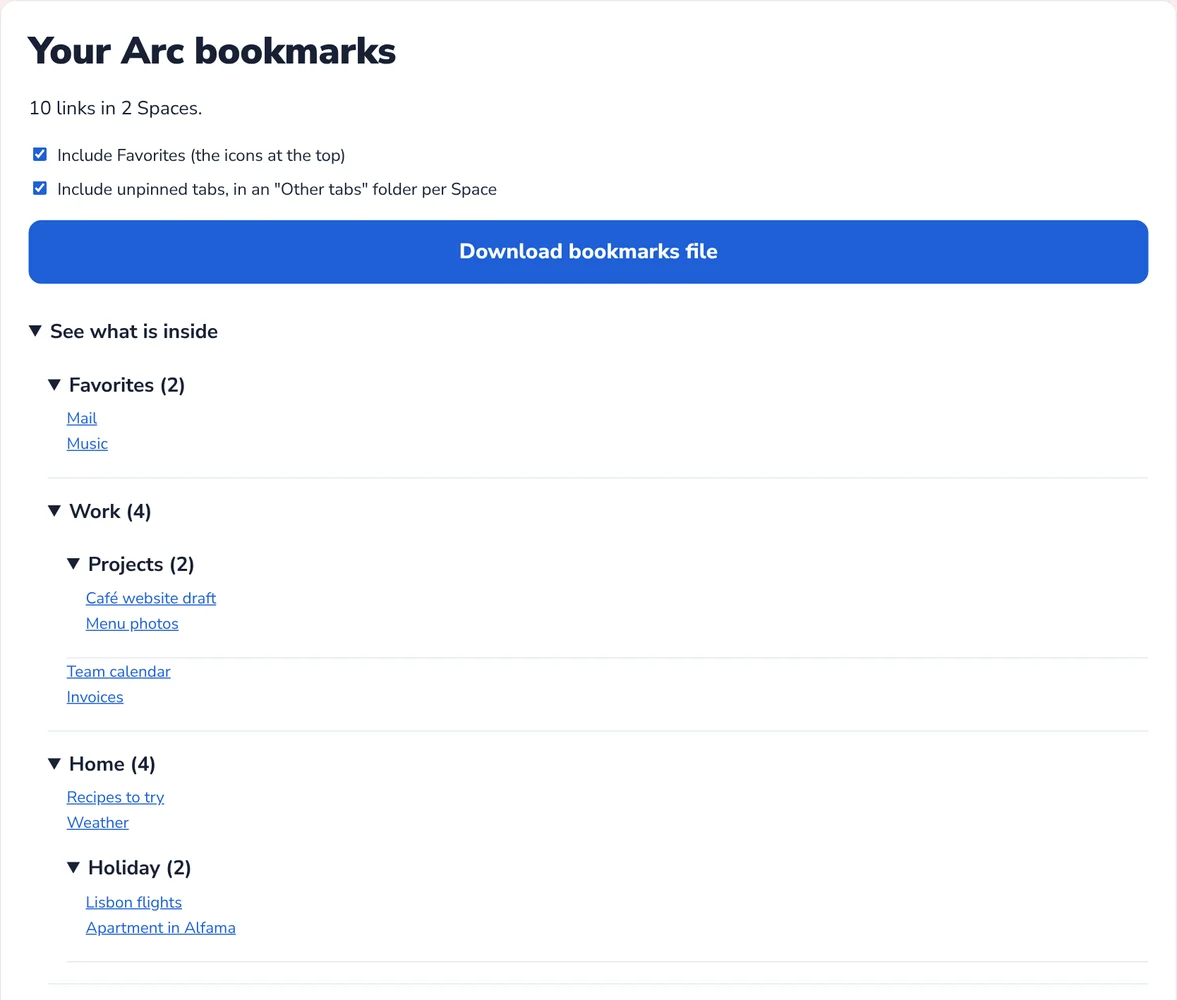
A sample Arc sidebar we made ourselves, with made-up names and data, opened in this tool and shown as it came out. Your own files stay on your device.
Which browser to move to
Chrome, Edge, Brave, Vivaldi and Opera are built on the same engine as Arc, so sites behave the same and most extensions are available. Firefox and Zen offer vertical tabs and a different engine. Dia, from the makers of Arc, can import from Arc directly while Arc still starts. All of them import the bookmarks file made here.
Spaces become folders
Each Space turns into a folder named after it, with its pinned tabs and folders inside in the same order. Favorites (the icons at the top of the sidebar) get their own folder, and you choose whether unpinned tabs come along in an "Other tabs" folder per Space.
What else to move before Arc stops
The bookmarks file holds links only. Passwords, history, extensions and site sign-ins are separate: move them through the new browser's own import or your password manager while Arc still works. After 22 December Arc will no longer run, so do this while it still opens; the sidebar file stays on your disk, though, and can be converted here later.
How to export Arc to Chrome here
Find StorableSidebar.json in Arc's data folder (the questions below say where on a Mac and on Windows), or make "Arc Data Export.md" in Arc's settings, and drop the file on the box above. Your Spaces appear in a list with their folders and pinned tabs, so you can check that everything is there. Choose whether unpinned tabs should come along, then save the bookmarks file. All of this happens inside your browser; the file is not uploaded.
Importing the bookmarks file
Chrome: Bookmarks > Import bookmarks and settings, choose "Bookmarks HTML File" and pick the file. Edge: Settings > Profiles > Import browser data, then "Favorites or bookmarks HTML file". Safari: File > Import From > Bookmarks HTML File. Firefox: Bookmarks > Manage bookmarks > Import and Backup > Import Bookmarks from HTML. Your Spaces show up as folders, which you can drag to the bookmarks bar or turn into tab groups. Other free tools: open winmail.dat, KML viewer.
Questions
Is Arc shutting down?
Yes. The Browser Company stops Arc on 22 December 2026. After that the app no longer starts, so copy your Spaces, pinned tabs and folders out before then.
Which file do I upload?
Best is StorableSidebar.json: it holds every Space, pinned tab and folder with its nesting. On a Mac it is in the folder ~/Library/Application Support/Arc/ (in Finder press Cmd+Shift+G and paste that path). On Windows it is in %LOCALAPPDATA%\Packages\TheBrowserCompany.Arc_…\LocalCache\Local\Arc\. The "Arc Data Export.md" file from Settings > Advanced > Export Data works too.
Is my file uploaded anywhere?
No. The conversion runs in your browser, on your device. The file is not sent to our server or anyone else.
Which browsers can import the result?
Chrome, Safari, Firefox, Edge, Brave, Vivaldi, Opera and Dia all import a bookmarks HTML file. Each Space becomes a folder, with your folders and pinned tabs inside it.
What is not carried over?
Only links move: no passwords, history, cookies or open sessions. Easels and notes are skipped, and split views become separate bookmarks. Moving to Dia? It can import from Arc directly while Arc still works.
Does it cost anything?
No, it is free, with no account. We also convert old files that no longer open, such as Publisher, Works and Apple Numbers.
Arc is a trademark of The Browser Company. FileOpens is not affiliated with The Browser Company.