Free No account · the file is deleted after 24 hours
Excel to PDF converter
Convert Excel to PDF here: upload an .xlsx, .xls or .csv and get a PDF of every sheet, laid out on pages with the print area, page breaks and charts you set in Excel. No Excel needed, free.
or drop it here. .xlsx, .xls, .xlsm, .ods, .csv, up to 200 MB. Free, no account.
Convert to PDF
The file is sent over an encrypted connection to our server in Canada (OVHcloud, Beauharnois, Quebec), processed by a program there, and deleted with the result 24 hours later. Nobody looks at it.
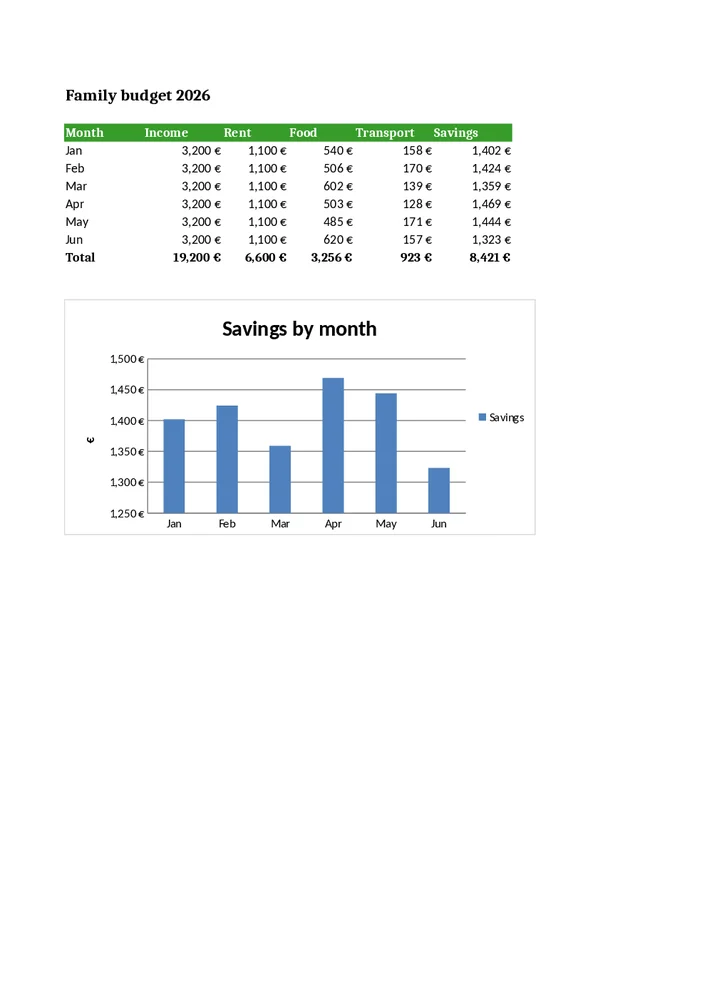
A spreadsheet converted to PDF by FileOpens
budget.xlsxbudget.pdf
Family budget with a chart
- Number formats as in Excel
- Header row colours kept
- The chart printed with the table
Sample budget we made ourselves, with made-up names and data, converted here and shown as they came out. Your own files are never shown to anyone.
How to convert Excel to PDF
-
Step 1
Choose the spreadsheet
An Excel workbook, an older .xls, a LibreOffice .ods or a .csv file.
-
Step 2
It is laid out on pages
Every sheet is printed the way Excel would print it.
-
Step 3
Download the PDF
The previews show how the pages were cut, so you can check before sending.
How a spreadsheet becomes pages
A sheet has no pages of its own; it is one big grid. To make a PDF, the converter "prints" it, exactly like the Print button in Excel does, and that means the page settings saved in the workbook decide the result: the print area if you set one, the paper size and orientation, "Fit to 1 page wide", repeated title rows, headers and footers, and manual page breaks. Every sheet that has content is included, one after another, and charts and pictures are drawn where they sit on the sheet. Numbers keep their formatting: currencies, dates, percentages and decimals look as they did in Excel.
Why a wide sheet ends up on many pages
This is the most common surprise. When a sheet is wider than a page and no scaling is set, the columns that do not fit are moved to the next pages, so a table with 20 columns can become a stack of narrow strips. Excel does the same when it prints. The fix is in Excel (or LibreOffice, or Numbers): Page Layout > Orientation > Landscape, and Scale to Fit > Width: 1 page, or set a print area that covers only the part you need. Save, upload again, and the table comes out on one page width. The page previews on the result page show you at once whether that happened.
What carries over from Excel to PDF
Cell values, number formats, fonts, colours, borders, merged cells, conditional formatting, charts, pictures and shapes are all printed. Formulas are printed as their results, as in any printout. Hidden rows, columns and sheets are left out. Comments and notes are not printed unless the workbook is set to print them. Very long sheets are fine, the PDF simply has more pages. A .csv has no page settings, so it is printed on portrait pages with default margins; for a nicer layout open it in Excel or LibreOffice, adjust, save as .xlsx and convert that.
Other spreadsheet formats
Besides .xlsx and the older .xls, this converter accepts .xlsm (macros do not run), .xlsb, LibreOffice .ods and .csv. For Apple Numbers files, use Numbers to PDF; for old Lotus 1-2-3 and Quattro Pro files, Lotus 1-2-3 to Excel. Going the other way, from a PDF table back into a spreadsheet, is PDF to Excel.
Privacy and limits
The workbook is sent to our server over an encrypted connection and converted there by LibreOffice; both files are deleted 24 hours later and nobody opens them. Files up to 200 MB are accepted. Workbooks protected with a password to open cannot be converted; remove the password in Excel (File > Info > Protect Workbook > Encrypt with Password, then clear it) and upload again. Sheet protection, which only stops editing, does not get in the way.
More free PDF tools and converters
- Merge PDF
- Split PDF
- Compress PDF
- Compress PDF to 100 KB
- Delete PDF pages
- Rotate PDF
- Extract PDF pages
- Reorder PDF pages
- Crop PDF
- Add page numbers
- Watermark PDF
- Sign PDF
- Protect PDF
- Unlock PDF
- OCR PDF
- Flatten PDF
- PDF to grayscale
- Invert PDF colors
- Remove PDF metadata
- PDF to Word
- Word to PDF
- PDF to Excel
- PDF to PowerPoint
- PowerPoint to PDF
- JPG to PDF
- PNG to PDF
- Image to PDF
- PDF to JPG
- PDF to PNG
- PDF to text
- HTML to PDF
- PDF to EPUB
- PDF to PDF/A
- PDF to TIFF
- PDF to SVG
Questions about converting Excel to PDF
Are all sheets included?
Yes, every sheet with content, in order. Hidden sheets are left out.
Why are my columns on separate pages?
The sheet is wider than a page and no "fit to width" is set. Set landscape and "fit to 1 page wide" in Excel, save, convert again.
Do formulas still work in the PDF?
A PDF shows the results, like a printout. For live formulas, keep the Excel file.
Can I convert a CSV file?
Yes. It is printed on portrait pages with default margins.
Is it free?
Yes, with no account and no watermark.