Free Nothing is uploaded
Open a GEDCOM family tree
Drop a .ged file and browse your family: every person, their parents, partners and children, and a chart of their ancestors. Print it as a family book or take the list to Excel. Free and private.
or drop it here. From Ancestry, MyHeritage, FamilySearch, Family Tree Maker, Gramps, RootsMagic and others. Read on your device, never sent anywhere.
Family tree
This tree is large, so the book is made for one person's family: their ancestors, descendants and partners. Pick the person first.
The book opens your browser's print window: choose "Save as PDF" to keep it. Names in it are links.
Ancestors
A family tree opened in FileOpens
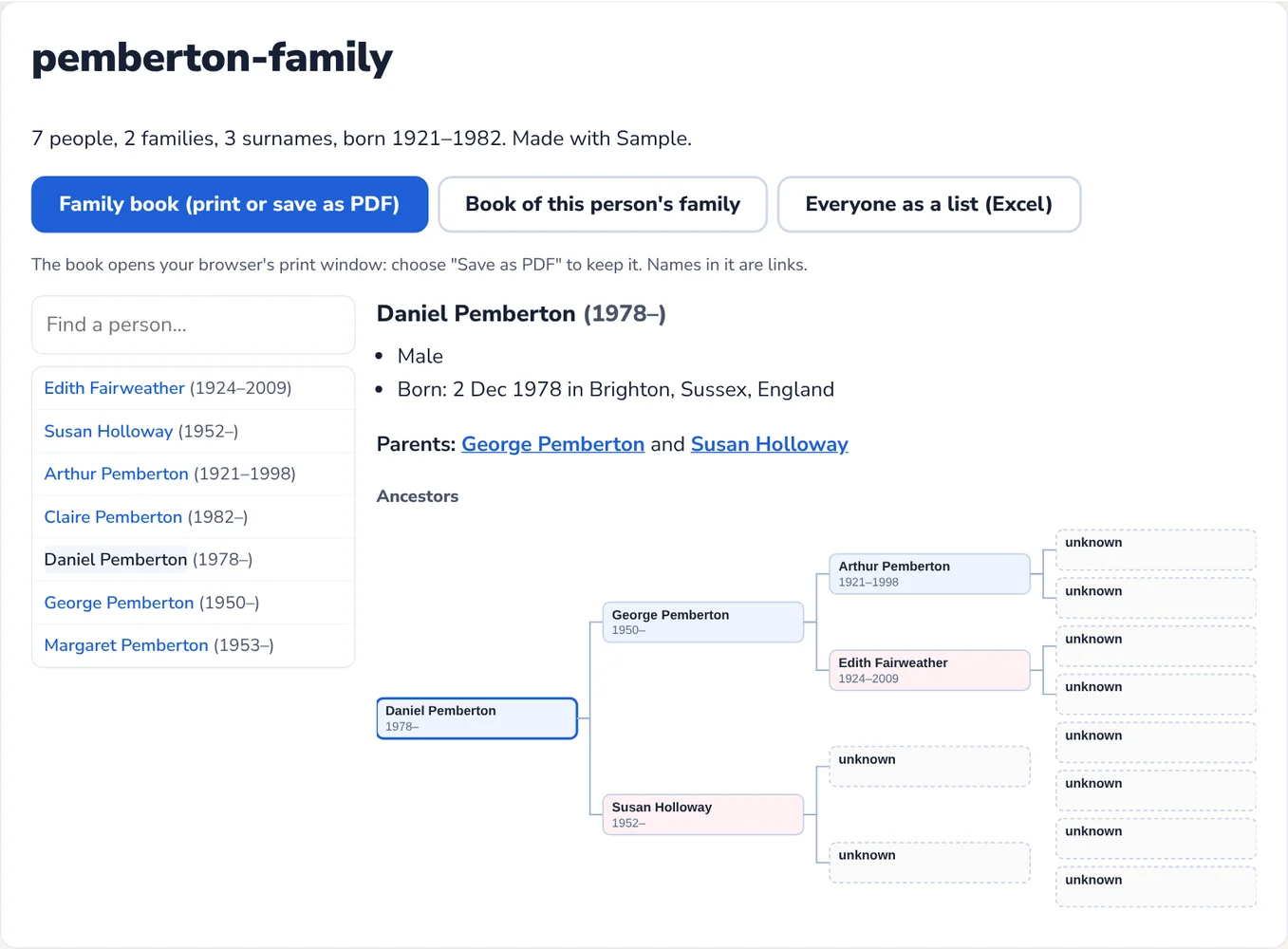
pemberton-family.gedfamily book (PDF)
Person page with ancestors
- Birth, death and places
- Parents as links
- Ancestor chart
A sample family tree we made ourselves, with made-up names and data, opened in this tool and shown as it came out. Your own files stay on your device.
What you can do with it
- Browse everyoneSearch by name, open a person, and walk to their parents, partners and children with one click.
- See the ancestorsA chart of four generations for whoever you open: parents, grandparents, great-grandparents.
- Print a family bookEveryone A to Z with births, marriages, deaths, places and notes. Save it as a PDF to share with relatives.
- Take the list to ExcelOne row per person: names, dates and places, parents, partners, number of children.
Where to get a GEDCOM file
- AncestryTrees → choose your tree → Tree settings → Export tree. The .ged file arrives as a download.
- MyHeritageFamily tree → Manage trees → Export to GEDCOM. You get a link by e-mail.
- FamilySearch, Geni, WikiTreeEach has a GEDCOM export in its tree or profile settings.
- Desktop programsFamily Tree Maker, RootsMagic, Legacy, Gramps, MacFamilyTree: File → Export → GEDCOM.
What is a GEDCOM file?
GEDCOM (Genealogical Data Communication) is the file format FamilySearch created in the 1980s so that family tree programs could exchange data. Version 5.5.1 from 1999 is still the one most programs and websites write; GEDCOM 7 followed in 2021. A .ged file is plain text: a record for every person and every family, linked to each other, with dates, places and notes.
Open a GEDCOM without installing a program
Desktop programs such as Gramps or RootsMagic need installing and setting up, and family tree websites want an account and a copy of your data. Here you only drop the file: the tree opens in your browser in a few seconds, on Windows, a Mac, a Chromebook or a tablet, and nothing is uploaded.
Share your family tree with relatives
Not everyone in the family uses a genealogy program. Make the family book as a PDF and e-mail it, print it for a reunion, or send the Excel list so cousins can check names and dates. In the PDF every name is a link to that person's entry, so it is easy to follow a line up or down.
A word about living relatives
Family trees hold birth dates and places of people who are alive. Before you share a GEDCOM or a book publicly, many family tree programs can hide living people when exporting. This viewer keeps everything on your own device, so opening a tree here shares nothing.
Accents and special letters come out right
Older trees are often saved in ANSEL, a character set made for library catalogues, which many tools show as gibberish. We read ANSEL, ANSI, Mac and UTF-8 files, so names like Åsa, Łukasz, Bjørn or Müller look as they should. Other free tools that run in your browser: KML viewer for Google Earth files and ICS viewer for calendars.
Questions
What is a GEDCOM file?
The common file format for family trees (.ged). Ancestry, MyHeritage, FamilySearch and every family tree program can save one, so it is how trees move between programs and relatives.
Is my family tree uploaded anywhere?
No. It is read in your browser, on your device. Names, dates and notes of living relatives never leave your computer.
Which GEDCOM files work?
GEDCOM 5.5 and 5.5.1 from any program, and GEDCOM 7 text files, in every character set they use (UTF-8, ANSEL, ANSI, Mac). Trees with hundreds of thousands of people open too; very large ones take a few seconds.
How do I make a PDF of my tree?
Press "Family book". Your browser's print window opens: choose "Save as PDF" as the printer. You get everyone from A to Z with their dates, places, parents, partners and children, and the names are links. For very large trees, open a person and make the book of their family.
Can I open my tree in Excel?
Yes. "Everyone as a list" saves a CSV file that opens in Excel, Numbers and Google Sheets: one row per person with names, birth and death dates and places, parents, partners and the number of children.
Are photos and sources shown?
Photos are not inside a GEDCOM file, only links to them, so they do not appear. Notes are shown; sources and citations are left out to keep the view readable.
Does it cost anything?
No, it is free, with no account. We also convert old files that no longer open, such as Publisher, Works, Access and Visio.
Ancestry, MyHeritage and FamilySearch are trademarks of their owners. FileOpens is not affiliated with them.