Free Your pictures are not uploaded
GIF maker
Make a GIF here from your own pictures: choose photos, screenshots or drawings, put them in the order they should play, set how long each one shows, the size and how often it loops, and the GIF maker builds an animated GIF in your browser. Nothing is uploaded, and the result plays right on the page.
or drop them here, in the order of the frames. JPG, PNG, WebP, HEIC and more. Nothing is uploaded.
Your frames
Everything happens in this browser tab: your pictures are not sent to FileOpens or anywhere else, and nothing is kept when you close the page.
An animated GIF made from photos by FileOpens
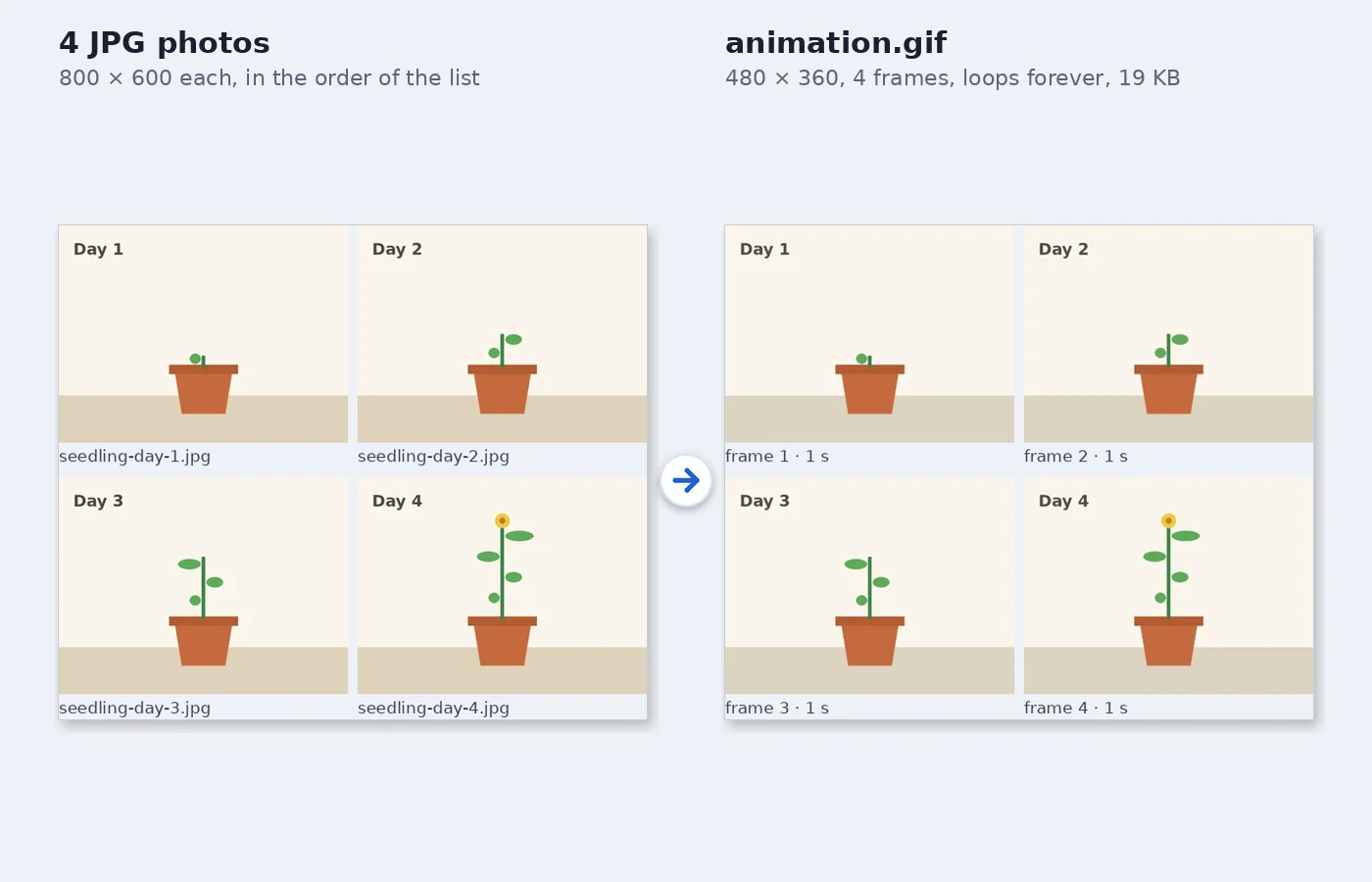
4 JPG photosanimation.gif
Four photos of a seedling as one animation
- 1 second per frame, loops forever
- 800 × 600 photos made 480 × 360
- 19 KB GIF
A sample set of photos we made ourselves, with made-up names and data, opened in this tool and shown as it came out. Your own files stay on your device.
How to make a GIF from pictures
-
Step 1
Choose the pictures
Two or more photos, screenshots or drawings; add more at any time.
-
Step 2
Set the order and speed
Move frames up with ↑, then pick the time per frame, size and loop.
-
Step 3
Make the GIF
It is saved to your downloads and shown on the page.
What you can make with a GIF maker
An animated GIF is a small file that plays by itself almost everywhere: in chats, emails, slides, forums, product pages and documentation. Common uses are a before-and-after of a room or a photo edit, a few steps of a recipe or a repair, a product turning or changing colour, a short comic, a flip-book drawing, a chart that changes year by year, or a set of screenshots that shows how to click through a program. All of them start as separate pictures, which is exactly what this GIF maker takes.
Order, speed and loop
Frames play in the order of the list. Choose the files in order, or move a picture up with the ↑ button; remove one with ×. Each frame shows for the time you choose, from 0.1 seconds for a smooth flip-book to 3 seconds for a slideshow of steps people need to read. The GIF can loop forever, the usual choice, play once and stop on the last frame, or play three times. "Forward and back" plays the frames and then runs them backwards, a "boomerang" that loops without a jump.
Size and pictures of different shapes
The GIF takes the size of the first picture, or a width you choose: 480 pixels is plenty for chats and keeps the file small, 800 pixels suits slides and web pages. When pictures have other shapes, "fit" shows each one whole with a border in the colour you pick, or a transparent border; "fill" crops them to fill the frame. Phone photos are turned the right way up first, and iPhone HEIC photos are read directly.
Keeping the GIF small
Every frame is stored in full, so a GIF grows with the number of frames and their size. GIF also has only 256 colours per frame: drawings, screenshots and charts stay crisp, while photos look slightly grainy. For a smaller file, use fewer frames, a smaller width, or the GIF compressor afterwards. For a video clip instead of pictures, video to GIF picks the part of the video you want, and GIF to MP4 turns a large GIF into a much smaller video for social media.
GIF makers on phones and in apps
iPhone Shortcuts, Google Photos animations, Giphy and Canva all make GIFs too, but they often need an account, add a logo, or upload your pictures. This page needs nothing: open it on a computer or phone, pick the pictures, and the GIF is built by your own browser. It works in Chrome, Edge, Firefox and Safari.
Private
The pictures never leave your device: they are read and encoded by the page itself, and nothing is kept when you close it.
More free image converters
- Image converter
- Compress image
- JPG to PNG
- PNG to JPG
- JPEG to JPG
- Compress JPEG
- Compress PNG
- GIF to PNG
- PNG to GIF
- GIF to JPG
- JPG to GIF
- Remove background
- Background eraser
- Make background transparent
- White background for photo
- Remove white background
- Resize image
- Crop image
- Rotate image
- Flip image
- Blur image
- Pixelate image
- Black and white photo
- Invert image colors
- Merge images
- Watermark image
- Add text to image
- Remove EXIF data
- EXIF viewer
- Change DPI
- Image to Base64
- Base64 to image
- MP4 to GIF
- Video to GIF
- GIF to MP4
- GIF compressor
- PNG to SVG
- JPG to SVG
- Image to SVG
- SVG to PDF
- Image to text
- PNG to DXF
- SVG to DXF
- DXF to SVG
- HEIC to JPG
- HEIC to PNG
- HEIC to PDF
- HEIC viewer
- WebP to PNG
- WebP to JPG
- WebP to GIF
- WebP to PDF
- PNG to WebP
- JPG to WebP
- AVIF to PNG
- AVIF to JPG
- JFIF to JPG
- JFIF to PNG
- SVG to PNG
- SVG to JPG
- PNG to ICO
- ICO to PNG
- BMP to JPG
- BMP to PNG
- TIFF to JPG
- TIFF to PNG
- PSD viewer
- PSD to PNG
- PSD to JPG
- PSD to PDF
- AI to SVG
- AI to PNG
- Open AI file
- EPS to PNG
- DDS to PNG
- TGA to PNG
- TGA to JPG
- RAW to JPG
- CR3 to JPG
- CR2 to JPG
- NEF to JPG
Questions about the GIF maker
How many pictures can I use?
As many as your browser memory allows; dozens of frames are fine.
Can I change the order?
Yes, move a picture up with ↑ or remove it with ×.
Can the GIF play only once?
Yes, choose "once" or "3 times" instead of "forever".
Can I make a GIF from a video?
Use video to GIF or MP4 to GIF, which pick a part of the video.
Is there a watermark?
No, and no account is needed.
Are my pictures uploaded?
No, the GIF is made in your browser.