Open an Access database
Got an .mdb or .accdb file and no Microsoft Access? See what is in every table in your browser and keep it all as an Excel workbook. Works on a Mac too.
- See your data free before you pay.
- Every table, every row, as Excel.
- Refund in one click if it is not usable.
- Deleted after 24 hours. Nobody looks at it.
An Access database converted by FileOpens
shop.mdbshop.xlsx
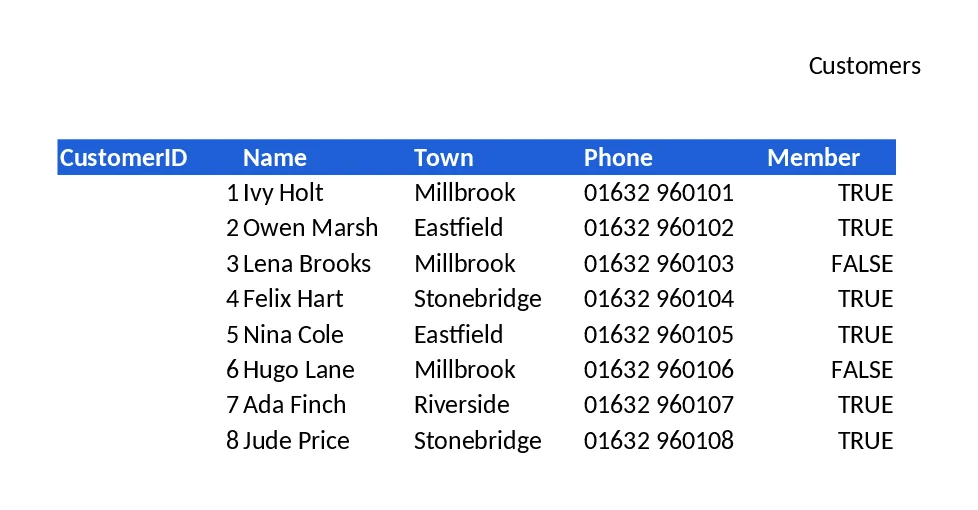
Customers table
- One sheet per table
- Yes/No fields as TRUE/FALSE
shop.mdbshop.xlsx
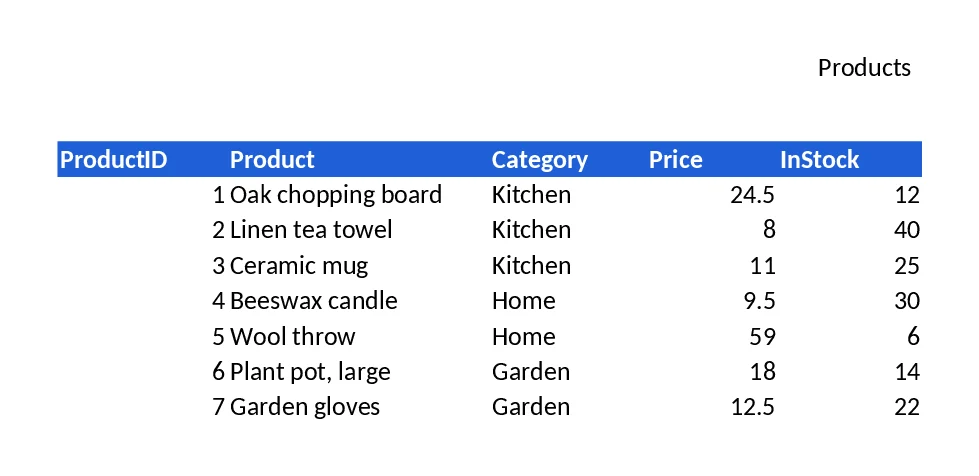
Products table
- Prices stay numbers
- Column names from Access
shop.mdbshop.xlsx
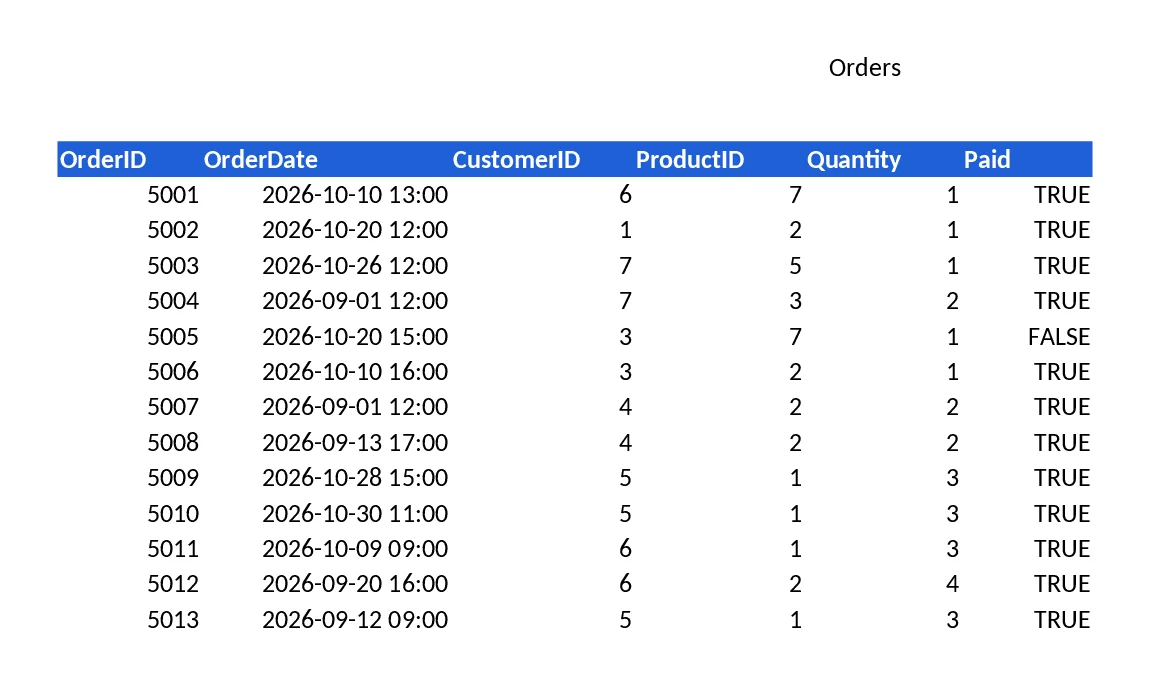
Orders table
- Dates stay dates
- Every row of every table
Sample database we made ourselves, with made-up names and data, converted here and shown as they came out. Your own files are never shown to anyone.
Access databases people convert with us
- Customer and contact lists
- Inventories and stock
- Orders and invoices
- Club and church members
- School and lab records
- Collections and catalogues
- Old business systems
How to convert an Access database
-
STEP 1
Upload your database
.mdb or .accdb, up to 500 MB. No Access needed.
-
STEP 2
See the data first
The first rows of up to 12 tables, ready in under a minute.
-
STEP 3
Pay once, download
One Excel workbook, a sheet per table. Refund in one click.
What you get back
- A sheet per tableEvery table of the database on its own sheet, named after the table.
- Every rowAll the data, not a sample. Very long tables continue on the next sheet.
- Real numbers and datesThey sort, filter and add up in Excel, Numbers or Google Sheets.
- Field names on topA bold header row that stays in view while you scroll.
- Old and new Access.mdb from Access 97–2003 and .accdb from 2007 to today.
- See it firstThe first rows of up to 12 tables in the preview before you pay.
Price
See your data free. Then $4.99 per database, or $14.99 for up to 10 files and $39 for up to 100. One payment, no subscription.
Ways to open an Access database
Microsoft Access itself needs Windows and the right Microsoft 365 plan; the free Access Runtime opens only databases built as applications. Other spreadsheet programs open .mdb files only with add-ons and drivers. The quickest way: choose the file above, check the first rows of up to 12 tables and download them as Excel.
Customer lists, stock, members, records
Address books, inventories, orders, club and church member lists, school and lab records: the data of every table comes through, ready to sort and filter in Excel, Numbers or Google Sheets. See Access to Excel.
Opening an MDB file on a Mac
Microsoft Access has never been made for the Mac, and Excel for Mac cannot read .mdb or .accdb files. Upload the database here from Safari or Chrome, look through the first rows of up to 12 tables, and download an Excel workbook that opens in Excel for Mac or Numbers.
What is inside an MDB or ACCDB file
An Access database keeps everything in one file: tables with the data, and on top of them queries, forms, reports, macros and VBA code that make it work like a small program. To open an MDB file and get the information out, the tables are what matter: every customer, order, product or member is a row in one of them. That is what you see in the preview and what you get in Excel, every table on its own sheet, every row.
Password-protected and damaged databases
A database encrypted with a password cannot be read without it; open it in Access with the password, decrypt it (File > Info > Decrypt Database) and upload the copy. A database that Access reports as damaged can often still be read here table by table, because only the data pages are needed. If nothing can be read, you see that before paying and are not charged. A Microsoft Works database (.wdb) instead? See WDB to Excel.
More Access tools
Also on FileOpens
Questions about Access databases
Is my database uploaded?
Yes: unlike our in-browser tools, databases are converted on our server. They are used only for your file, nobody looks at them, and they are deleted with the results 24 hours after upload.
Which Access databases can you open?
Databases from Access 97 to the current Access in Microsoft 365: .mdb and .accdb files, and compiled .mde and .accde files (their tables are read; forms and code are not).
What does the Excel file look like?
Every table on its own sheet, with the field names as a bold header row, frozen at the top. Numbers stay numbers, dates stay dates and Yes/No fields become TRUE or FALSE, so you can sort, filter and add up straight away. Tables longer than an Excel sheet (about a million rows) continue on the next sheet.
What is not included?
Forms, reports, macros and VBA code stay in Access, and saved queries are not run: Excel gets the data of every table, which is what queries and reports are built from. Pictures and files stored inside the database (OLE and Attachment fields) are left out.
My database has a password. Can you open it?
Databases encrypted with a password cannot be read without it. Open the database in Access with the password, choose File > Info > Decrypt Database, save it, and upload it again.
How much does it cost?
You see the first rows of up to 12 tables free first. Then $4.99 per database, or $14.99 for up to 10 files and $39 for up to 100, mixed with any other format we convert. Not usable? Refund within 24 hours.
What happens to my files?
They are used only to make your Excel file and are deleted automatically 24 hours after upload. Nobody looks at them.