Open an XER file without Primavera P6
Got a Primavera P6 schedule as an .xer file and no P6 licence? Open the XER file here: see the activities and the Gantt chart in your browser, then keep the schedule as Excel and PDF.
- See the Gantt chart free before you pay.
- Excel and PDF in one go.
- Refund in one click if it is not usable.
- Deleted after 24 hours. Nobody looks at it.
A Primavera P6 XER converted by FileOpens
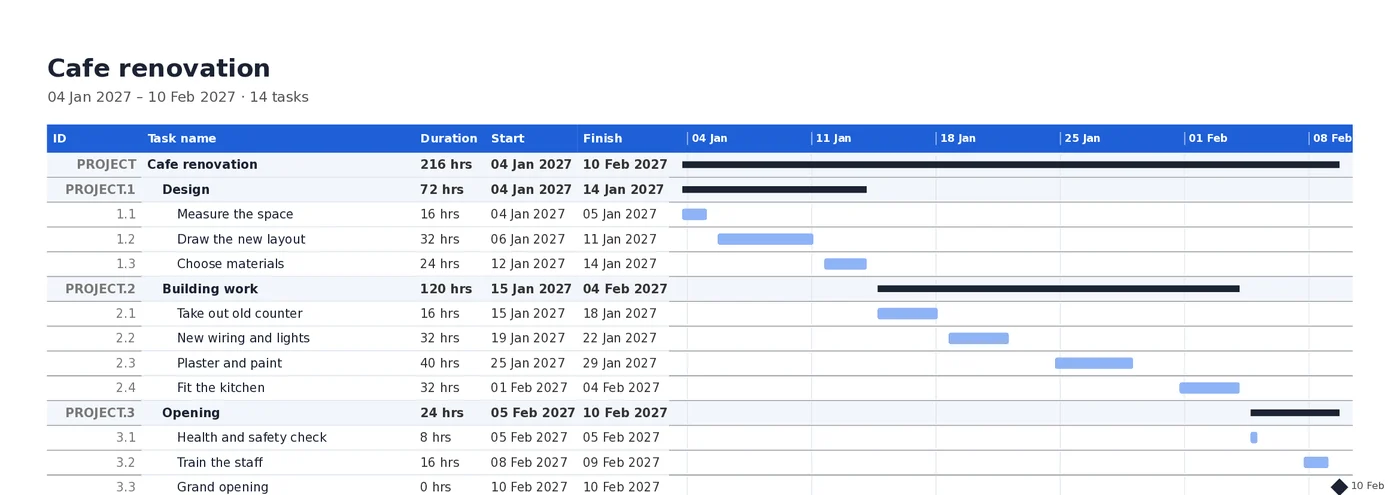
cafe-renovation.xerschedule.xlsx + Gantt PDF
P6 schedule with its WBS
- WBS codes and activities
- Durations in hours, as P6 keeps them
- Bars on a dated timeline
Sample schedule we made ourselves, with made-up names and data, converted here and shown as they came out. Your own files are never shown to anyone.
Project plans people open with us
- Construction schedules
- Software release plans
- Engineering projects
- Event plans
- Tender and bid schedules
- Office moves
- Old project archives
How to open a Primavera P6 schedule
-
STEP 1
Upload your .xer file
One schedule or many. No P6 licence needed.
-
STEP 2
See the Gantt chart first
Activities, dates and bars, ready in seconds.
-
STEP 3
Pay once, download
Excel with every activity and a PDF Gantt chart. Refund in one click.
What you get back
- Every task in ExcelID, WBS, indented names, durations, dates, % complete, predecessors, resources, notes.
- A Gantt chart PDFTask table and bars on landscape pages, the date scale on every page.
- Resources and detailsPeople, equipment and materials, plus the project title, manager and dates.
- P6 Professional and EPPMXER exports of whole projects: WBS, activities, relationships and resources.
- See it firstEvery page in the preview before you pay, so there are no surprises.
Price
See the Gantt chart free. Then $4.99 per plan, or $14.99 for up to 10 files and $39 for up to 100. One payment, no subscription.
What is an XER file?
XER is the export format of Oracle Primavera P6, the scheduling software used on construction, energy, infrastructure and engineering projects. Contractors send their programmes to owners, consultants and subcontractors as .xer files, because one file carries the whole project: the WBS, every activity with its dates and durations, the logic between activities, calendars and resources. It is the format a client usually asks for in the contract, next to a PDF printout.
Why an XER file will not open on your computer
Double-clicking an .xer file does nothing useful, because only P6 knows what to do with it. P6 is licensed per user and costs thousands of dollars a year, so many people who receive a schedule do not have it: subcontractors, clients, claims consultants, lawyers, estimators, new team members. P6 Professional is a Windows program, so on a Mac there is no direct way at all. Dedicated XER viewers exist, but most are paid Windows programs or subscriptions, which is a lot for a schedule you need to read once.
Can I open an XER file in Excel or Notepad?
You can, but it will not help much. An XER file is plain text: tables of the P6 database written one after another, with lines starting %T for a table name, %F for its field names and %R for each record. Excel shows these as rows of internal numbers, where an activity points to its WBS and its predecessors by database ID, not by name. Turning that into a readable schedule means rebuilding the links between a dozen tables. That is the work we do for you: you get a clean Excel schedule with one row per activity.
How to open an XER file on Windows, Mac or a phone
Here it works the same everywhere, in the browser: drop the .xer file above, wait a few seconds, and the Gantt chart appears on the screen. Nothing to install, no Oracle account, no Java. On an iPhone or Android phone, pick the file from Files or from the e-mail attachment. If the schedule is large, the preview shows the first pages; the Excel file and the PDF hold all of it.
What you get from an XER file
An Excel workbook with every activity: the activity ID as P6 shows it (such as A1000), WBS code, the name indented under its WBS, original duration, start and finish, % complete, predecessors written with their activity IDs and relationship types (for example A1010SS+8h), resources and notes. A Resources sheet and a Project sheet come with it, plus an XER to PDF printout: the activity table and the Gantt chart on landscape pages. In the chart, WBS levels are black summary bars with their activities indented below, diamonds are milestones and the darker part of a bar shows progress. The date scale repeats on every page, so a long schedule stays readable when printed for a site meeting.
What stays in P6
We read the schedule as it was last calculated in P6, we do not reschedule it. Layouts, filters, user-defined fields, activity codes other than the ID, baselines, costs and expenses stay in P6. One export can hold several projects: we convert the first one and say so on the result page. Microsoft Project files have their own page: open an MPP file, and old SureTrak and P3 backups too: open a SureTrak file.
More Project tools
Also on FileOpens
Questions about XER files
Which XER files can you open?
XER exports from Primavera P6 Professional and P6 EPPM. If a file does not open, for example because it was edited by hand or cut short, you see that straight away and pay nothing.
Why are durations shown in hours?
P6 stores durations in hours and converts them to days using the calendar of each activity. We show them as they are stored, so nothing is rounded by a calendar we cannot see exactly as P6 does.
My XER file has several projects. What happens?
We convert the first project in the file and tell you on the result page how many there are. Write to support@fileopens.com if you need the others; you can also export each project to its own XER file in P6.
How much does it cost?
You see the first pages of the Gantt chart free. Then $4.99 per schedule, or $14.99 for up to 10 files and $39 for up to 100, mixed with any other format we convert. Not usable? Refund within 24 hours.
What happens to my file?
It is used only to make your Excel and PDF files and is deleted automatically 24 hours after upload. Nobody looks at it, and it is never shared.