Free Your file is not uploaded
KML to GPX: convert Google Earth files for your GPS
Got a route or a set of pins as a .kml or .kmz? Convert KML to GPX here, free: check the places on a map, then download a GPX file that Garmin, Komoot, OsmAnd and most GPS apps import. Nothing is uploaded.
or drop it here. From Google Earth, Google My Maps and GPS apps. Read on your device, never sent anywhere.
Places
| Name | Folder | Type | Latitude, longitude | Description |
|---|
Map background © OpenStreetMap contributors. Only the map area on the screen is loaded from OpenStreetMap; your file stays on your device.
A KMZ file opened in FileOpens
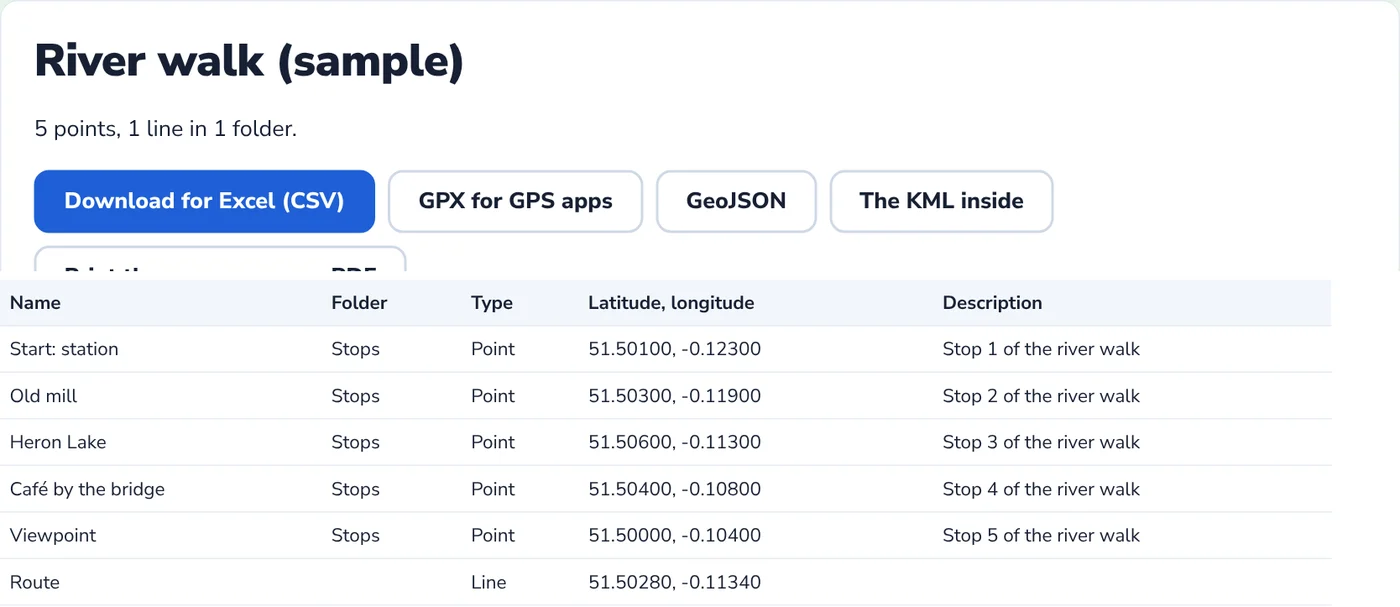
river-walk.kmzplaces.csv / .gpx
Every place in a table
- Name, folder and type
- Latitude and longitude
- Descriptions from the file
A sample map file we made ourselves, with made-up names and data, opened in this tool and shown as it came out. Your own files stay on your device.
How to convert KML to GPX in three steps
-
Step 1
Drop the file
A .kml or .kmz from Google Earth, My Maps, a GPS app or an e-mail.
-
Step 2
See every place
Pins, routes and areas on a map, with their names, folders and notes in a table.
-
Step 3
Take it with you
CSV for Excel, GPX for GPS apps, GeoJSON for GIS, or print the map as a PDF.
Why convert KML to GPX
KML and KMZ are the formats of Google Earth and Google My Maps, where most people draw a route, collect places for a trip or receive a map from someone else. GPS devices and outdoor apps speak GPX instead: Garmin watches and handhelds, Komoot, Gaia GPS, OsmAnd, Organic Maps, Locus and many bike computers import GPX, and only some of them read KML. Converting KML to GPX is the step between planning a route on a big screen and following it on your wrist, handlebar or phone.
How to convert KML to GPX here
Drop the .kml or .kmz file above. Your browser opens it and shows every pin, line and area on a map, with their names in a table, so you can check you have the right file. Then click Download GPX. The conversion runs on your own device: the file is never uploaded, there is no account and no limit. A KMZ is unpacked in the browser first, so you do not need to unzip it.
What goes into the GPX file
Each pin (point) becomes a waypoint with its name, description and altitude if the file has one. Each line or path becomes a track with all its points, in the same order. Tracks recorded with time stamps, such as gx:Track from Google Earth or a GPS logger, keep their times, so speed and duration show up again in the app. Areas (polygons) are written as a track along their outline, which most apps can show but not fill. Folders are not part of GPX, so everything comes into one file; colours, icons, pictures and HTML formatting of descriptions are left out, because GPX has no place for them.
From Google My Maps or Google Earth to GPX
In Google My Maps, open the menu next to the map name and choose Export to KML/KMZ; pick one layer or the whole map, then drop the downloaded file here. In Google Earth Pro, right-click a place, a path or a folder and choose Save Place As, which gives a KMZ. A route you plan in Google Maps directions cannot be exported directly; recreate it in My Maps (Add directions) and export from there. Then import the GPX into Garmin Connect (Courses), Komoot, Gaia GPS or OsmAnd and send it to your device.
Check the result, keep it private
If the file only links to another file online (a network link), it holds no places itself and the page says so. Image overlays and 3D models do not belong in GPX and are skipped. Only the map background is loaded from OpenStreetMap, which sees the area on your screen, not your file. Need the places as a list for Excel instead? See KMZ to CSV; to just look at a file, the KML viewer.
Also on FileOpens
Questions about KML and KMZ files
How do I convert KML to GPX?
Drop the .kml or .kmz file on this page, check the places on the map, and click Download GPX. Points become waypoints and lines become tracks.
Can I convert KMZ to GPX without unzipping it?
Yes. The KMZ is unpacked in your browser and the KML inside is converted directly.
How do I put the GPX on my Garmin?
In Garmin Connect, import it as a course and send it to your device, or copy the .gpx into the Garmin/NewFiles folder when the device is connected by USB. Older handhelds open it in Garmin BaseCamp.
Why are my colours and folders gone?
GPX has no colours, icons or folders: it keeps the names, descriptions, positions, altitudes and times. The map on this page shows the original with its folders before you convert.
Can I convert GPX back to KML?
Not on this page. Google Earth Pro and Google My Maps import GPX files directly.
Is my file uploaded?
No. The conversion runs in your browser on your own device, free and without an account.
Google Earth and Google My Maps are trademarks of Google LLC. FileOpens is not affiliated with Google.