Free No account · the file is deleted after 24 hours
SVG to DXF converter
Convert SVG to DXF here: every path, rectangle, polygon and curve of your SVG becomes a DXF polyline, circles stay true circles, sizes are kept in millimetres or inches, and each colour gets its own layer, ready for laser cutters, CNC, Silhouette Studio and CAD programs.
or drop it here. SVG or SVGZ, up to 200 MB. Free, no account.
Convert your SVG
The file is sent over an encrypted connection to our server in Canada (OVHcloud, Beauharnois, Quebec), processed by a program there, and deleted with the result 24 hours later. Nobody looks at it.
An SVG coaster converted to DXF by FileOpens
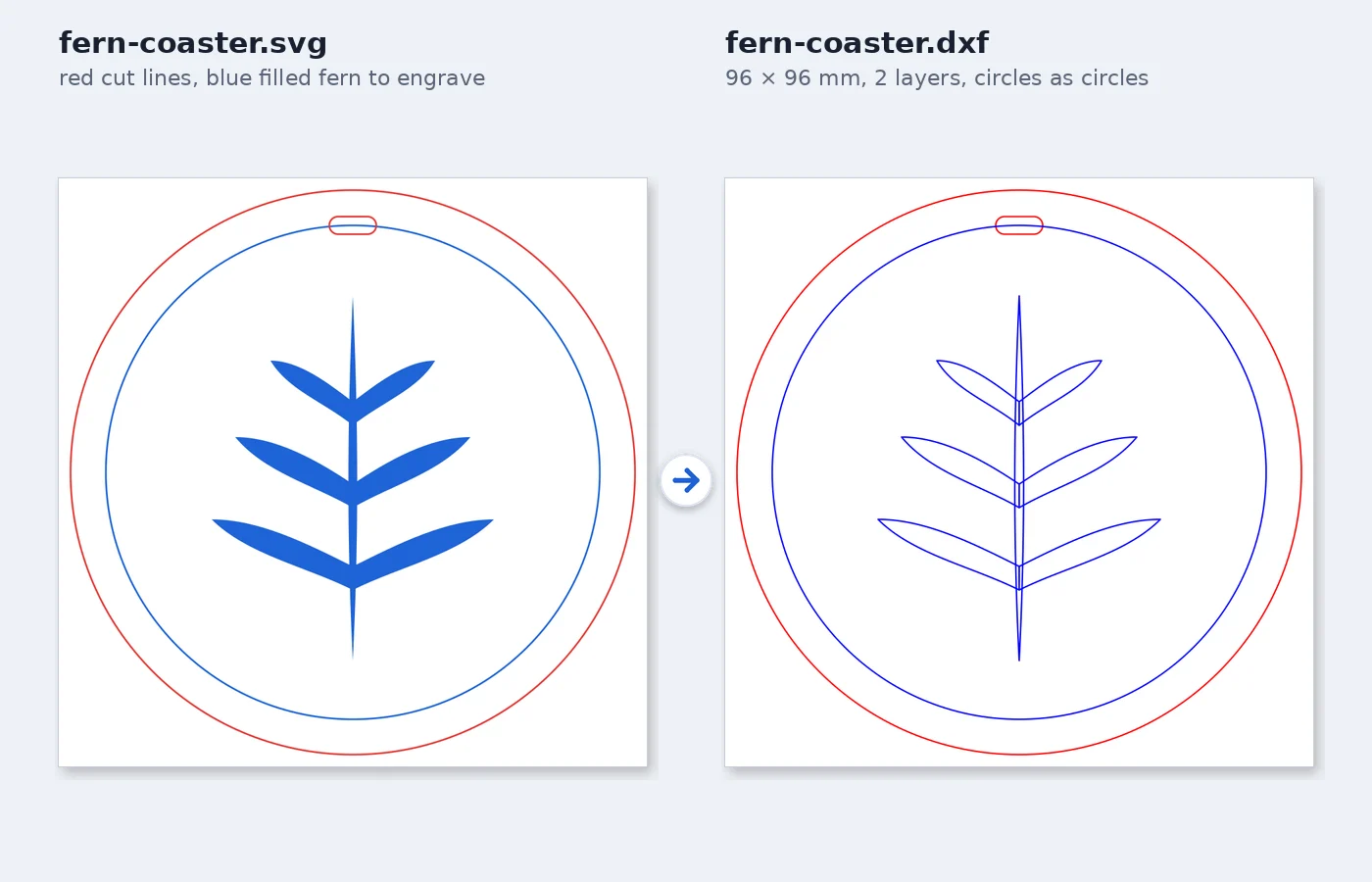
fern-coaster.svgfern-coaster.dxf
A laser coaster with cut and engrave colours
- 96 × 96 mm, as in the SVG
- Red and blue on their own layers
- Circles kept as true circles
A sample coaster design we made ourselves, with made-up names, converted by this tool and shown as it came out. Files you upload are deleted after 24 hours and never shown to anyone.
How to convert SVG to DXF
-
Step 1
Choose the SVG
From Inkscape, Illustrator, Figma, Canva or a design shop.
-
Step 2
Check units and size
Keep the SVG sizes, or set a width.
-
Step 3
Download the DXF
With a preview of the lines.
SVG to DXF for Silhouette Studio
The free Basic Edition of Silhouette Studio cannot open SVG files; that needs the paid Designer Edition. It does open DXF, so converting an SVG design to DXF is the usual way to cut it on a Silhouette Cameo or Portrait without upgrading. Cricut Design Space on Windows and Mac accepts both formats, though not DXF in the phone apps. Open the DXF, check the size, and cut.
SVG to DXF for lasers and CNC
Laser and CNC software reads DXF most reliably, and many shops that cut parts for you, from laser services to waterjet and sheet metal shops, ask for DXF. Lines are placed at their real size: SVG sizes in mm, cm or inches are read as they are, and pixels count as 96 to the inch, the SVG standard. Set a width instead if you want the part a different size. The bottom-left corner of the design is at 0,0.
How the shapes are converted
Straight lines stay straight lines. Curves, arcs and ellipses are split into short straight pieces no longer than about a quarter of a millimetre, which every cutter follows smoothly. Circles are written as real DXF circles, handy for holes and drilling. Shapes that are only filled, with no outline, give their outline, since that is where a machine cuts. Each colour in the SVG goes to its own layer, named after the colour, so cut, score and engrave lines stay apart.
What is left out
DXF holds lines, so embedded photos are left out, and text that is still live text in the SVG is left out too; convert text to paths first ("Object to Path" in Inkscape, "Create Outlines" in Illustrator, "Outline stroke" in Figma). The result page says if anything was skipped. Line thickness, gradients and clipping masks are not carried over: a clipped shape comes out whole. Before converting, ungroup clipped objects you want cut, convert strokes that should be cut as a shape into paths ("Stroke to Path" in Inkscape, "Outline Stroke" in Illustrator), and delete guides or hidden layers you do not want. Give cut lines and engrave lines different colours, and the DXF will keep them on separate layers that your laser software can assign different power and speed to.
DXF versions
"AutoCAD 2000" writes lightweight polylines with true colours and is read by LightBurn, RDWorks, LaserGRBL, Fusion 360, VCarve, AutoCAD, LibreCAD and Silhouette Studio. "R12" writes the oldest common form of DXF for old controllers and software that reject newer files. To go back, DXF to SVG converts a drawing to SVG; for a printable copy of an SVG, use SVG to PDF.
Privacy and limits
The file goes to our server over an encrypted connection, is processed automatically and is deleted with the result 24 hours later. Nobody looks at it. Up to 200 MB.
More free image converters
- Image converter
- Compress image
- JPG to PNG
- PNG to JPG
- JPEG to JPG
- Compress JPEG
- Compress PNG
- GIF to PNG
- PNG to GIF
- GIF to JPG
- JPG to GIF
- GIF maker
- Remove background
- Background eraser
- Make background transparent
- White background for photo
- Remove white background
- Resize image
- Crop image
- Rotate image
- Flip image
- Blur image
- Pixelate image
- Black and white photo
- Invert image colors
- Merge images
- Watermark image
- Add text to image
- Remove EXIF data
- EXIF viewer
- Change DPI
- Image to Base64
- Base64 to image
- MP4 to GIF
- Video to GIF
- GIF to MP4
- GIF compressor
- PNG to SVG
- JPG to SVG
- Image to SVG
- SVG to PDF
- Image to text
- PNG to DXF
- DXF to SVG
- HEIC to JPG
- HEIC to PNG
- HEIC to PDF
- HEIC viewer
- WebP to PNG
- WebP to JPG
- WebP to GIF
- WebP to PDF
- PNG to WebP
- JPG to WebP
- AVIF to PNG
- AVIF to JPG
- JFIF to JPG
- JFIF to PNG
- SVG to PNG
- SVG to JPG
- PNG to ICO
- ICO to PNG
- BMP to JPG
- BMP to PNG
- TIFF to JPG
- TIFF to PNG
- PSD viewer
- PSD to PNG
- PSD to JPG
- PSD to PDF
- AI to SVG
- AI to PNG
- Open AI file
- EPS to PNG
- DDS to PNG
- TGA to PNG
- TGA to JPG
- RAW to JPG
- CR3 to JPG
- CR2 to JPG
- NEF to JPG
Questions about SVG to DXF
Can I use the DXF in Silhouette Studio Basic?
Yes, the Basic Edition opens DXF, though not SVG.
Are sizes kept?
Yes, in mm or inches; or set your own width.
Why is my text missing?
Live text is left out: convert it to paths in your design program first.
Are circles kept as circles?
Yes, as real DXF circles.
Are colours kept?
Each colour goes to its own layer named after it.
Is it free?
Yes, with no account and no watermark.