Open an MPP file without Microsoft Project
Got a Microsoft Project plan (.mpp) and no Project licence? See the tasks and the Gantt chart in your browser, then keep the whole plan as Excel and PDF. Nothing to install.
- See the Gantt chart free before you pay.
- Excel and PDF in one go.
- Refund in one click if it is not usable.
- Deleted after 24 hours. Nobody looks at it.
A Microsoft Project plan converted by FileOpens
cafe-renovation.mpxplan.xlsx + Gantt PDF
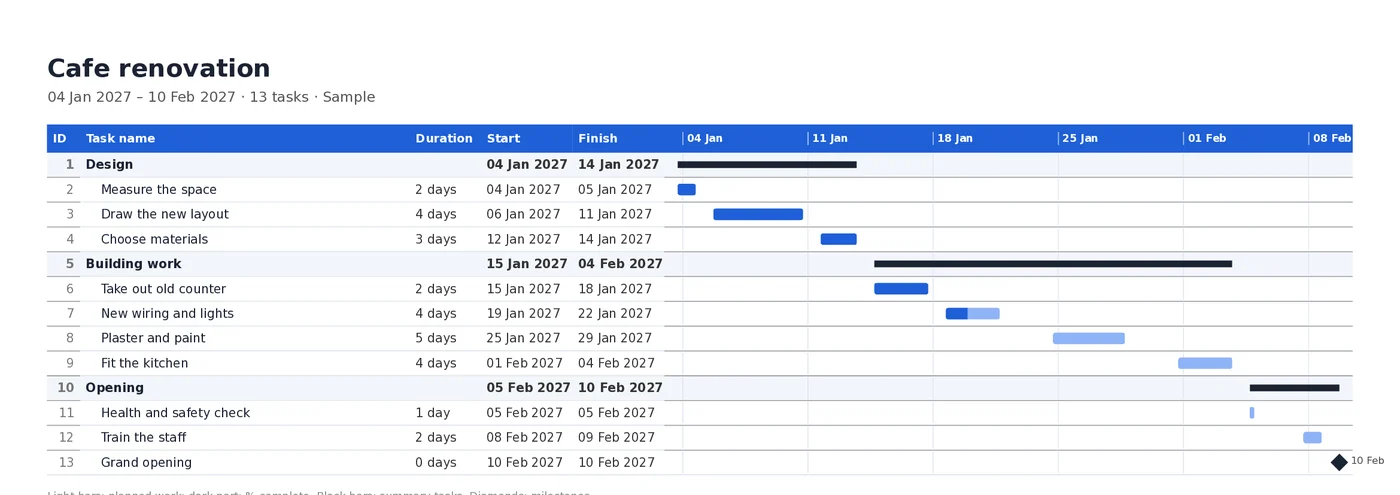
Gantt chart of a renovation plan
- Tasks with their outline numbers
- Start, finish and duration
- Bars, progress and the milestone
- Every task also in Excel
Sample project plan we made ourselves, with made-up names and data, converted here and shown as they came out. Your own files are never shown to anyone.
Project plans people open with us
- Construction schedules
- Software release plans
- Engineering projects
- Event plans
- Tender and bid schedules
- Office moves
- Old project archives
How to open a Microsoft Project file
-
STEP 1
Upload your .mpp file
One plan or many. No Project licence needed.
-
STEP 2
See the Gantt chart first
Tasks, dates and bars, ready in seconds.
-
STEP 3
Pay once, download
Excel with every task and a PDF Gantt chart. Refund in one click.
What you get back
- Every task in ExcelID, WBS, indented names, durations, dates, % complete, predecessors, resources, notes.
- A Gantt chart PDFTask table and bars on landscape pages, the date scale on every page.
- Resources and detailsPeople, equipment and materials, plus the project title, manager and dates.
- Project 98 to today.mpp from every version, .mpt templates and old .mpx files.
- See it firstEvery page in the preview before you pay, so there are no surprises.
Price
See the Gantt chart free. Then $4.99 per plan, or $14.99 for up to 10 files and $39 for up to 100. One payment, no subscription.
How to open an MPP file here
Choose the .mpp file above. In a few seconds you see the first pages of the plan: every task with its duration, start and finish, and the bars of the Gantt chart. If it is what you need, pay once and download the Excel workbook and the full PDF.
Why MPP files are hard to open
Microsoft Project is not part of the usual Microsoft 365 plans: it is a separate, fairly expensive licence, and there has never been a Project for the Mac. Microsoft also retired Project Online on 30 September 2026, so teams that used it in the browser lost that way of looking at plans. Contractors, clients and new team members often receive an .mpp file and have nothing to open it with.
Is there a free Microsoft Project viewer?
Microsoft does not make one. Third-party viewers exist for Windows, usually as a paid install or a trial. Here you only need a browser: Windows, Mac, Chromebook or a tablet. More: MPP to Excel.
Reading the Gantt chart in the PDF
Each task is a row with its ID, name, duration, start and finish; the bars on the right show when it happens. Black bars are summary tasks with their sub-tasks indented below, diamonds are milestones, and the darker part of a bar shows how much of the task is complete. The header with the dates repeats on every page, so long plans stay readable when printed.
Construction schedules, software plans, events
Builders, engineers and project managers send schedules as .mpp. Building schedules with hundreds of tasks, software release plans, event and moving plans all come through, with resources such as subcontractors or team members listed for every task. Primavera P6 schedules come as .xer: see open an XER file.
Microsoft Project on a Mac
Microsoft has never made Project for the Mac, and Excel and Numbers cannot read .mpp files. Mac users who receive a plan usually ask the sender for a PDF, which loses the task list. Here a Mac needs only Safari or Chrome: upload the .mpp, look through the Gantt chart in the preview, and download an Excel workbook that opens in Numbers and a PDF that opens in Preview.
More Project tools
Also on FileOpens
Questions about Microsoft Project files
Can I edit the plan after converting it?
In Excel you can sort, filter, add notes and change dates, but Excel does not recalculate a schedule the way Project does. To keep planning, import the Excel file into another planning tool, or use the PDF as the reference for the current plan.
Which Project files can you open?
Plans from Microsoft Project 98 to Project 2021 and 2024 and the Project desktop app in Microsoft 365: .mpp files, .mpt templates and older .mpx files.
What do I get back?
An Excel workbook with every task (ID, WBS, name indented by level, duration, start, finish, % complete, predecessors, resources and notes), a sheet of resources and one with the project details, plus a PDF of the task list with a Gantt chart, ready to print or send.
What is not included?
Project's own views, filters, custom reports, baselines and cost tables stay in Project. The schedule itself, the dates Project calculated, comes through as it was last saved.
How much does it cost?
You see the first pages of the Gantt chart free. Then $4.99 per plan, or $14.99 for up to 10 files and $39 for up to 100, mixed with any other format we convert. Not usable? Refund within 24 hours.
What happens to my file?
It is used only to make your Excel and PDF files and is deleted automatically 24 hours after upload. Nobody looks at it.