SMS backup to PDF: read your text messages
Made a backup with the Android app SMS Backup & Restore and want to read it, print it or hand it over? Upload the .xml file: you get an SMS backup PDF with every conversation, photo, date and name, plus an Excel list.
- See the first pages free before you pay.
- Photos stay in the chat, where they were sent.
- Refund in one click if it is not usable.
- Deleted after 24 hours. Nobody looks at it.
Text messages converted by FileOpens
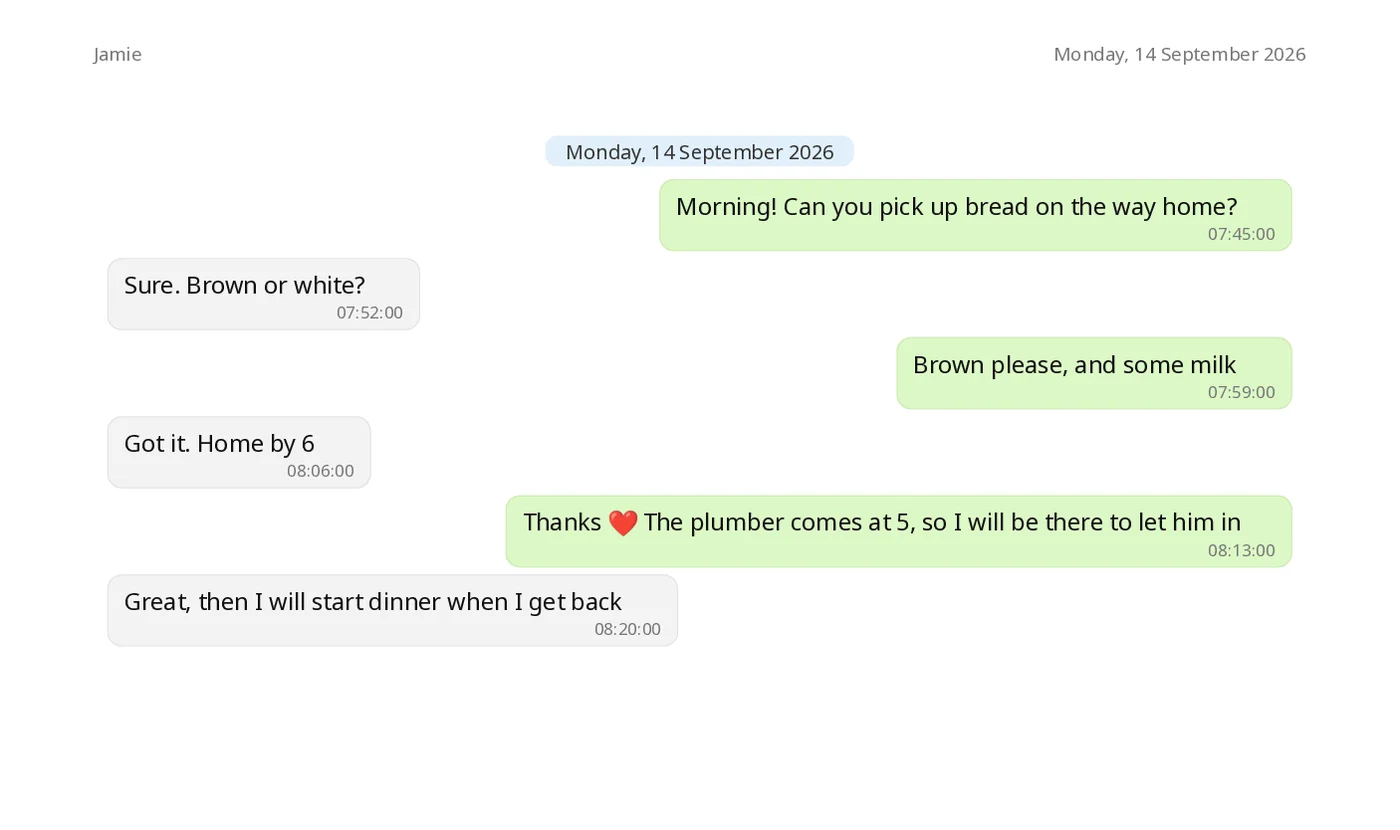
sms-20260914.xmlmessages.pdf + .xlsx
SMS Backup & Restore file
- Sent on the right, received on the left
- Contact name and date
- Emoji kept
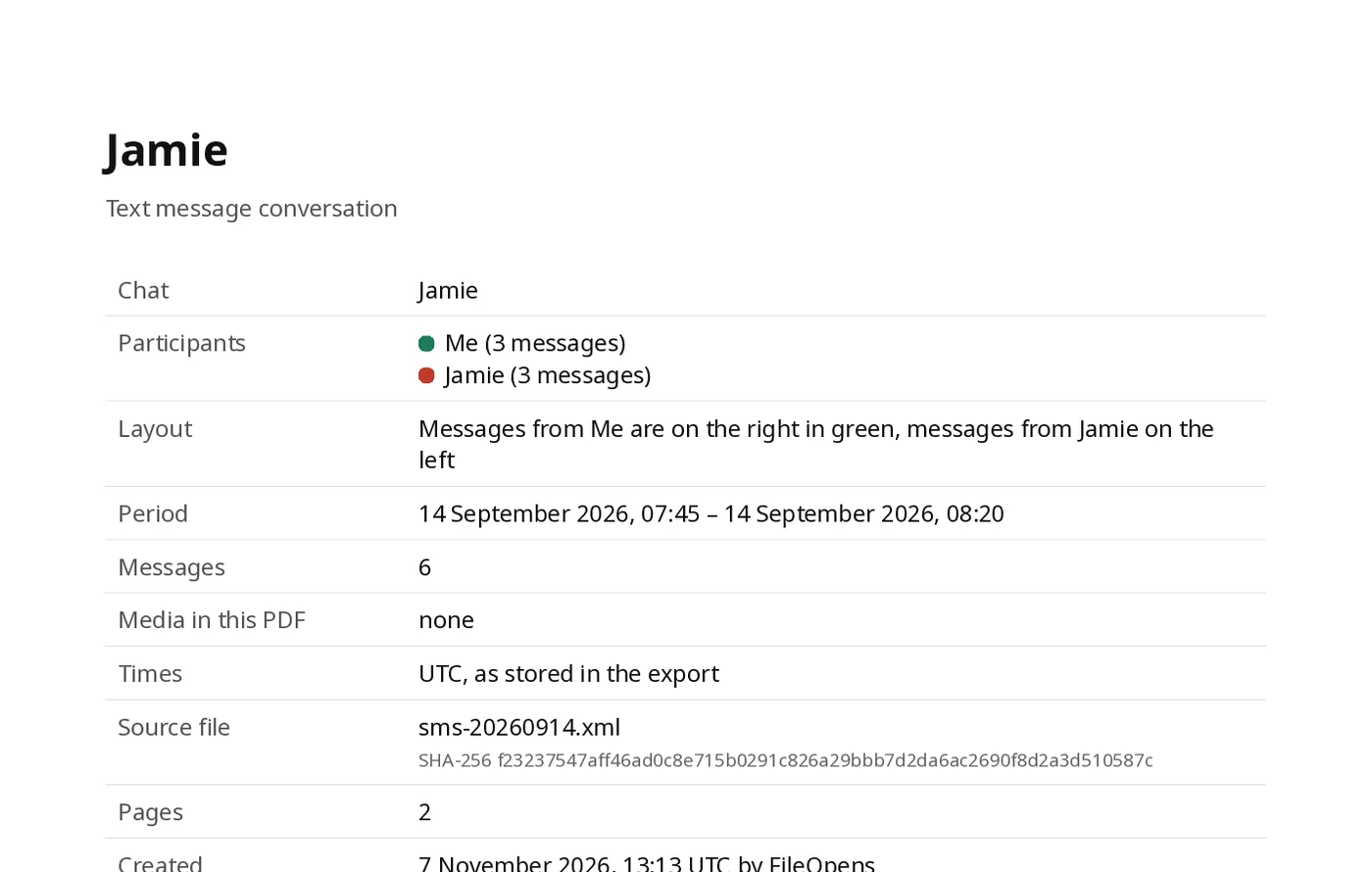
sms-20260914.xmlmessages.pdf + .xlsx
Cover page
- Messages per person
- Period of the backup
Sample backup we made ourselves, with made-up names and data, converted here and shown as they came out. Your own files are never shown to anyone.
Chats people save as PDF
- Evidence for court or a lawyer
- Divorce and custody
- Disputes with a landlord or employer
- Business and client agreements
- Family groups and memories
- Chats with someone who has died
- Printing to keep
How to turn text messages into a PDF
-
STEP 1
Back up with SMS Backup & Restore
The free Android app: Back Up > Messages, with MMS media.
-
STEP 2
Upload the .xml and look
Every conversation is found; the cover and first pages appear free.
-
STEP 3
Pay once, download
One PDF with all conversations and photos, plus Excel. Refund in one click.
What you get back
- Every conversation as a PDFBubbles with names or numbers, dates and times, a contents page and page numbers.
- Photos in placePhotos and stickers where they were sent, videos with a still frame, voice notes with their length.
- A cover pageParticipants, number of messages, the period, and the SHA-256 fingerprint of your export file.
- Every message in ExcelDate, time, sender and text in columns, to search, filter or quote.
- Every conversation at onceOne backup holds all your texts; each conversation starts on its own page.
Price
See the cover and the first pages free. Then $4.99 per backup file, with every conversation in it: the PDF and the Excel file. One payment, no subscription, refund within 24 hours if it is not usable.
What is in an SMS Backup & Restore file?
SMS Backup & Restore by SyncTech is the best-known Android app for saving text messages. It writes one XML file, usually named sms-20261105123456.xml, with every text (SMS) and picture message (MMS) on the phone: the number, the date in milliseconds, whether it was sent or received, the text, and, if "include MMS media" was on, the photos and videos themselves, packed into the file as base64 text. If contact names were turned on, each message also carries the name from your contacts. Call logs go into a separate calls-….xml file. The XML is meant for restoring to a phone, not for reading: opened in a browser or Notepad it is thousands of lines of attributes, and the pictures are walls of letters.
How to make the backup
Install SMS Backup & Restore from Google Play (the free version is enough), open it and tap Set up a backup. Choose Messages and make sure MMS media are included if you want the photos. Pick where to save it: on the phone, Google Drive, Dropbox or OneDrive, or by e-mail. When it finishes, get the .xml file onto the computer or open it from the phone's Files app, and upload it above. If you use the Pro version with encryption turned on, back up once without encryption for this, because a password-protected file cannot be opened.
SMS backup to PDF: what you get
Each conversation starts on a new page, with its name, the people in it, the period and the number of messages. Your messages are on the right in green, the other side's on the left, with the time under each one and a line for every new day. Group texts show who wrote each message. MMS photos appear where they were sent, videos with a still frame, voice clips with their length. The cover page lists all conversations with the page where each begins, the period, the number of messages, and the SHA-256 fingerprint of your backup file, so anyone can check that the PDF was made from that exact file. The Excel workbook has one sheet per conversation with the date, time, sender and text of every message.
Dates, times and names
The backup stores each time twice: in UTC, and, when "readable date" was on, as the phone showed it. We use the phone's own time when it is there, so the times match what you saw on the screen, including daylight saving changes; otherwise the cover says the times are in UTC. Names come from the contact names in the backup. Numbers that were not in your contacts stay as numbers, and the same person with and without +1 in front is recognised as one conversation.
Why not just open it on the phone?
SyncTech has its own viewers, and on the phone the messages app shows the texts one screen at a time. That is fine for finding one message. It is not enough when you need the whole history on paper or as one file: for a lawyer, an insurer, a landlord dispute, a family archive, or because the phone is being replaced. With Samsung Messages discontinued in the US in July 2026, many people are also moving years of texts between apps and want a copy they can read without any app. More on that on how to print text messages; for WhatsApp chats see WhatsApp to PDF.
More chat tools
Also on FileOpens
Questions about SMS backups
Can you open an SMS Backup & Restore .xml file?
Yes, that is exactly what this page does: upload the sms-….xml file (or a .zip with it) and you see every conversation as a PDF, with the first pages free.
Are MMS photos included?
Yes, if the backup was made with MMS media included. If it was made without, the PDF shows the file name of each picture where it was sent and says it was not in the backup.
Can I upload a calls backup?
No, a calls-….xml file only lists calls. Upload the messages backup (sms-….xml).
How much does it cost?
The cover and the first pages are free to see. Then $4.99 per backup file, with every conversation in it, for the PDF and the Excel file. Not usable? Refund within 24 hours.
What happens to my messages?
They are used only to make your PDF and Excel file and are deleted automatically 24 hours after upload, together with the photos. Nobody reads them, and they are never shared.