Free No account · the file is deleted after 24 hours
PDF to Excel converter
Convert PDF to Excel here: the tables in your PDF come out as an .xlsx, one sheet for each page with tables, and amounts like 1,250.00 or €540 become numbers you can add up. Free, no account.
or drop it here. Up to 200 MB, 500 pages. Free, no account.
Convert to Excel
The file is sent over an encrypted connection to our server in Canada (OVHcloud, Beauharnois, Quebec), processed by a program there, and deleted with the result 24 hours later. Nobody looks at it.
A PDF table converted to Excel by FileOpens
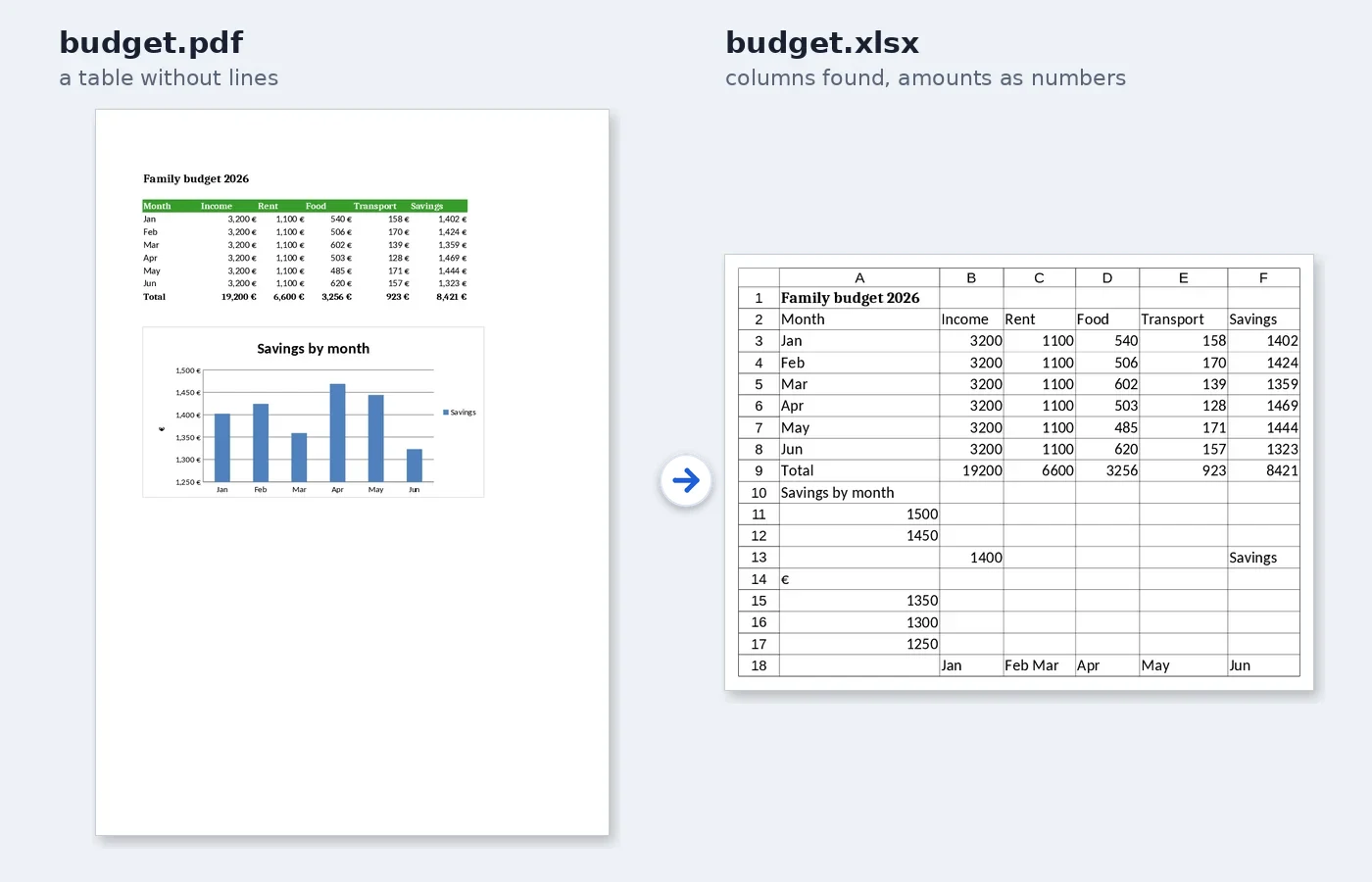
budget.pdfbudget.xlsx
Family budget without table lines
- Six columns found from how the words line up
- Amounts stored as numbers, ready to sum
- Chart labels come through as text below the table
Sample budget we made ourselves, with made-up names and data, converted here and shown as they came out. Your own files are never shown to anyone.
How to convert a PDF table to Excel
-
Step 1
Choose the PDF
A report, a price list, a statement, a timetable: any PDF with tables in real text.
-
Step 2
Tables are found
Ruled tables by their lines, others by how the words line up in columns.
-
Step 3
Download the .xlsx
Open it in Excel, Google Sheets, Numbers or LibreOffice.
How PDF to Excel finds the tables
A PDF does not know it has a table; it only has words at positions and, sometimes, lines drawn between them. The converter, built on the pdfplumber library, first looks for ruled tables: where lines cross they form cells, and every cell becomes an Excel cell. Many reports, though, have no lines at all, just columns of figures aligned with spaces. For those it looks at where the words sit: words on one baseline form a row, and words whose left or right edges line up from row to row form a column, so right-aligned amounts land in one column. Each page with a table becomes its own sheet named "Page 3", say, with the first row in bold.
Numbers that are numbers
Copying from a PDF into Excel usually gives text that looks like numbers but cannot be added up. Here cells like 1,250, 1,250.50, -12, £390 or 540 € are stored as real numbers, so SUM, sorting and charts work straight away. Codes with leading zeros, such as 00123 or a phone number, stay text so the zeros are not lost. Dates are kept as text in the form the PDF shows them, because "03/04" means different days in different countries; Excel's Data > Text to Columns turns them into dates in your format.
What to check in the result
A cell with text on two lines in the PDF (a long product name, say) can come out as two rows, the second with only that text; delete or join it. Merged header cells are put in their first column. If a page has no table, its text goes to a sheet called "Text", one line per row, so nothing is lost. Statements and invoices with a logo, an address block and then a table come out with the address in the first rows of the sheet and the table below it. For documents you will edit as text rather than calculate with, PDF to Word keeps the layout better.
Scanned tables
A scanned page is a picture: there are no words in it to put into cells. You can tell because you cannot select text in your PDF reader. Make it searchable first with OCR PDF, then convert that PDF here. The result depends on how clean the scan is: a straight, sharp scan of a printed table converts well, a photo taken at an angle less so. When a PDF has almost no text, the result page warns you.
Privacy and limits
Financial documents are private. The PDF goes to our server over an encrypted connection, is processed automatically, and is deleted with the Excel file 24 hours later; nobody looks at it. PDFs up to 200 MB and 500 pages are accepted; for longer ones, split or extract the pages with the tables first. Going the other way, a spreadsheet into a PDF, is Excel to PDF.
More free PDF tools and converters
- Merge PDF
- Split PDF
- Compress PDF
- Compress PDF to 100 KB
- Delete PDF pages
- Rotate PDF
- Extract PDF pages
- Reorder PDF pages
- Crop PDF
- Add page numbers
- Watermark PDF
- Sign PDF
- Protect PDF
- Unlock PDF
- OCR PDF
- Flatten PDF
- PDF to grayscale
- Invert PDF colors
- Remove PDF metadata
- PDF to Word
- Word to PDF
- Excel to PDF
- PDF to PowerPoint
- PowerPoint to PDF
- JPG to PDF
- PNG to PDF
- Image to PDF
- PDF to JPG
- PDF to PNG
- PDF to text
- HTML to PDF
- PDF to EPUB
- PDF to PDF/A
- PDF to TIFF
- PDF to SVG
Questions about converting PDF to Excel
Does it work on tables without lines?
Yes. Columns are found from how the words line up, including right-aligned amounts.
Will the numbers be real numbers?
Yes: amounts with commas, decimals and currency signs become numbers. Codes with leading zeros stay text.
Why is a long cell split into two rows?
It was on two lines in the PDF. Join or delete the extra row in Excel.
Can it read a scanned table?
Run the scan through OCR PDF first, then convert the searchable PDF.
Is it free?
Yes, with no account and no watermark.