Free Your pictures are not uploaded
Make background transparent
Make background transparent here, in any picture: the subject of your photo, drawing or logo is cut out by an AI model in your browser and saved as a PNG with a transparent background, ready to place on slides, designs, stickers and websites. It is free, full size, and nothing is uploaded.
or drop them here. JPG, PNG, WebP, HEIC and more. Nothing is uploaded.
Your pictures
Everything happens in this browser tab: your pictures are not sent to FileOpens or anywhere else, and nothing is kept when you close the page.
A transparent PNG made by FileOpens
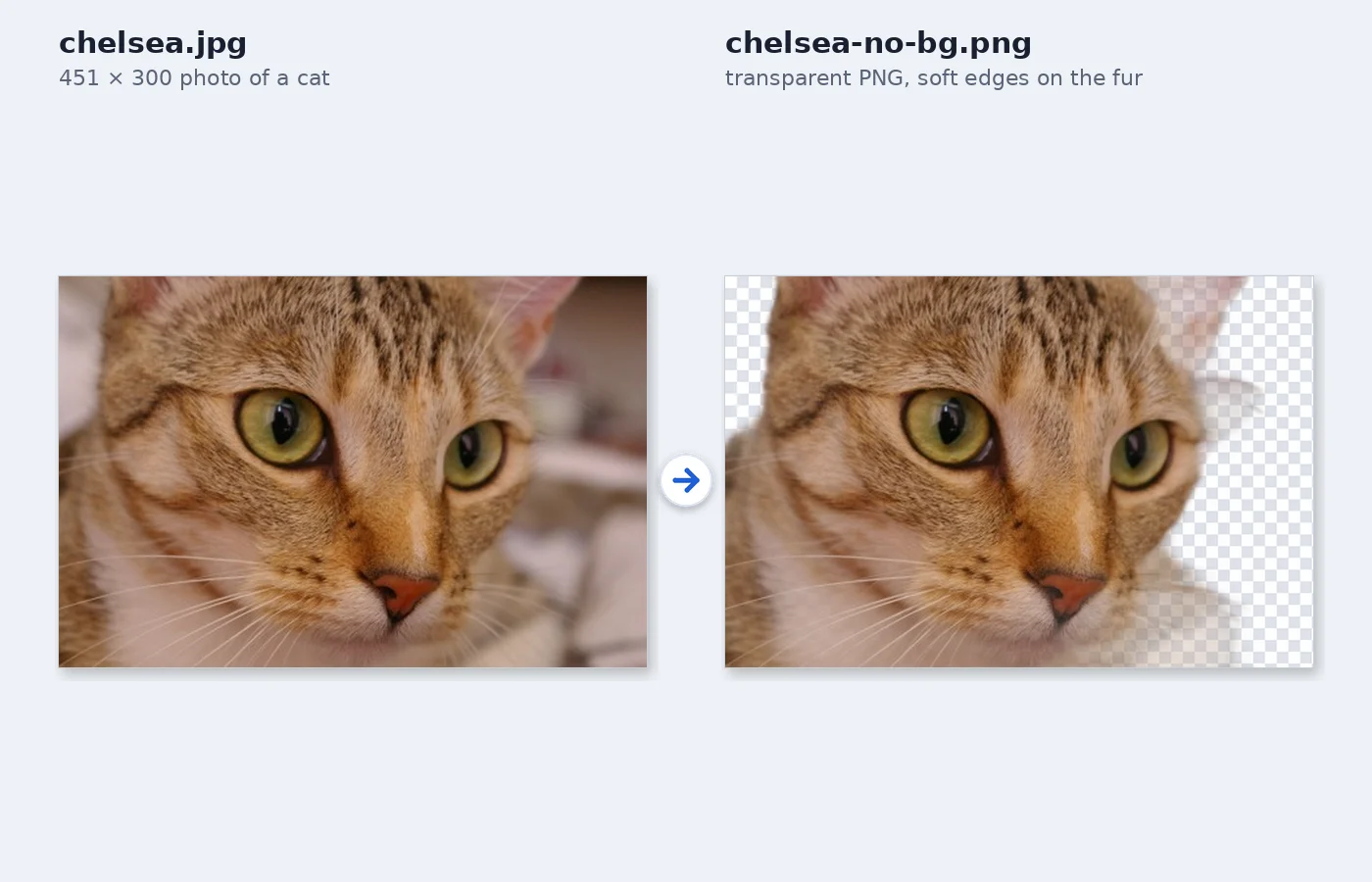
chelsea.jpgchelsea-no-bg.png
A photo turned into a transparent PNG
- Alpha channel with soft edges
- Ready for slides and designs
Sample photos with no copyright restrictions (CC0): the coffee cup by Rachel Michetti and Chelsea the cat by Stefan van der Walt, from the scikit-image test images. Processed by this tool in the browser; the photos shown are the real results.
How to make a background transparent
-
Step 1
Choose the picture
A photo, a scan, a drawing or a logo.
-
Step 2
Check the preview
The checkerboard shows the transparent parts.
-
Step 3
Save the PNG
Full size, with an alpha channel.
What "transparent" means in a picture
A JPG has no transparency: every pixel has a colour, so a photo always carries its background with it. A PNG can store a fourth value for each pixel, the alpha channel, that says how see-through it is. When the background pixels are fully transparent, the subject sits on whatever is behind it, a slide, a coloured web page or another photo, without a white box around it. The checkerboard pattern used in the preview, and in most editors, is how transparent areas are shown.
Transparent PNG maker for any photo
Choose a JPG, HEIC from an iPhone, WebP saved from a website, or any other picture. The AI model finds the main subject and makes everything else transparent, with soft edges where hair, fur or motion blur need them, then saves a PNG at the full size of the original. This is the same model as on remove background; the default here is a transparent result. For a logo, a stamp or a signature on plain white paper, there is a simpler route that keeps every edge exact: remove white background makes only the white transparent, with a tolerance you set, and keeps white areas inside the design if you like. Use this page for photos and pictures with a background that is not a single plain colour.
Why make background transparent
Common uses are product cut-outs for presentations and marketplaces, profile pictures on coloured backgrounds, stickers for WhatsApp and Telegram, print-on-demand designs for T-shirts and mugs, thumbnails for YouTube, collages and greeting cards. Most design tools, including Canva, PowerPoint, Google Slides, Keynote, Photoshop and GIMP, keep the transparency of a PNG when you place it.
Check the edges, keep the transparency
Look at the preview on the checkerboard before saving. Thin parts such as bicycle spokes, plant stems, jewellery chains and the gap between an arm and a body are where any background remover is most likely to leave a bit of background or cut a bit of subject. If the subject has very low contrast with its background, a photo taken against a plain wall gives a much cleaner transparent PNG. For a cut-out on a colour instead, choose the colour option, or see the page on white backgrounds. Transparency survives only in formats that support it: PNG, WebP, GIF (on or off only) and TIFF. If you convert the result to JPG, or paste it into a program that flattens pictures, the empty areas turn white or black. PNG files with transparency can be large; the PNG compressor makes them smaller while keeping the alpha channel.
Make background transparent on a phone
On an iPhone or Android phone, open this page, tap "Choose pictures" and pick a photo from the gallery. The model is downloaded once over your connection, so Wi-Fi is best for the first time; after that it works even with a weak signal. The PNG is saved to your downloads or files, from where you can share it to WhatsApp, Telegram or Instagram, or open it in a design app. iPhone users can also save it to Photos, where the transparency is kept.
Private
Your photos never leave your device. The page downloads the AI model once (44 MB) and your browser keeps it; the subject is found and cut out by your own computer or phone. Nothing is uploaded, and nothing is kept when you close the page.
More free image converters
- Image converter
- Compress image
- JPG to PNG
- PNG to JPG
- JPEG to JPG
- Compress JPEG
- Compress PNG
- GIF to PNG
- PNG to GIF
- GIF to JPG
- JPG to GIF
- GIF maker
- Remove background
- Background eraser
- White background for photo
- Remove white background
- Resize image
- Crop image
- Rotate image
- Flip image
- Blur image
- Pixelate image
- Black and white photo
- Invert image colors
- Merge images
- Watermark image
- Add text to image
- Remove EXIF data
- EXIF viewer
- Change DPI
- Image to Base64
- Base64 to image
- MP4 to GIF
- Video to GIF
- GIF to MP4
- GIF compressor
- PNG to SVG
- JPG to SVG
- Image to SVG
- SVG to PDF
- Image to text
- PNG to DXF
- SVG to DXF
- DXF to SVG
- HEIC to JPG
- HEIC to PNG
- HEIC to PDF
- HEIC viewer
- WebP to PNG
- WebP to JPG
- WebP to GIF
- WebP to PDF
- PNG to WebP
- JPG to WebP
- AVIF to PNG
- AVIF to JPG
- JFIF to JPG
- JFIF to PNG
- SVG to PNG
- SVG to JPG
- PNG to ICO
- ICO to PNG
- BMP to JPG
- BMP to PNG
- TIFF to JPG
- TIFF to PNG
- PSD viewer
- PSD to PNG
- PSD to JPG
- PSD to PDF
- AI to SVG
- AI to PNG
- Open AI file
- EPS to PNG
- DDS to PNG
- TGA to PNG
- TGA to JPG
- RAW to JPG
- CR3 to JPG
- CR2 to JPG
- NEF to JPG
Questions about transparent backgrounds
Which format keeps the transparency?
PNG; the result is always a PNG with an alpha channel.
Why is my result white in another program?
That program flattens transparency; place the PNG instead of pasting a copy.
Can I make a logo transparent?
Yes; for logos on plain white, remove white background keeps exact edges.
Is the picture uploaded?
No, the AI model works in your browser.
Is the full size kept?
Yes, the PNG has the size of the original.