Open a GAN file (GanttProject) online
Got a .gan file and no GanttProject on this computer? Open the GAN file here: see the tasks and the Gantt chart in your browser for free, then keep the plan as an Excel workbook and a PDF.
- See the Gantt chart free before you pay.
- Excel and PDF in one go.
- Refund in one click if it is not usable.
- Deleted after 24 hours. Nobody looks at it.
A GanttProject file converted by FileOpens
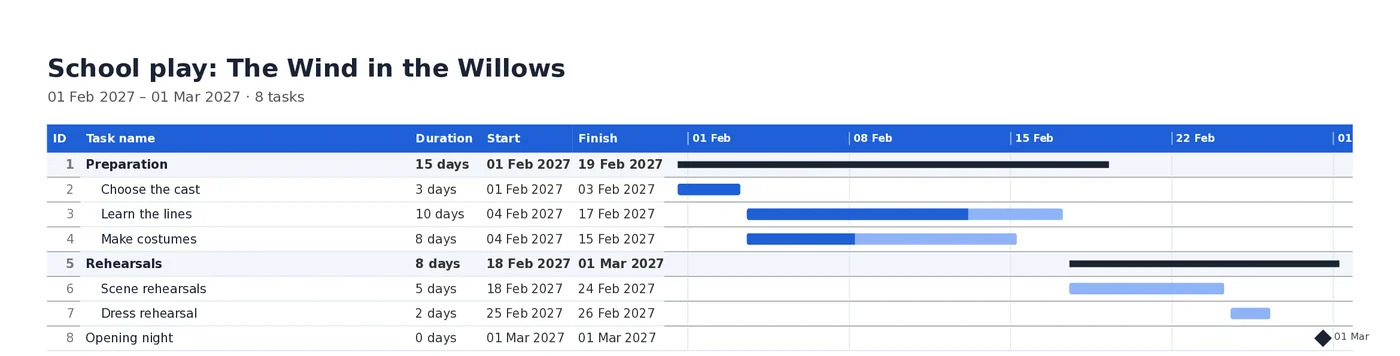
school-play.ganplan.xlsx + Gantt PDF
Plan for a school play
- Task groups and their tasks
- Per cent done shown on the bars
- The milestone on its date
Sample project plan we made ourselves, with made-up names and data, converted here and shown as they came out. Your own files are never shown to anyone.
Project plans people open with us
- Construction schedules
- Software release plans
- Engineering projects
- Event plans
- Tender and bid schedules
- Office moves
- Old project archives
How to open GanttProject files
-
STEP 1
Upload your .gan file
One plan or many. No GanttProject needed.
-
STEP 2
See the Gantt chart first
Tasks, dates and bars, ready in seconds.
-
STEP 3
Pay once, download
Excel with every task and a PDF Gantt chart. Refund in one click.
What you get back
- Every task in ExcelID, WBS, indented names, durations, dates, % complete, predecessors, resources, notes.
- A Gantt chart PDFTask table and bars on landscape pages, the date scale on every page.
- Resources and detailsPeople, equipment and materials, plus the project title, manager and dates.
- GanttProject 2 and 3Plans saved by GanttProject on Windows, Mac or Linux.
- See it firstEvery page in the preview before you pay, so there are no surprises.
Price
See the Gantt chart free. Then $4.99 per plan, or $14.99 for up to 10 files and $39 for up to 100. One payment, no subscription.
What is a GAN file?
GAN is the file format of GanttProject, a free, open-source planning program for Windows, macOS and Linux. It is popular at universities, in small teams and in open-source projects: students hand in project plans as .gan files, and many software projects keep their roadmap in one. Inside, a GAN file is XML text with every task, its start date, duration, progress and dependencies, the resources and their assignments, and the calendar.
Why a GAN file will not open
Windows and macOS do not know the .gan extension, so double-clicking it does nothing or opens a text editor full of XML tags. To see the plan properly you need GanttProject, which means a download and an installation. That is easy on your own computer, but not on a locked work laptop, a shared PC, a Chromebook, an iPad or a phone. And often the real need is different: a teacher marking a student plan, a manager who wants the tasks in Excel, or someone who has to print the chart for a meeting. If you do have GanttProject, it can export to PDF, CSV and Microsoft Project itself, and that is free. This page is for when you do not have it or do not want to install it.
How to open a GAN file on any device
Drop the .gan file above. In a few seconds the task list and the Gantt chart appear on the screen, the same on Windows, Mac, Linux, a Chromebook or a phone. Nothing is installed and no account is needed. The first pages are free to look at, so you can check that the plan opened well before deciding anything. Several files at once are fine, for example a whole class of student plans.
GAN to Excel and GAN to PDF
The Excel workbook has one row per task: ID, WBS number, the task name indented under its parent, duration, start, finish, % complete, predecessors written with their link type and lag, resources and notes. A second sheet lists the resources, a third the project details. The PDF shows the task table and the Gantt chart side by side on landscape pages, with summary tasks in black, milestones as diamonds and progress shaded, and the date scale on every page. It is a clean printout to attach to a report or an e-mail. The same output is available for Microsoft Project files and ProjectLibre .pod files.
What comes through, and what does not
Tasks, dates, durations, progress, dependencies, resources and notes come through as GanttProject saved them. We do not recalculate the schedule. Task colours, custom columns, the PERT chart, the resource load chart and baselines stay in GanttProject. Very old GAN files from the first versions of the program are rare, but if one does not open, the preview tells you straight away and you pay nothing.
Privacy
Your plan is used only to make your Excel and PDF files. It is processed on our own server, never shared, and deleted automatically 24 hours after upload. No account is needed.
More Project tools
Also on FileOpens
Questions about GAN files
How do I open a .gan file without GanttProject?
Upload it above. You see the tasks and the Gantt chart in your browser right away, and you can keep the plan as Excel and PDF. Nothing to install.
Can I open a GAN file in Excel?
Not directly: Excel shows the XML, not the plan. Our GAN to Excel conversion gives you a normal workbook with one task per row, ready to sort and filter.
Is GanttProject free?
Yes, GanttProject is free and open source. If you can install it, it opens .gan files and exports them itself. We are useful when you cannot or do not want to install it, or need Excel and a ready PDF in one go.
How much does it cost?
You see the first pages of the Gantt chart free. Then $4.99 per plan, or $14.99 for up to 10 files and $39 for up to 100. Not usable? Refund within 24 hours.
What happens to my file?
It is used only to make your Excel and PDF files and is deleted automatically 24 hours after upload. Nobody looks at it.