Free Your pictures are not uploaded
Blur image
Blur images here: soften a whole picture to use it as a background, or mark one area to hide a face, a number plate, a name or an address before you share it. The strength is adjustable with a live preview, and everything happens in your browser.
or drop them here. JPG, PNG, WebP, HEIC, AVIF, GIF, BMP, TIFF. Nothing is uploaded.
Blur your pictures
Everything happens in this browser tab: your pictures are not sent to FileOpens or anywhere else, and nothing is kept when you close the page.
A number plate blurred by FileOpens
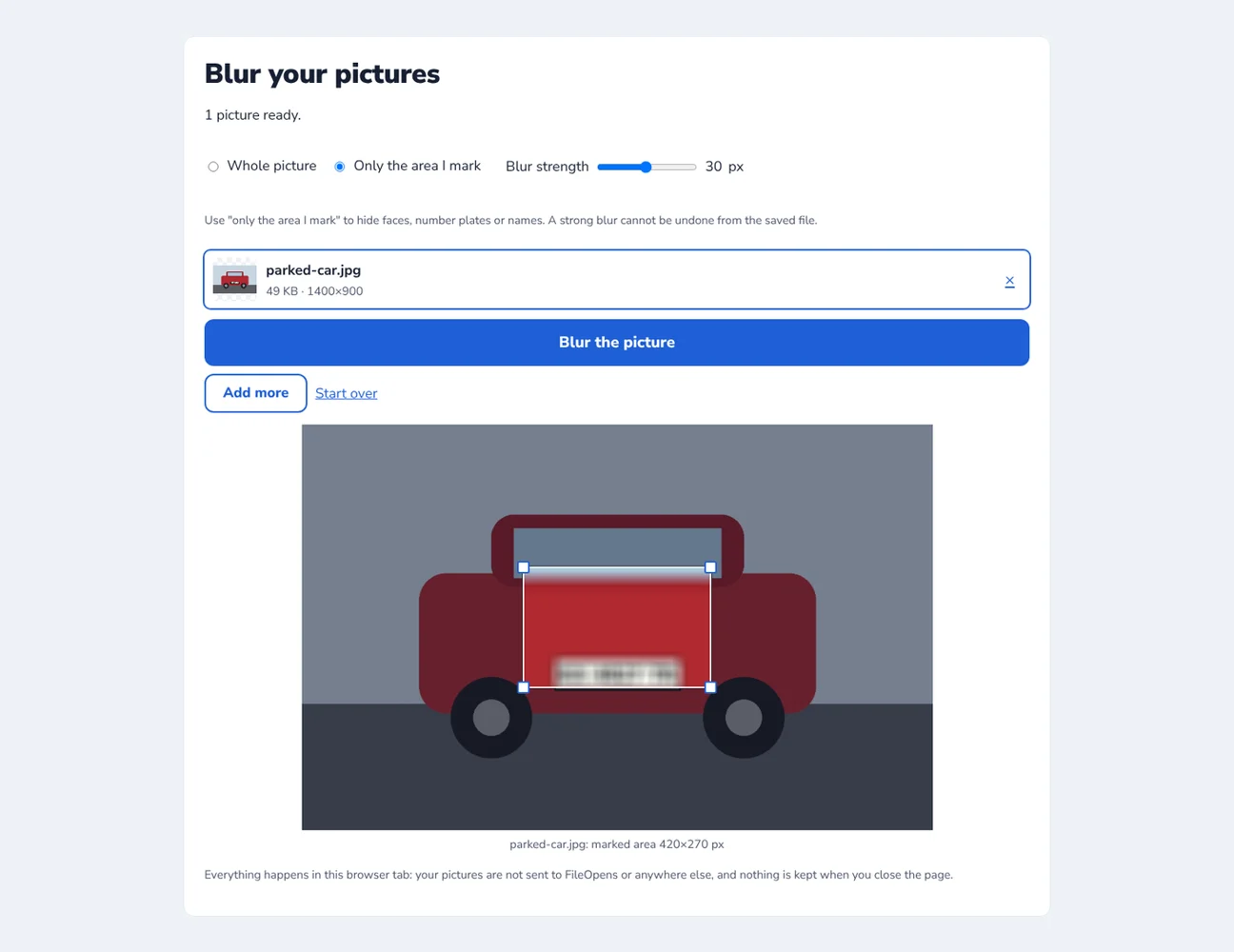
parked-car.jpgthe marked area
Marking the plate, with a live preview
- Only the marked area changes
- Strength 30
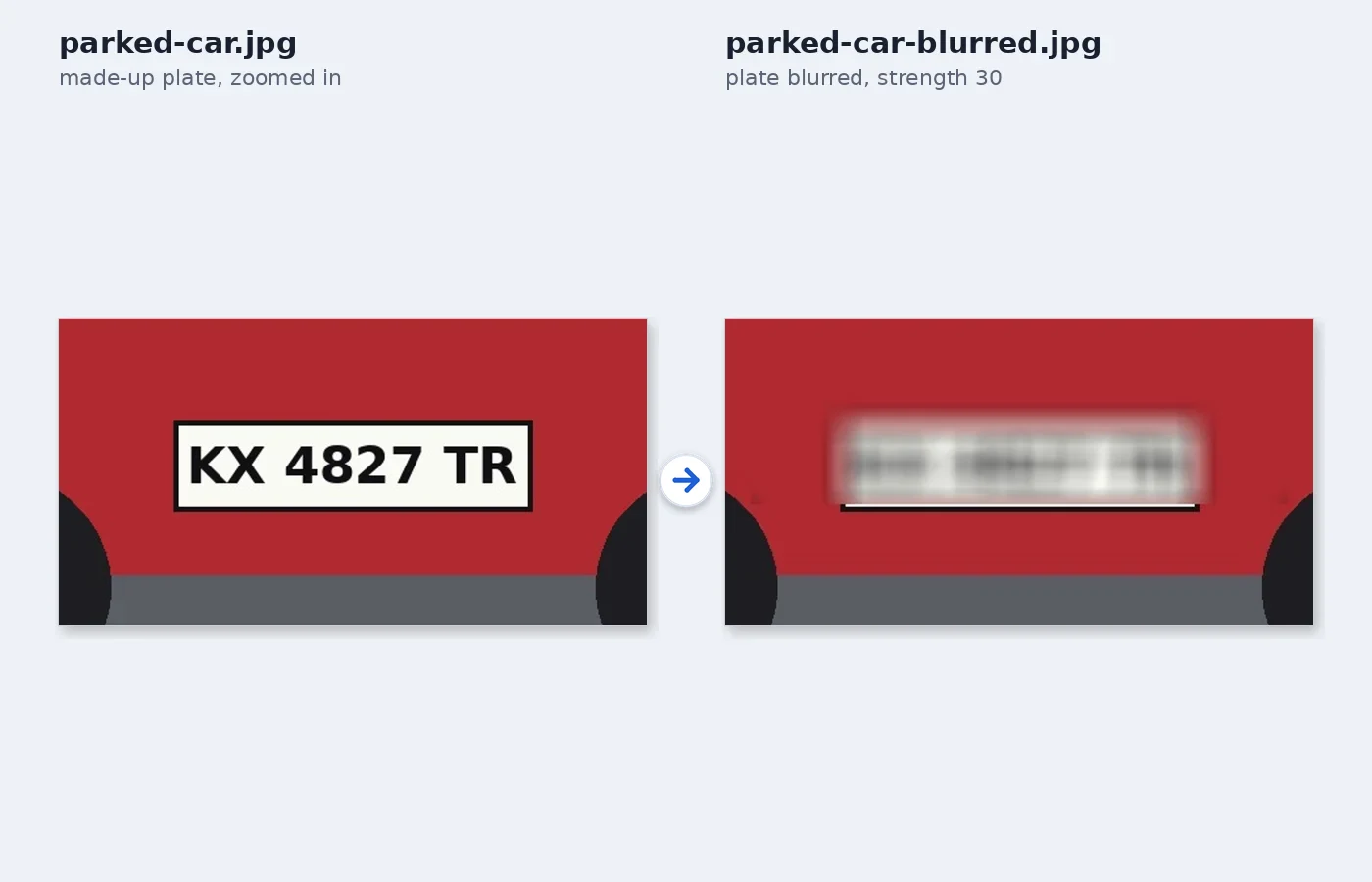
parked-car.jpgparked-car-blurred.jpg
The plate after blurring
- Unreadable after saving
- The rest of the photo untouched
A sample photo we made ourselves, with made-up names and data, opened in this tool and shown as it came out. Your own files stay on your device.
How to blur an image
-
Step 1
Choose the pictures
Photos, screenshots, documents.
-
Step 2
Whole picture or an area
Mark the area to hide and set the strength; the preview updates.
-
Step 3
Blur and download
The blurred pictures, one by one or in a ZIP.
Blur part of an image to protect privacy
Before posting a photo of a street, a car, a crowd, a child's school event or a screenshot with personal details, it is wise to hide what others should not see: faces, number plates, house numbers, names, email addresses, order numbers. Choose "Only the area I mark", drag a frame over the part to hide and set the strength; the preview shows exactly what will be saved. Each picture in the list keeps its own area.
Is a blur safe enough?
A light blur can sometimes be partly reversed or guessed, especially on large text. For anything sensitive, use a strong setting, 25 px or more, so letters and features dissolve completely, or use pixelate image with big blocks. Either way the saved file contains only the blurred pixels: nothing of the original area is kept underneath, unlike a shape drawn on top in some editors that can be removed later.
Blur image backgrounds and whole pictures
With "Whole picture" the entire image is softened: for a calm background behind text on a slide or website, a privacy-friendly preview, or a dreamy look. The strength scales with the picture, so a big photo and a small one look similarly soft at the same setting. The blur is a Gaussian-like blur made of three box blurs, calculated by the page itself, so it works the same in every browser including Safari.
Formats and quality
JPG pictures are saved as JPG at quality 92, PNG stays PNG with its transparency, WebP stays WebP; HEIC, AVIF, GIF, BMP and TIFF are saved as PNG, which every program opens. Only the marked area changes; the rest of the picture is copied exactly. Transparent pictures keep their transparency, and the blur does not darken their edges. To blur and then cut the picture to a new shape, combine it with crop image.
Blur screenshots before sharing
Screenshots often contain more than intended: email addresses, phone numbers, account names, order or tracking numbers, other people in a chat. Mark each sensitive part and blur it before sending the screenshot to support, posting it in a forum or adding it to a presentation. For text, a strong blur of 25 px or more is safest; check the preview at full size by zooming in your browser. If a screenshot has several things to hide, blur the first one, then load the result again and blur the next.
Private
The pictures you are hiding details in never leave your device: blurring happens in the browser.
More free image converters
- Image converter
- Compress image
- JPG to PNG
- PNG to JPG
- JPEG to JPG
- Compress JPEG
- Compress PNG
- GIF to PNG
- PNG to GIF
- GIF to JPG
- JPG to GIF
- GIF maker
- Remove background
- Background eraser
- Make background transparent
- White background for photo
- Remove white background
- Resize image
- Crop image
- Rotate image
- Flip image
- Pixelate image
- Black and white photo
- Invert image colors
- Merge images
- Watermark image
- Add text to image
- Remove EXIF data
- EXIF viewer
- Change DPI
- Image to Base64
- Base64 to image
- MP4 to GIF
- Video to GIF
- GIF to MP4
- GIF compressor
- PNG to SVG
- JPG to SVG
- Image to SVG
- SVG to PDF
- Image to text
- PNG to DXF
- SVG to DXF
- DXF to SVG
- HEIC to JPG
- HEIC to PNG
- HEIC to PDF
- HEIC viewer
- WebP to PNG
- WebP to JPG
- WebP to GIF
- WebP to PDF
- PNG to WebP
- JPG to WebP
- AVIF to PNG
- AVIF to JPG
- JFIF to JPG
- JFIF to PNG
- SVG to PNG
- SVG to JPG
- PNG to ICO
- ICO to PNG
- BMP to JPG
- BMP to PNG
- TIFF to JPG
- TIFF to PNG
- PSD viewer
- PSD to PNG
- PSD to JPG
- PSD to PDF
- AI to SVG
- AI to PNG
- Open AI file
- EPS to PNG
- DDS to PNG
- TGA to PNG
- TGA to JPG
- RAW to JPG
- CR3 to JPG
- CR2 to JPG
- NEF to JPG
Questions about blurring images
How do I blur a face in a photo?
Choose "Only the area I mark", drag the frame over the face and blur.
Can a blur be undone?
Not from the saved file; a strong blur leaves nothing readable.
Can I blur several areas?
One area per picture for now; run the result through again for a second area.
Does it work on screenshots?
Yes, it is a quick way to hide names and numbers before sharing.
Does it work in Safari?
Yes, the blur is calculated by the page itself.
Are my pictures uploaded?
No, they are blurred in your browser.