Free Your pictures are not uploaded
Change image DPI
Change image DPI here: set JPG and PNG files to 300 DPI for print, 72 or 96 for screens, or any value a form asks for. Only the resolution note in the file changes; the pixels, quality and size stay exactly the same, and the page shows the print size the new DPI gives.
or drop them here. JPG, PNG, WebP, HEIC, AVIF, GIF, BMP, TIFF. Nothing is uploaded.
Your pictures
Everything happens in this browser tab: your pictures are not sent to FileOpens or anywhere else, and nothing is kept when you close the page.
DPI changed by FileOpens
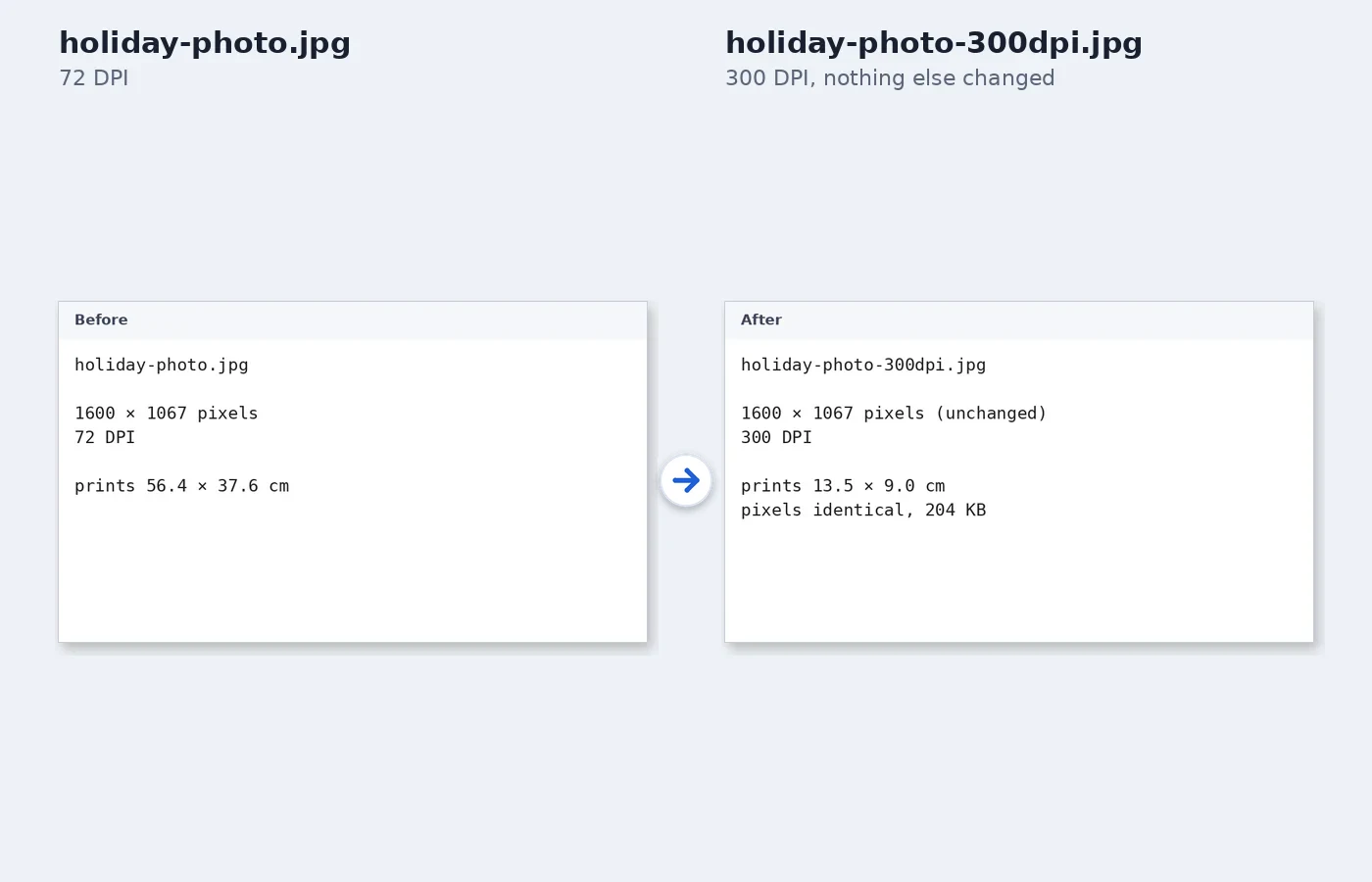
holiday-photo.jpgholiday-photo-300dpi.jpg
From 72 to 300 DPI
- JFIF and EXIF both say 300
- Pixels and size unchanged
A sample photo we made ourselves, with made-up names and data, opened in this tool and shown as it came out. Your own files stay on your device.
How to change the DPI of an image
-
Step 1
Choose the pictures
Photos, scans, designs for print.
-
Step 2
Pick the DPI
300 for print, or any value; the print size is shown.
-
Step 3
Download
The same pictures with the new DPI.
What DPI means for a digital image
DPI (dots per inch, also called PPI) tells printers and layout programs how large to print the picture by default: a 3000 × 2000 pixel photo at 300 DPI prints 10 × 6.7 inches (25.4 × 16.9 cm); at 150 DPI, twice that size. On screens, DPI does nothing at all: the picture is shown by its pixels. That is why changing the DPI here does not change the file size or quality; it changes a number that print software reads.
Change image DPI to 300 for print
Print shops, publishers, photo labs and some application forms ask for "300 DPI". Often the picture already has enough pixels but its file says 72 or 96 DPI, which is the default many phones and programs write, so the check fails. Setting 300 DPI here fixes that in a second, without any loss. If the print size shown is then too small, the picture simply has too few pixels for that size at 300 DPI; increasing the DPI cannot add detail, and enlarging it with resize image only makes it softer.
How the DPI is stored
In JPG files the value is written in the JFIF header and, if the photo has EXIF data, in its resolution fields too, so Photoshop, Word, InDesign and print software all read the same number. PNG files get a pHYs chunk with the equivalent pixels per metre. The compressed picture data is copied unchanged. HEIC, WebP, AVIF, GIF, BMP and TIFF files are saved as PNG with the new DPI, because PNG is accepted by every print and layout program.
Which DPI to choose
300 DPI is the standard for photos and printed documents viewed up close; 150–200 is fine for posters seen from a distance; 600 is used for line art and scans of text. 72 and 96 are traditional screen values, useful only when a system expects them. To check what a file currently says, look at the list: each picture shows its present DPI. For scanned PDFs, OCR PDF makes the text searchable.
DPI for forms and print shops
Visa and passport photo services, publishers and print shops often check the DPI field automatically and reject files marked 72 DPI even when they have plenty of pixels. Setting the value they ask for fixes that rejection. If they also ask for a size in pixels or centimetres, check the print size the page shows: at 300 DPI, a 35 × 45 mm passport photo needs at least 413 × 531 pixels. A whole batch can be changed at once and downloaded as one ZIP.
Private
Pictures are changed in your browser and never uploaded.
More free image converters
- Image converter
- Compress image
- JPG to PNG
- PNG to JPG
- JPEG to JPG
- Compress JPEG
- Compress PNG
- GIF to PNG
- PNG to GIF
- GIF to JPG
- JPG to GIF
- GIF maker
- Remove background
- Background eraser
- Make background transparent
- White background for photo
- Remove white background
- Resize image
- Crop image
- Rotate image
- Flip image
- Blur image
- Pixelate image
- Black and white photo
- Invert image colors
- Merge images
- Watermark image
- Add text to image
- Remove EXIF data
- EXIF viewer
- Image to Base64
- Base64 to image
- MP4 to GIF
- Video to GIF
- GIF to MP4
- GIF compressor
- PNG to SVG
- JPG to SVG
- Image to SVG
- SVG to PDF
- Image to text
- PNG to DXF
- SVG to DXF
- DXF to SVG
- HEIC to JPG
- HEIC to PNG
- HEIC to PDF
- HEIC viewer
- WebP to PNG
- WebP to JPG
- WebP to GIF
- WebP to PDF
- PNG to WebP
- JPG to WebP
- AVIF to PNG
- AVIF to JPG
- JFIF to JPG
- JFIF to PNG
- SVG to PNG
- SVG to JPG
- PNG to ICO
- ICO to PNG
- BMP to JPG
- BMP to PNG
- TIFF to JPG
- TIFF to PNG
- PSD viewer
- PSD to PNG
- PSD to JPG
- PSD to PDF
- AI to SVG
- AI to PNG
- Open AI file
- EPS to PNG
- DDS to PNG
- TGA to PNG
- TGA to JPG
- RAW to JPG
- CR3 to JPG
- CR2 to JPG
- NEF to JPG
Questions about changing DPI
Does changing DPI change the quality?
No. Only the stored resolution changes; pixels stay the same.
How do I make an image 300 DPI?
Choose 300 and download; the page shows the print size it gives.
Why is my picture small at 300 DPI?
It has too few pixels for a larger print; DPI cannot add detail.
Does DPI matter on screens?
No, screens show pictures by their pixels.
Will the file size change?
No, only by a few bytes.
Are my pictures uploaded?
No, everything happens in your browser.