Free No account · the file is deleted after 24 hours
PNG to DXF converter
Convert PNG to DXF here: the dark shapes of a logo, sign, silhouette or drawing are traced into closed outlines and saved as a DXF at the width you choose, in millimetres or inches, ready to open in laser, CNC, plasma and CAD software. JPG, WebP and BMP pictures work too.
or drop it here. PNG, JPG, WebP, BMP or GIF, up to 200 MB. Free, no account.
Make your DXF
The file is sent over an encrypted connection to our server in Canada (OVHcloud, Beauharnois, Quebec), processed by a program there, and deleted with the result 24 hours later. Nobody looks at it.
A PNG sign traced to DXF by FileOpens
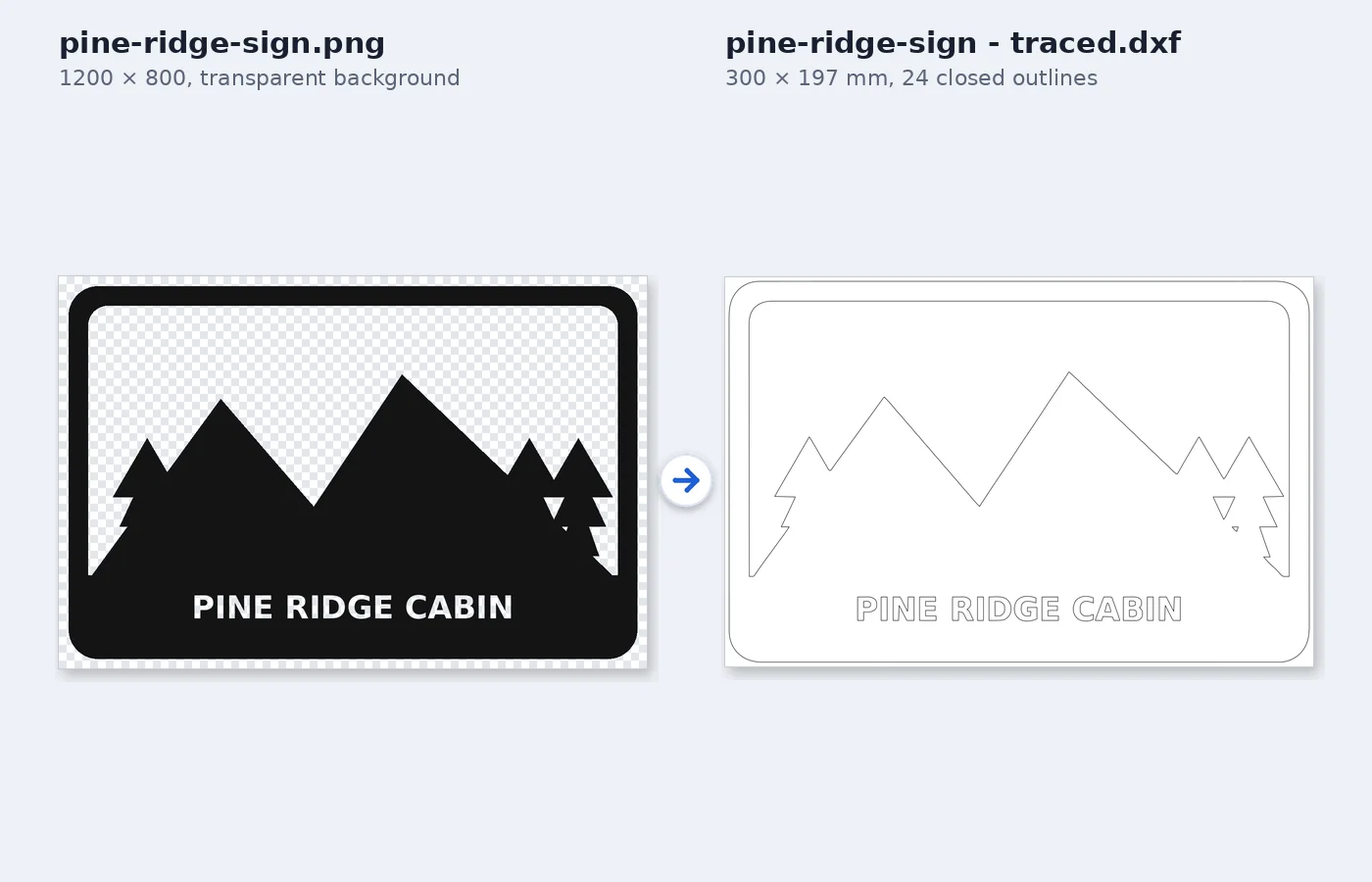
pine-ridge-sign.pngpine-ridge-sign - traced.dxf
A cabin sign as cut lines
- Width set to 300 mm
- 24 closed outlines, letters with their holes
- Opens in CAD and laser software
A sample sign we made ourselves, with made-up names, converted by this tool and shown as it came out. Files you upload are deleted after 24 hours and never shown to anyone.
How to convert PNG to DXF
-
Step 1
Choose the picture
A logo, silhouette, sign or line drawing; dark on light works best.
-
Step 2
Set the width
In millimetres or inches; the height follows.
-
Step 3
Download the DXF
With a preview of the cut lines.
Why a PNG needs converting
Laser cutters, CNC routers, plasma tables and waterjets follow lines, and DXF, the drawing exchange format Autodesk introduced with AutoCAD in 1982, is the format their software reads most reliably. A PNG has only pixels, with no lines to follow. This page traces the picture: dark areas become shapes, and the outline of each shape, including the holes inside letters and cut-outs, becomes a closed polyline in the DXF.
Choosing the size
A PNG has no real-world size, so you choose the width of the finished part, for example 100 mm for a coaster or 24 inches for a metal sign; the height follows the picture. The drawing starts at 0,0 and its units are written into the file, so LightBurn, LaserGRBL, RDWorks, Fusion 360, VCarve, SheetCam and AutoCAD open it at that size. Use "R12" only if old machine software rejects the newer format.
What makes a good picture for cutting
Use a clean, high-contrast picture: black shapes on a white or transparent background, without shadows, gradients or textures. Transparent parts count as white. Light colours below the middle grey are treated as empty and dark ones as material. Thin lines narrower than a few pixels may break up, so start from the largest version of the picture you have. Pictures larger than 2000 pixels are reduced to that size before tracing.
Other routes
If you need a vector for Cricut or a website rather than a machine, PNG to SVG keeps colours. If your design is already an SVG, SVG to DXF converts it without tracing, which keeps exact shapes and sizes. Paid DXF drawings can be turned into PDF for printing with DXF to PDF.
PNG to DXF for signs, stencils and inlays
Typical jobs are house numbers and name signs cut from plywood or acrylic, metal silhouettes for gates and walls, stencils for painting, rubber stamps, and inlay pieces for woodwork. In each case the shape in the PNG becomes the path the tool follows, at the width you set. Make sure every part you want to keep is connected, and allow for the kerf, the width of the cut, if parts must fit together. When you cut letters like O, A or R out of a sheet, the inner parts fall out. For a stencil, add small bridges in the picture before converting, or in your CAD program afterwards. For a sign cut from metal, make sure every part touches the frame. The preview on the result page shows exactly which lines will be cut.
Privacy and limits
The file goes to our server over an encrypted connection, is processed automatically and is deleted with the result 24 hours later. Nobody looks at it. Up to 200 MB.
More free image converters
- Image converter
- Compress image
- JPG to PNG
- PNG to JPG
- JPEG to JPG
- Compress JPEG
- Compress PNG
- GIF to PNG
- PNG to GIF
- GIF to JPG
- JPG to GIF
- GIF maker
- Remove background
- Background eraser
- Make background transparent
- White background for photo
- Remove white background
- Resize image
- Crop image
- Rotate image
- Flip image
- Blur image
- Pixelate image
- Black and white photo
- Invert image colors
- Merge images
- Watermark image
- Add text to image
- Remove EXIF data
- EXIF viewer
- Change DPI
- Image to Base64
- Base64 to image
- MP4 to GIF
- Video to GIF
- GIF to MP4
- GIF compressor
- PNG to SVG
- JPG to SVG
- Image to SVG
- SVG to PDF
- Image to text
- SVG to DXF
- DXF to SVG
- HEIC to JPG
- HEIC to PNG
- HEIC to PDF
- HEIC viewer
- WebP to PNG
- WebP to JPG
- WebP to GIF
- WebP to PDF
- PNG to WebP
- JPG to WebP
- AVIF to PNG
- AVIF to JPG
- JFIF to JPG
- JFIF to PNG
- SVG to PNG
- SVG to JPG
- PNG to ICO
- ICO to PNG
- BMP to JPG
- BMP to PNG
- TIFF to JPG
- TIFF to PNG
- PSD viewer
- PSD to PNG
- PSD to JPG
- PSD to PDF
- AI to SVG
- AI to PNG
- Open AI file
- EPS to PNG
- DDS to PNG
- TGA to PNG
- TGA to JPG
- RAW to JPG
- CR3 to JPG
- CR2 to JPG
- NEF to JPG
Questions about PNG to DXF
Which software opens the DXF?
LightBurn, LaserGRBL, RDWorks, Fusion 360, VCarve, AutoCAD, QCAD and other CAD and CAM programs.
How is the size set?
You choose the width in mm or inches; the height follows.
Are holes inside letters kept?
Yes, every hole is its own closed outline.
Does it work with JPG?
Yes, JPG, WebP, BMP and GIF pictures work too.
Is colour kept?
No, the DXF holds outlines of the dark shapes; use PNG to SVG for colour.
Is it free?
Yes, with no account and no watermark.