Free Your pictures are not uploaded
Pixelate image
Pixelate images here: cover a face, a name, a number plate or an address with a mosaic of blocks, or turn a whole picture into chunky pixels for a retro look. Choose the block size and see a live preview; everything happens in your browser.
or drop them here. JPG, PNG, WebP, HEIC, AVIF, GIF, BMP, TIFF. Nothing is uploaded.
Pixelate your pictures
Everything happens in this browser tab: your pictures are not sent to FileOpens or anywhere else, and nothing is kept when you close the page.
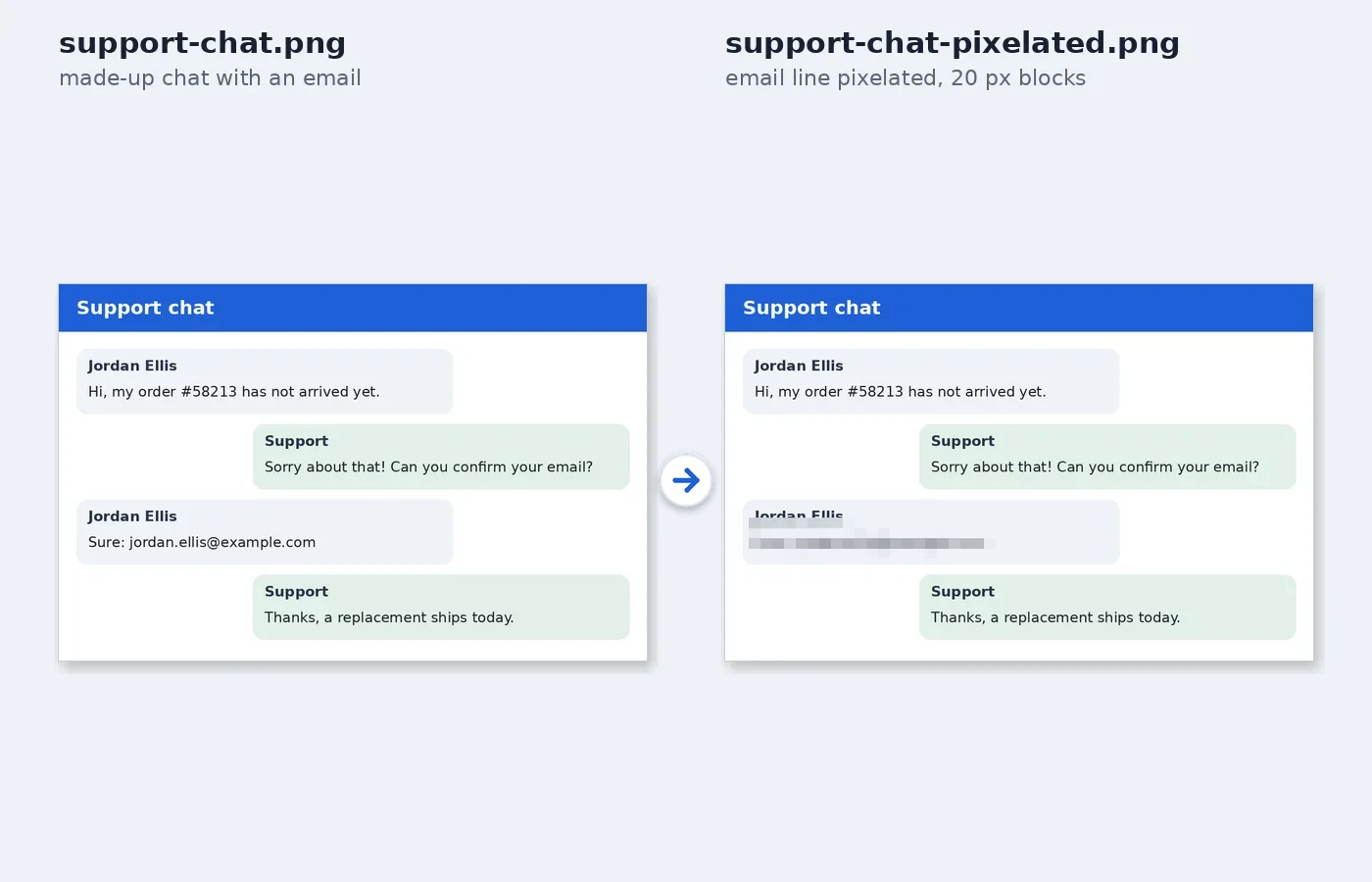
An email address pixelated by FileOpens
support-chat.pngsupport-chat-pixelated.png
A chat screenshot with the email hidden
- 20 px blocks over one line
- Everything else stays sharp
A sample screenshot we made ourselves, with made-up names and data, opened in this tool and shown as it came out. Your own files stay on your device.
How to pixelate an image
-
Step 1
Choose the pictures
Photos and screenshots to censor, or pictures to stylise.
-
Step 2
Mark and set the blocks
Whole picture or one area; block size from 4 to 80 px.
-
Step 3
Pixelate and download
One by one or as a ZIP.
Pixelate to censor
Pixelation, the mosaic effect used on TV, is the classic way to make faces, licence plates, names and addresses unrecognisable while showing that something was hidden. Choose "Only the area I mark", drag a frame over what should disappear, and set the block size. Unlike a black bar, a mosaic keeps the overall shape and colour of the scene, so the photo still looks natural while the identity or the number is gone. The preview shows the result live, so you can check that nothing is readable before saving.
Which block size
The block size is the width of each square in pixels on a typical photo, scaled up for very large pictures. Small blocks of 4–8 px give a subtle effect that can still leave large text guessable; for faces, plates and text use 16 px or more, and make the marked area a bit larger than the thing you hide. Each block takes the average colour of the pixels it covers, so fine details are gone from the saved file for good.
Pixelate image for a retro look
Choose "Whole picture" to turn any image into a pixel-art-like mosaic: 8–16 px blocks give a retro game look, bigger blocks an abstract one. For real pixel art at a tiny size, pixelate here and then shrink with resize image, or enlarge small pixel art with the "by percentage" option. Edges stay sharp because the blocks are drawn without smoothing.
Blur or pixelate?
Both hide details; pixelation makes it obvious that something was censored, while blur image looks softer and suits backgrounds and car plates in photos. JPG pictures are saved as JPG at quality 92, PNG stays PNG with its transparency, WebP stays WebP; HEIC, AVIF, GIF, BMP and TIFF are saved as PNG, which every program opens.
Pixelate screenshots and documents
In screenshots and photographed documents, pixelate names, signatures, account numbers, barcodes and QR codes before sharing. Make the frame cover the whole line of text with a small margin, because blocks at the edge of the area can still reveal the height of letters. A QR code or barcode becomes unreadable with blocks larger than its modules, so 16 px or more is a safe choice. Check the preview, and if anything is still readable, pick a larger block size and pixelate again. Each picture in the list keeps its own marked area, so a batch of screenshots can be censored in one go.
Private
Pictures are pixelated in your browser and never uploaded.
More free image converters
- Image converter
- Compress image
- JPG to PNG
- PNG to JPG
- JPEG to JPG
- Compress JPEG
- Compress PNG
- GIF to PNG
- PNG to GIF
- GIF to JPG
- JPG to GIF
- GIF maker
- Remove background
- Background eraser
- Make background transparent
- White background for photo
- Remove white background
- Resize image
- Crop image
- Rotate image
- Flip image
- Blur image
- Black and white photo
- Invert image colors
- Merge images
- Watermark image
- Add text to image
- Remove EXIF data
- EXIF viewer
- Change DPI
- Image to Base64
- Base64 to image
- MP4 to GIF
- Video to GIF
- GIF to MP4
- GIF compressor
- PNG to SVG
- JPG to SVG
- Image to SVG
- SVG to PDF
- Image to text
- PNG to DXF
- SVG to DXF
- DXF to SVG
- HEIC to JPG
- HEIC to PNG
- HEIC to PDF
- HEIC viewer
- WebP to PNG
- WebP to JPG
- WebP to GIF
- WebP to PDF
- PNG to WebP
- JPG to WebP
- AVIF to PNG
- AVIF to JPG
- JFIF to JPG
- JFIF to PNG
- SVG to PNG
- SVG to JPG
- PNG to ICO
- ICO to PNG
- BMP to JPG
- BMP to PNG
- TIFF to JPG
- TIFF to PNG
- PSD viewer
- PSD to PNG
- PSD to JPG
- PSD to PDF
- AI to SVG
- AI to PNG
- Open AI file
- EPS to PNG
- DDS to PNG
- TGA to PNG
- TGA to JPG
- RAW to JPG
- CR3 to JPG
- CR2 to JPG
- NEF to JPG
Questions about pixelating images
How do I pixelate a face?
Choose "Only the area I mark", cover the face and pick 16 px blocks or more.
Can pixelation be reversed?
Not from the saved file with large blocks; the detail is no longer there.
Can I pixelate a whole picture?
Yes, choose "Whole picture" for a mosaic or retro look.
Is transparency kept?
Yes, PNG pictures stay transparent.
Does it work on a phone?
Yes, mark the area with your finger.
Should I pixelate or blur?
Pixelate when it should be obvious that something is hidden; blur for a softer look.
Are my pictures uploaded?
No, everything happens in your browser.