How to print text messages
Need to print text messages, a few or a whole conversation, with the dates and names on the page? Here is how to print text messages from Android and iPhone, and how to turn every Android text into one PDF in a few minutes.
- See the first pages free before you pay.
- Photos stay in the chat, where they were sent.
- Refund in one click if it is not usable.
- Deleted after 24 hours. Nobody looks at it.
Text messages converted by FileOpens
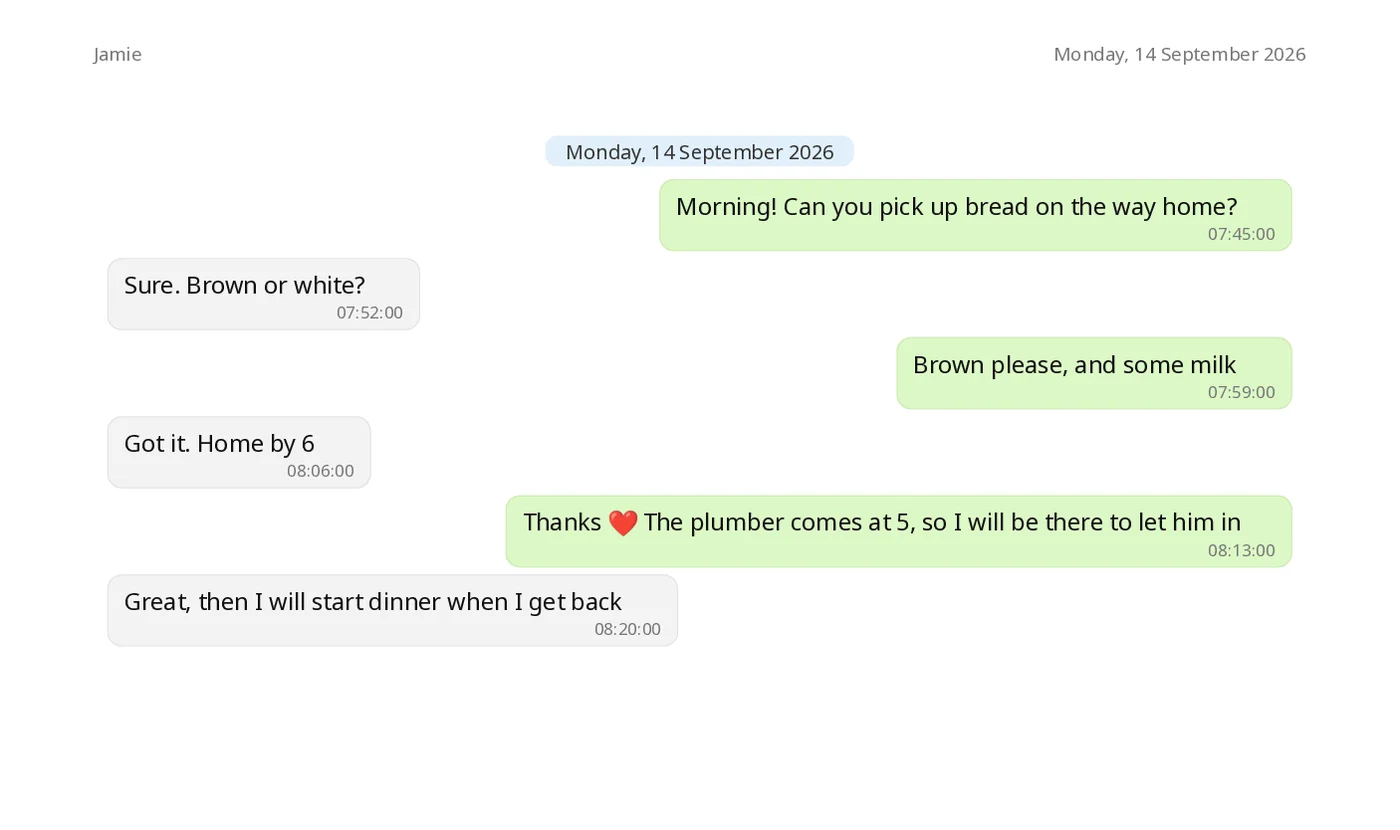
sms-20260914.xmlmessages.pdf + .xlsx
SMS Backup & Restore file
- Sent on the right, received on the left
- Contact name and date
- Emoji kept
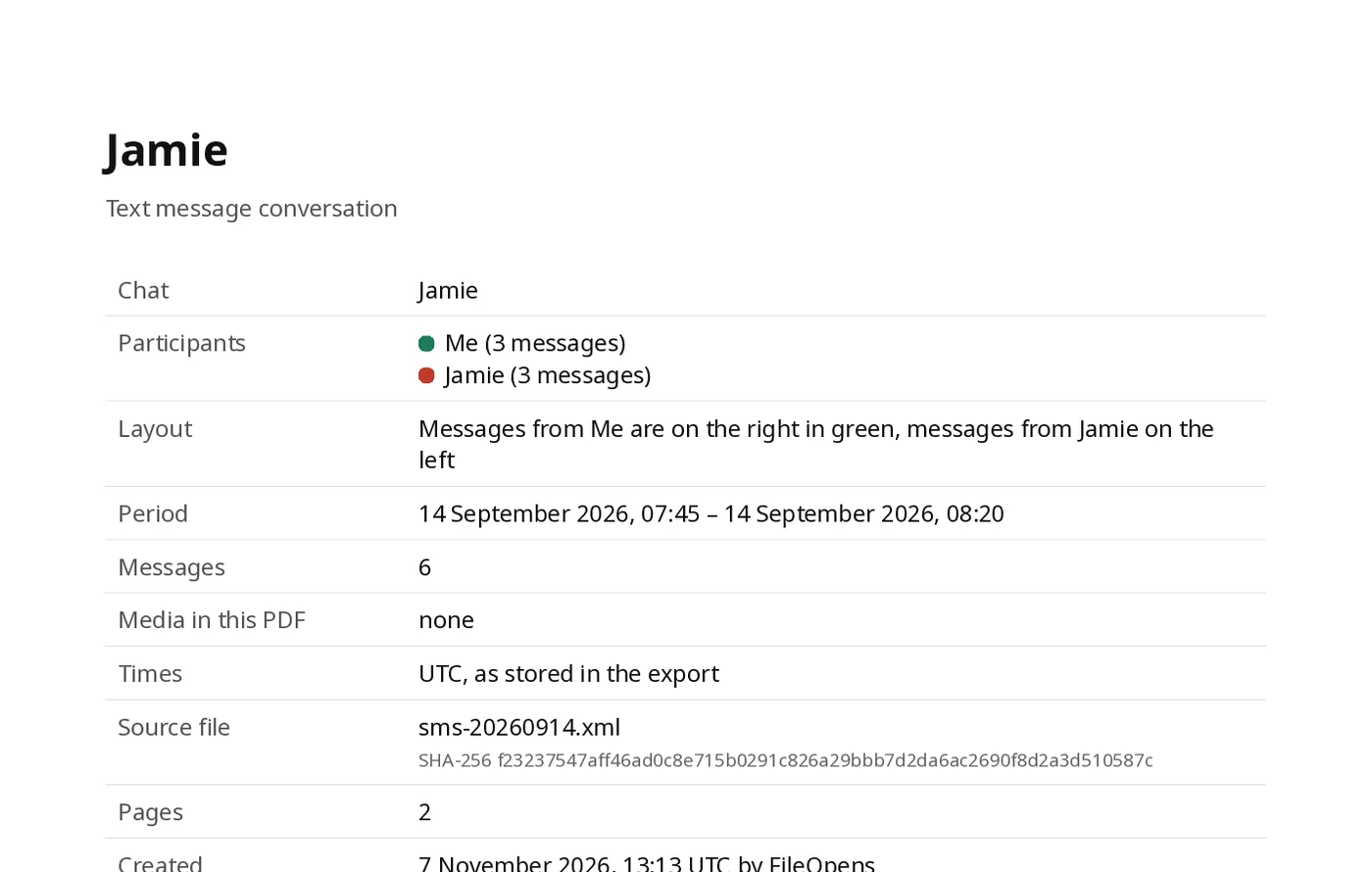
sms-20260914.xmlmessages.pdf + .xlsx
Cover page
- Messages per person
- Period of the backup
Sample backup we made ourselves, with made-up names and data, converted here and shown as they came out. Your own files are never shown to anyone.
Chats people save as PDF
- Evidence for court or a lawyer
- Divorce and custody
- Disputes with a landlord or employer
- Business and client agreements
- Family groups and memories
- Chats with someone who has died
- Printing to keep
How to turn text messages into a PDF
-
STEP 1
Back up with SMS Backup & Restore
The free Android app: Back Up > Messages, with MMS media.
-
STEP 2
Upload the .xml and look
Every conversation is found; the cover and first pages appear free.
-
STEP 3
Pay once, download
One PDF with all conversations and photos, plus Excel. Refund in one click.
What you get back
- Every text on paperEach conversation as bubbles with names, dates and times, ready to print.
- Photos in placePhotos and stickers where they were sent, videos with a still frame, voice notes with their length.
- A cover pageParticipants, number of messages, the period, and the SHA-256 fingerprint of your export file.
- Every message in ExcelDate, time, sender and text in columns, to search, filter or quote.
- Every conversation at onceAll texts from one backup, each conversation on its own pages.
Price
See the cover and the first pages free. Then $4.99 per backup file, with every conversation in it: the PDF and the Excel file. One payment, no subscription, refund within 24 hours if it is not usable.
Why printing texts is harder than it should be
Phones have no Print button for a conversation. Google Messages, Samsung Messages and the iPhone's Messages app all show texts one screen at a time, and none of them has a simple way to save a whole conversation as a file you can print. So people take screenshots, page after page, and lose the dates that the screen did not show. That is fine for one message, but not for months of texts with a landlord, an ex-partner, an employer or a contractor, which is what a lawyer, a court, an insurer or a housing office usually asks for.
How to print text messages from Android
The reliable way is a backup. Install the free app SMS Backup & Restore from Google Play, tap Set up a backup, choose Messages, include MMS media if you want the pictures, and save the backup to the phone, Google Drive or e-mail. You get one file named sms-….xml. Upload it above: every conversation becomes a PDF with the texts as bubbles, the sender, date and time of each message, the photos where they were sent and page numbers on every page. Print the conversations you need, or send the PDF. The Excel list that comes with it lets you search and quote messages. The same backup page is also at SMS backup to PDF.
How to print text messages from an iPhone
If you have a Mac signed in with the same Apple Account and Messages in iCloud turned on, your texts are on the Mac too. Open Messages on the Mac, select the conversation and choose File > Print; in the print dialog, the PDF menu at the bottom saves it as a PDF. Scroll back first so the part you need is loaded, and check the result. Without a Mac, the options are screenshots, or paid desktop tools that read an iPhone backup. We do not read iPhone backups yet. WhatsApp chats can be exported on any phone: see print WhatsApp messages.
Printing text messages for court
Rules differ by court and country, and only a lawyer can say what yours will accept, but the same points come up again and again. Show whole conversations, not single messages taken out of context. Make sure every message shows the date, the time and who sent it. Keep the original phone and the backup file, unchanged, in case the other side disputes the printout. Our PDF helps with all three: it reproduces every message of the backup in order, with sender, date and time, adds nothing and removes nothing, and its cover page records the SHA-256 fingerprint of the backup file, so it can be checked against the file you kept.
Screenshots or a PDF?
Screenshots are quick and show exactly what the screen showed, which is why people trust them. But a long conversation needs dozens of them, dates often appear only once per day, and cropping invites doubts. A PDF made from the backup holds the whole conversation in one file with every timestamp, is searchable, and prints cleanly on A4 or Letter. Many people use both: the PDF for the full record and a few screenshots of key messages for a summary.
More chat tools
Also on FileOpens
Questions about printing text messages
Can I print a whole text conversation at once?
On Android, yes: back it up with SMS Backup & Restore and upload the .xml file here. You get every conversation as a PDF to print. On iPhone, use Messages on a Mac (File > Print).
Will the printout show dates and times?
Yes. Every message shows its time, every day has its date, and the cover lists the period of the conversation. Times are those the phone showed.
Are these printouts accepted in court?
That depends on the court and the case; ask your lawyer. Our PDF reproduces every message of the backup unchanged and records the backup file's SHA-256 fingerprint, which makes it easy to show where it came from.
How much does it cost?
You see the cover and the first pages free. Then $4.99 per backup file, with every conversation in it. Not usable? Refund within 24 hours.
What happens to my messages?
They are used only to make your PDF and Excel file and are deleted automatically 24 hours after upload. Nobody reads them.