Free Your pictures are not uploaded
White background for photo
Get a white background for photo after photo here: the subject is cut out by an AI model running in your browser and placed on pure white, or on any colour you choose, then saved as a full-size JPG ready for online shops, catalogues and documents. It is free, has no watermark, and the photo is not uploaded.
or drop them here, a whole product set at once. Nothing is uploaded.
Your photos
Everything happens in this browser tab: your pictures are not sent to FileOpens or anywhere else, and nothing is kept when you close the page.
A photo put on pure white by FileOpens
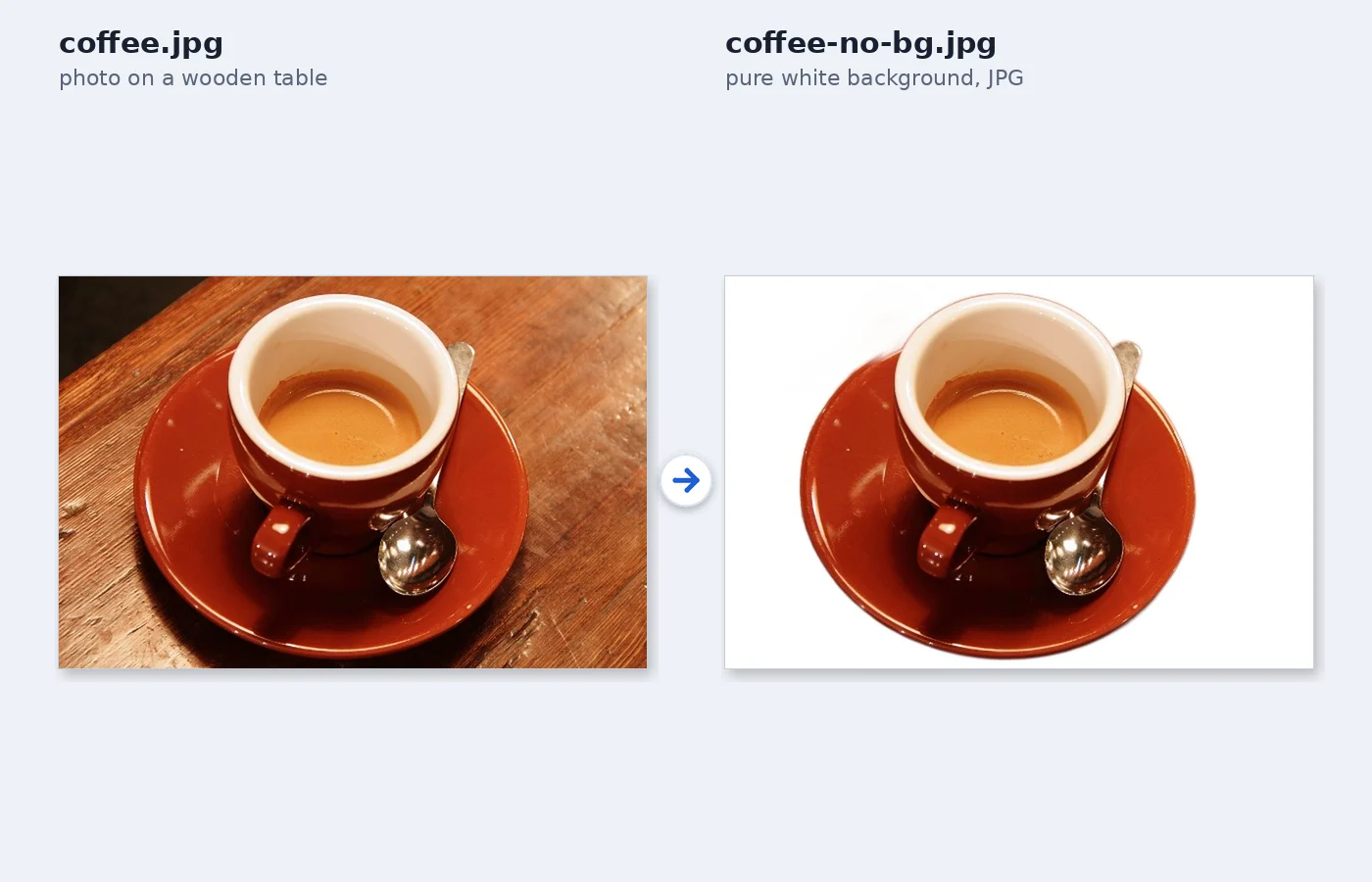
coffee.jpgcoffee-no-bg.jpg
A product-style photo on white
- Background exactly 255, 255, 255
- Colours of the cup unchanged
- JPG at full size
Sample photos with no copyright restrictions (CC0): the coffee cup by Rachel Michetti and Chelsea the cat by Stefan van der Walt, from the scikit-image test images. Processed by this tool in the browser; the photos shown are the real results.
How to put a photo on a white background
-
Step 1
Choose the photos
Products, food, crafts or portraits.
-
Step 2
Keep White, or pick a colour
The preview shows the result.
-
Step 3
Save the JPGs
Full size, one by one or in a ZIP.
Why shops want a white background
Marketplaces want the product, not the kitchen table it was photographed on. Amazon asks for main images on a pure white background, RGB 255, 255, 255, with the product filling most of the frame, and many shops, catalogues and comparison sites follow the same style because white looks clean and makes listings consistent. A phone photo taken by a window can meet that rule in seconds once the background is replaced with true white. eBay recommends a plain white or light background, Etsy leaves the style to the seller but shows thumbnails on white, and Google Shopping, Walmart and many catalogue printers prefer clean white images too. White also makes it easy to place photos on a website or in a PDF catalogue without visible edges. For social media, where white can look plain, try a soft brand colour instead with the "Colour" option.
A white background for photo listings: pure white, not almost white
A photo of a product on white card is not really white: the paper turns grey or cream in the shadows, and marketplaces notice. Here the background is removed entirely and the subject is placed on exact white, so every background pixel is 255, 255, 255. The subject itself keeps its original colours. For a soft shadow under the product, add one in your editor afterwards; a floating product on white is accepted everywhere.
Change the background colour of a photo
Choose "Colour" to put the subject on any colour instead: a brand colour for a banner, light grey for a catalogue, blue for a profile picture or a seasonal tone for social media. The colour is applied to the whole background, and the result is saved as a JPG. For a background you can fill later in another program, choose "Transparent" to get a PNG, or use make background transparent.
Getting a good result from a phone photo
Photograph the product against a plain wall or sheet with even light, so the model separates it easily. Fill the frame and keep the whole product in it, since cut-off edges cannot be added back. Shiny and glass products reflect their surroundings; a lighter setting reduces that. After saving, crop and resize to the shop's size with crop image and resize image, for example 2000 x 2000 pixels. A white or plain background also suits CVs, team pages and online profiles. For passports, visas and ID cards, check the official rules first: many offices do not accept edited photos and ask for a photo taken against a plain background in the first place.
A whole product set at once
Shops usually need several angles of every product, and dozens of products. Choose all the photos together: the first one is previewed, and when you press the button each photo is cut out and put on white in turn, saved under its own name with "-no-bg" added, or all together in one ZIP. The AI model is downloaded once and then reused, so the rest of the set goes faster. Keep the originals; if the background colour needs to change later, run them again with another colour.
Private
Your photos never leave your device. The page downloads the AI model once (44 MB) and your browser keeps it; the subject is found and cut out by your own computer or phone. Nothing is uploaded, and nothing is kept when you close the page.
More free image converters
- Image converter
- Compress image
- JPG to PNG
- PNG to JPG
- JPEG to JPG
- Compress JPEG
- Compress PNG
- GIF to PNG
- PNG to GIF
- GIF to JPG
- JPG to GIF
- GIF maker
- Remove background
- Background eraser
- Make background transparent
- Remove white background
- Resize image
- Crop image
- Rotate image
- Flip image
- Blur image
- Pixelate image
- Black and white photo
- Invert image colors
- Merge images
- Watermark image
- Add text to image
- Remove EXIF data
- EXIF viewer
- Change DPI
- Image to Base64
- Base64 to image
- MP4 to GIF
- Video to GIF
- GIF to MP4
- GIF compressor
- PNG to SVG
- JPG to SVG
- Image to SVG
- SVG to PDF
- Image to text
- PNG to DXF
- SVG to DXF
- DXF to SVG
- HEIC to JPG
- HEIC to PNG
- HEIC to PDF
- HEIC viewer
- WebP to PNG
- WebP to JPG
- WebP to GIF
- WebP to PDF
- PNG to WebP
- JPG to WebP
- AVIF to PNG
- AVIF to JPG
- JFIF to JPG
- JFIF to PNG
- SVG to PNG
- SVG to JPG
- PNG to ICO
- ICO to PNG
- BMP to JPG
- BMP to PNG
- TIFF to JPG
- TIFF to PNG
- PSD viewer
- PSD to PNG
- PSD to JPG
- PSD to PDF
- AI to SVG
- AI to PNG
- Open AI file
- EPS to PNG
- DDS to PNG
- TGA to PNG
- TGA to JPG
- RAW to JPG
- CR3 to JPG
- CR2 to JPG
- NEF to JPG
Questions about white backgrounds
Is the white pure white?
Yes, 255, 255, 255, as Amazon asks for main images.
Can I choose another colour?
Yes, pick any colour; the result is a JPG.
Can I do a whole product set?
Yes, choose many photos and save them in one ZIP.
Can I use it for a passport photo?
Check the official rules; many offices do not accept edited photos.
Are my photos uploaded?
No, they are processed in your browser.