Free Your pictures are not uploaded
TGA to JPG converter
Convert TGA to JPG here: Targa files from renders, games and old graphics software become JPEG pictures that open on every phone and website, at the quality you choose. Transparent parts are filled with white or a colour you pick, and everything happens in your browser.
or drop them here, as many as you like. Nothing is uploaded.
Your TGA pictures
Everything happens in this browser tab: your pictures are not sent to FileOpens or anywhere else, and nothing is kept when you close the page.
A TGA render converted to JPG by FileOpens
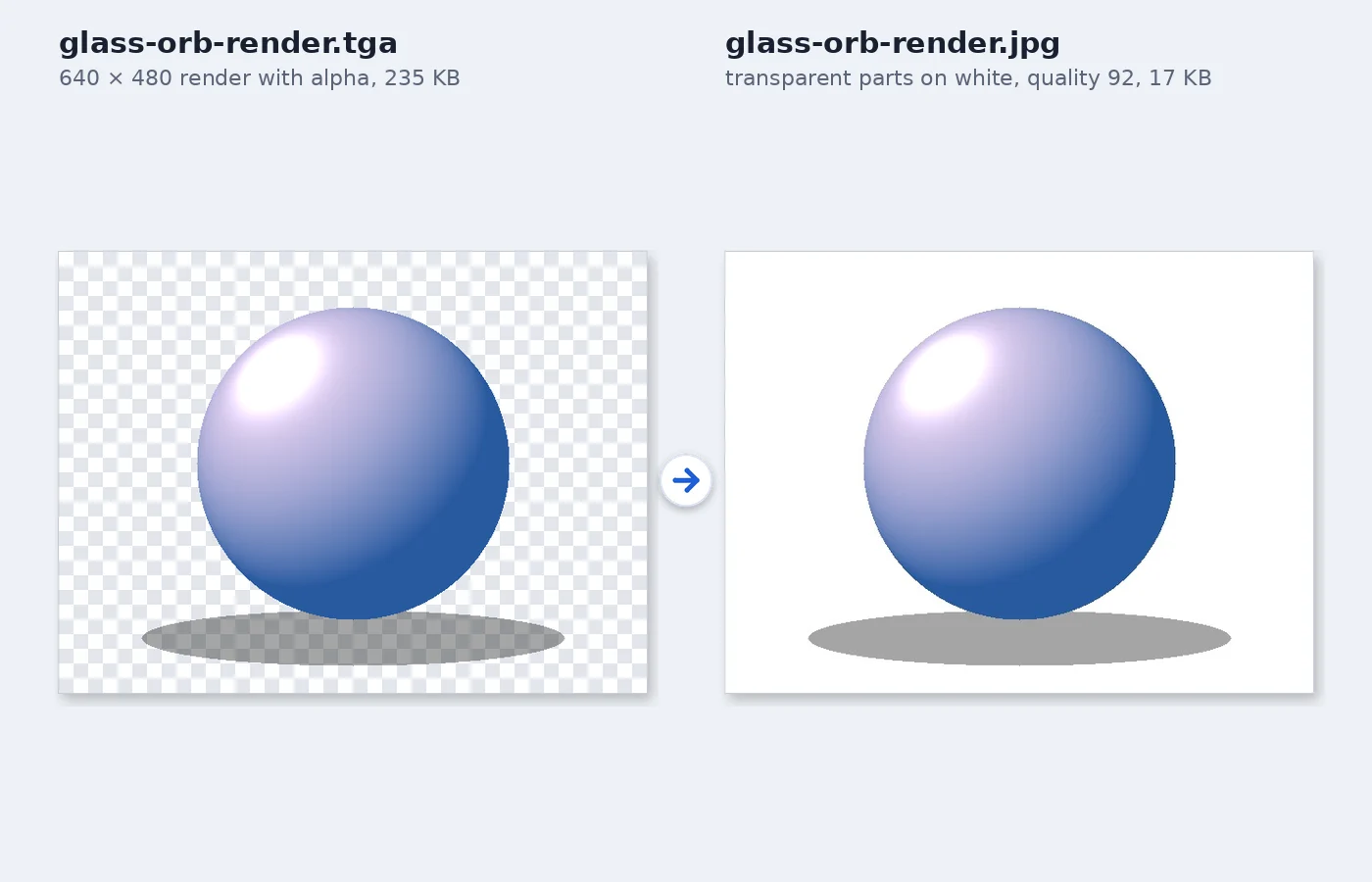
glass-orb-render.tgaglass-orb-render.jpg
A render with an alpha channel as JPG
- 235 KB TGA to 17 KB JPG
- Transparent parts on white
A sample render we made ourselves, with made-up names and data, opened in this tool and shown as it came out. Your own files stay on your device.
How to convert TGA to JPG
-
Step 1
Choose the .tga files
Renders, screenshots or textures.
-
Step 2
Set the quality
And the colour for transparent parts.
-
Step 3
Download
One by one or all in a ZIP.
When JPG is the better choice
A TGA file stores every pixel without loss, so a 1920 × 1080 render is about 6 MB, too large for most emails, forums and chat apps, and many of them refuse TGA altogether. JPG compresses photos and renders to a tenth of that size or less with differences you will hardly see, and it opens on every device. Choose JPG for sharing and posting; keep TGA to PNG for textures that need their transparency or pixel-exact detail.
Renders from 3D programs
Blender, 3ds Max, Cinema 4D and older render farms often save frames or stills as TGA. To show a client a few frames or post work on a portfolio, convert them to JPG at quality 90 to 92: the files become small, and gradients and skin tones stay smooth. A whole sequence can be dropped at once and downloaded as one ZIP, with names kept, so frame 0001 stays frame 0001.
Transparency becomes a background
JPG has no transparency. Areas that are transparent in the TGA, such as the empty space around a sprite or a render with an alpha channel, are filled with white, or with any colour you choose, so the picture looks as intended. If you want to keep the transparency, use PNG instead.
How to convert TGA to JPG without software
There is nothing to install: open this page in Chrome, Edge, Firefox or Safari on Windows, Mac, Linux, an iPhone or an Android phone, choose the TGA files and press Convert. Each picture is decoded by the page, drawn on white and saved as JPEG at the quality you set. Large folders work too; the list shows the size and TGA format of every file, so you can spot a damaged or unusual one before converting. True-colour TGAs of 16, 24 and 32 bits, greyscale and colour-table TGAs, uncompressed or RLE-compressed. Pictures stored bottom-up, the TGA default, are turned the right way up automatically. For other formats, the image converter reads PSD, DDS, HEIC, WebP, TIFF and more.
TGA, JPG and PNG compared
TGA is simple and lossless, which made it a favourite of game engines and render software, but it makes big files and few programs show it. PNG is also lossless, keeps transparency, and opens everywhere, so it is the right replacement for textures and sprites. JPG drops detail you rarely see to make files many times smaller, so it is best for renders and screenshots of scenes you want to share. Converting to JPG cannot be undone, so keep the TGA originals if you may need them again. The quality slider runs from 50 to 100. Around 92 gives files that are hard to tell from the original; 80 halves the size again and is fine for previews and messages. Text and sharp lines show JPEG artefacts first, so screenshots of interfaces look better as PNG.
Private
The page decodes and encodes the pictures in your browser; nothing is uploaded or kept.
More free image converters
- Image converter
- Compress image
- JPG to PNG
- PNG to JPG
- JPEG to JPG
- Compress JPEG
- Compress PNG
- GIF to PNG
- PNG to GIF
- GIF to JPG
- JPG to GIF
- GIF maker
- Remove background
- Background eraser
- Make background transparent
- White background for photo
- Remove white background
- Resize image
- Crop image
- Rotate image
- Flip image
- Blur image
- Pixelate image
- Black and white photo
- Invert image colors
- Merge images
- Watermark image
- Add text to image
- Remove EXIF data
- EXIF viewer
- Change DPI
- Image to Base64
- Base64 to image
- MP4 to GIF
- Video to GIF
- GIF to MP4
- GIF compressor
- PNG to SVG
- JPG to SVG
- Image to SVG
- SVG to PDF
- Image to text
- PNG to DXF
- SVG to DXF
- DXF to SVG
- HEIC to JPG
- HEIC to PNG
- HEIC to PDF
- HEIC viewer
- WebP to PNG
- WebP to JPG
- WebP to GIF
- WebP to PDF
- PNG to WebP
- JPG to WebP
- AVIF to PNG
- AVIF to JPG
- JFIF to JPG
- JFIF to PNG
- SVG to PNG
- SVG to JPG
- PNG to ICO
- ICO to PNG
- BMP to JPG
- BMP to PNG
- TIFF to JPG
- TIFF to PNG
- PSD viewer
- PSD to PNG
- PSD to JPG
- PSD to PDF
- AI to SVG
- AI to PNG
- Open AI file
- EPS to PNG
- DDS to PNG
- TGA to PNG
- RAW to JPG
- CR3 to JPG
- CR2 to JPG
- NEF to JPG
Questions about TGA to JPG
What happens to transparent areas?
They are filled with white or a colour you choose.
Which quality should I use?
About 90 to 92 for sharing; 80 for small previews.
Can I convert a render sequence?
Yes, drop all frames and download them in one ZIP with their names.
Are RLE TGA files supported?
Yes, compressed and uncompressed.
Are my files uploaded?
No, everything happens in your browser.