Open a SAV file without SPSS
An SPSS .sav file opens only in statistics software. Upload it here to see its variables, labels and first rows in your browser, free, and download the whole data set as Excel or CSV if you need it.
- See the data free before you pay.
- Excel and CSV, labels kept.
- Refund in one click if it is not usable.
- Deleted after 24 hours. Nobody looks at it.
An SPSS file converted by FileOpens
library-survey.savsurvey.xlsx + CSV
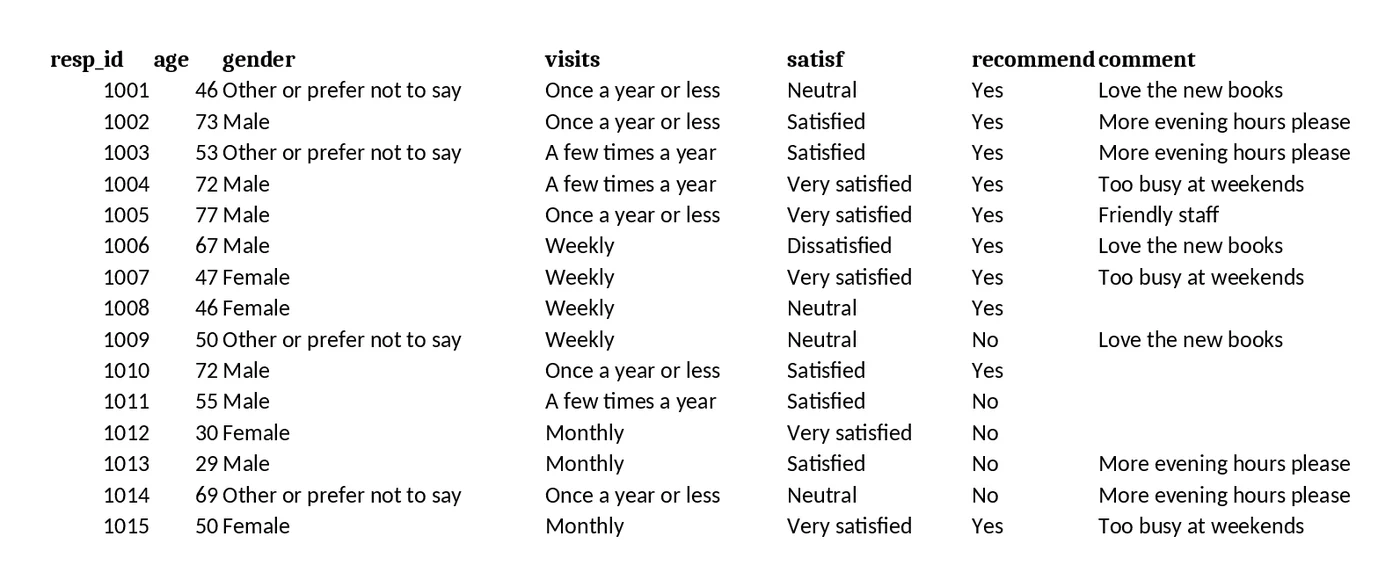
Answers with their value labels
- "Satisfied" instead of 4
- One row per respondent
- Columns sized to fit
library-survey.savsurvey.xlsx + CSV
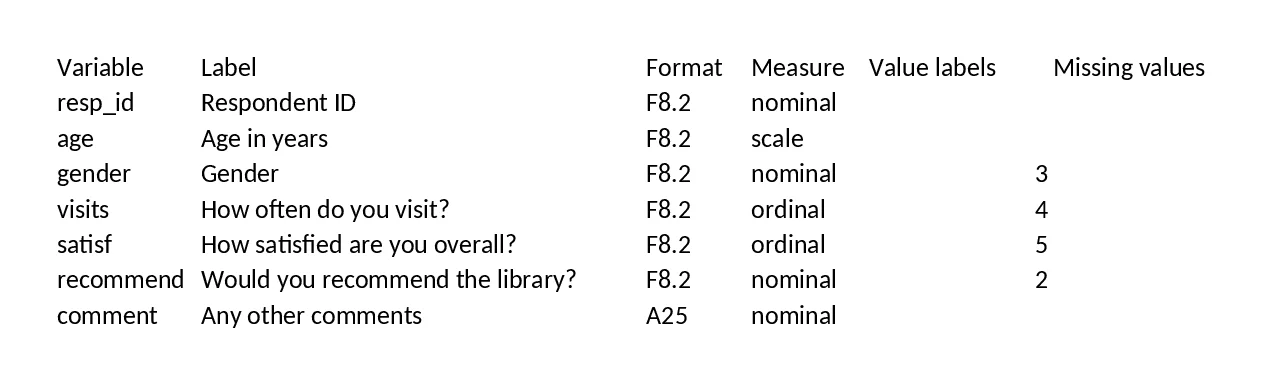
Codebook of the variables
- Question text of each variable
- Format and measure level
library-survey.savsurvey.xlsx + CSV
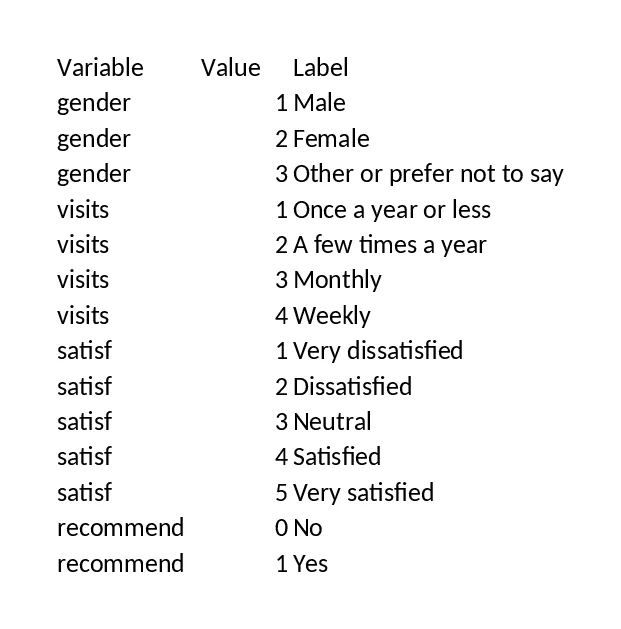
Every value label
- Code and label side by side
- Also a sheet with the raw codes
Sample survey data we made ourselves, with made-up names and data, converted here and shown as they came out. Your own files are never shown to anyone.
Data files people convert with us
- Survey results
- Thesis and dissertation data
- Public datasets
- Clinical and health studies
- Market research
- Course assignments
- Old project archives
How to convert an SPSS file
-
STEP 1
Upload the .sav
Or a Stata .dta or SAS .sas7bdat file. No SPSS needed.
-
STEP 2
See the data
The first rows with value labels and the full list of variables.
-
STEP 3
Pay once, download
Excel and CSV files with all cases. Refund in one click.
What you get back
- Labels, not just codesA Data sheet with value labels ("Female", "Agree") and a Codes sheet with the numbers.
- Every variableNames, labels, formats, measure levels and missing-value codes on their own sheet.
- Value labelsEvery code and its label in one table, ready for a codebook.
- CSV tooThe same in UTF-8 CSV files for R, Python, Google Sheets or any database.
- Dates as datesDates and times arrive as real Excel dates, not day counts.
- See it firstThe first rows and the variable list free, before you pay.
Price
See the first rows and all variables free. Then $4.99 per file, or $14.99 for up to 10 files and $39 for up to 100. One payment, no subscription.
What a SAV file is
SAV is the data file of IBM SPSS Statistics, one of the most used statistics programs in universities, market research and health care. A .sav file holds a table of cases and variables, plus everything that describes it: variable labels, value labels for coded answers, formats and missing-value codes. Windows and macOS have nothing that opens it, and Excel cannot read it either: double-clicking shows an error or unreadable characters. Do not confuse it with other .sav files: games use the same extension for saved games, and those are not SPSS data. If a .sav came from a survey tool such as Qualtrics or SurveyMonkey, from a researcher or from a statistics course, it is almost certainly SPSS.
How to open a SAV file here
Choose the .sav file above. In a few seconds you see a summary (how many cases and variables), the first 30 rows with their value labels, and the full list of variables with their labels, free and with no account. That is often all you need to know what a file contains. To work with the data, pay once and download an Excel workbook and CSV files with every case.
Open a SAV file in Excel
Excel cannot open .sav files directly, so you need a conversion first. The Excel file you get here has four sheets: the data with labels, the same data as codes, a list of variables and a list of value labels. Open it in Excel, Numbers, LibreOffice or Google Sheets, filter and chart it like any table, and share it with people who have no statistics software.
Free programs that open SAV files
If you want to analyse the data and can install software: GNU PSPP is a free, SPSS-like program that opens .sav files; jamovi and JASP are free statistics programs that open them too; R (haven) and Python (pandas) read them with one line of code. Students often still have SPSS through their university for the length of a course, so check that first.
Stata, SAS and other data files
Stata .dta and SAS .sas7bdat and .xpt files open the same way here, as do SPSS portable .por and compressed .zsav files. To convert directly, see SAV to CSV and Excel. For old database files, open an MDB file. Your data is deleted 24 hours after upload.
Also on FileOpens
Questions about SAV files
Is viewing the SAV file free?
Yes. The summary, the first 30 rows and the list of variables are free. Downloading all the data is paid.
Why does my SAV file show strange characters in Notepad?
A .sav file is binary, not text. It needs a program that understands the SPSS format, like this page.
Can I open a SAV file on a Mac or a phone?
Yes. This page works in any browser, on a Mac, a Chromebook, a tablet or a phone.
How much does it cost?
The first rows and the list of variables are free to see. Then $4.99 per file, or $14.99 for up to 10 files and $39 for up to 100, mixed with any other format we convert. Not usable? Refund within 24 hours.
Which files work?
SPSS .sav and compressed .zsav from any version, SPSS portable .por, Stata .dta (versions 8 to 18) and SAS .sas7bdat and transport .xpt files, up to 500 MB.
What happens to my data?
It is used only to make your Excel and CSV files and is deleted automatically 24 hours after upload. Nobody looks at it. For data that must not leave your institution, use one of the free programs named on this page.